How to set correct lines
-
If all you want to do is add space at the beginning of each line, you can use the column editor.
For example, if I want to add five space characters at the start of each line of a file, I would place my caret at the very beginning of the file, open the column editor (
Alt+Cwith default keybindings), check theText to Insertbutton, enter five space buttons into the text box below that button, and hitOK.You could accomplish the same task using regular expressions, but I’m presenting the most noob-friendly tool here.
-
This topic made me think of the script from THIS TOPIC. With that, you’d copy your text to the clipboard, then, on the line where you want to start the paste, you’d space over to your desired column, then run the script to paste every line in the clipboard with the same leading spacing.
-
@Mark-Olson Mark this not works .when for example put 5 lines .Onli firest line is correct .
                 AAAAAAAAAAAAAAA
                 AAAAAAAAAAAAAAA
                 AAAAAAAAAAAAAAA
                 AAAAAAAAAAAAAAA
    AAAAAAAAAAAAAAA
    AAAAAAAAAAAAAAA
    AAAAAAAAAAAAAAA
    AAAAAAAAAAAAAAA
I need put more then 100 lines lines by lines columns . Fires copy line is correct but rest move .
-
@olek
I am having a lot of trouble understanding you. Please use a better tool (maybe Google Translate?) to translate what you are trying to say into English. -
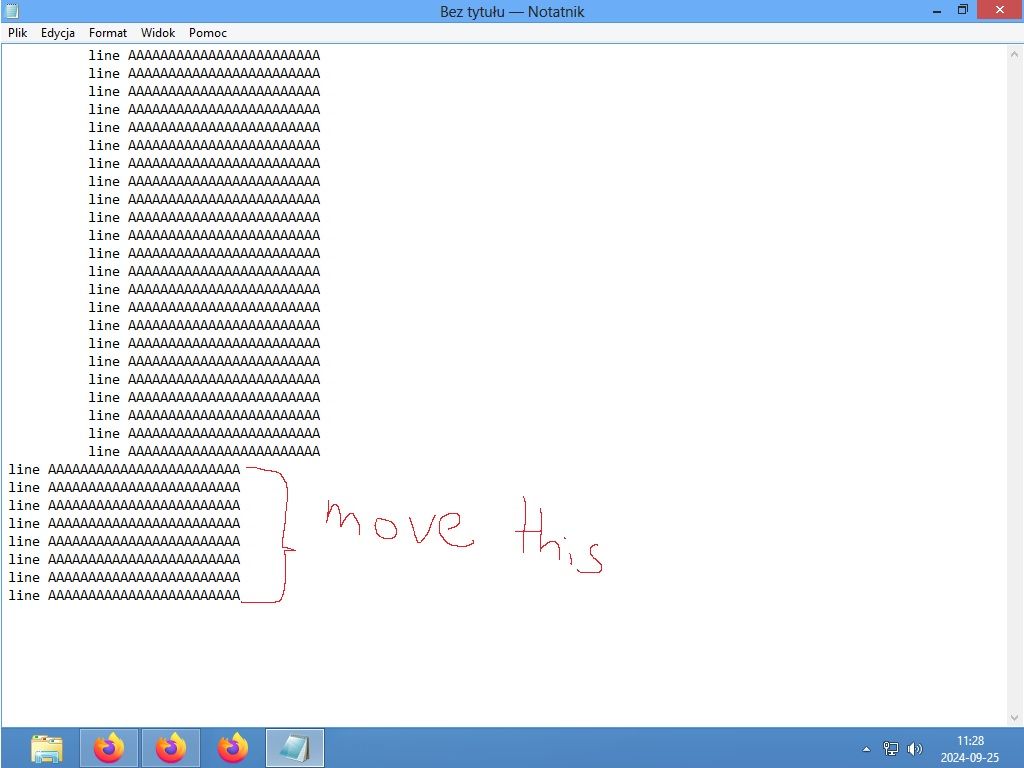
@Mark-Olson Mark, I have a file with lines in the middle. I need to paste the next line into this file in a column in a line. The first copied line is arranged correctly. But the next ones create a shift. I need to copy it the way it is arranged in the file. like this
      1.nnnnnnnnnnnn
      2.nnnnnnnnnnnn
      3.nnnnnnnnnnnn
4.nnnnnnnnnn
next copy 100 lines should be the same composition.But when I copy 10 lines only my first copy line lay good rest move for starters. Do you understand me .? In edited file is space .Next copy files also need space .I use keyboard to move line in correction . Space 2 cm column lines and next copy and past 10 lines should be the same gap .Still the some layer .
-
@olek
I’m still having a very hard time understanding you, but it sounds like you’re asking how to make it so that the right offset of some lines of text is 2 centimeters, the way you would do in Microsoft Word.If that is what you want, I’m pretty sure we can’t do that for you in Notepad++, because Notepad++ is a text editor, not a word processor.
-
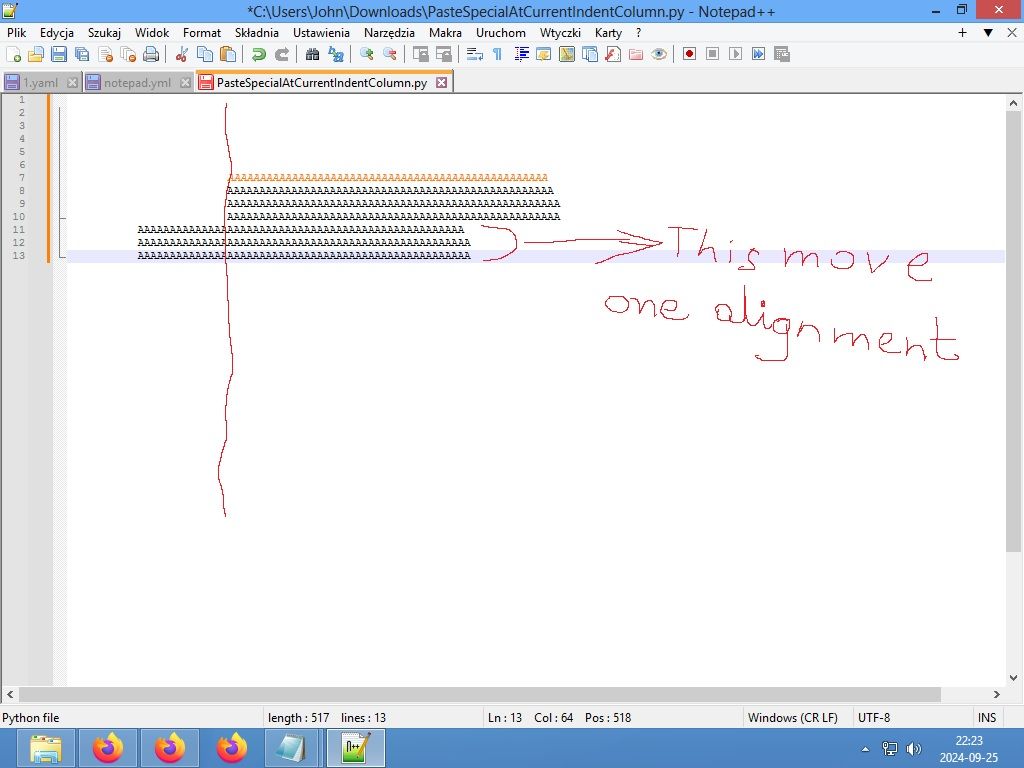
@Mark-Olson Mark I do not use Word .I have file template .yaml . in this template is some lines .This lines not on left edge .But lines locate move a little --> .If I copy and past new lines this template will not works .l need past new lines bottom column.One column. I copy not only 1 line I copy and past more about 10 lines .
First line when I past is correct .But rest lines back to edge . That way this Template will not works with program . Look screenshot .You can copy and past 1 line under column correct but I need copy 100 or more at once ,??
-
@olek
It seems like you should probably just use the script that AlanKilborn mentioned above. -
@Mark-Olson I try but this not works in my Windows 8 and on Linux shell too.I thought it is possible in Notepad++
-
@olek
I have no idea what plugins will work on Windows 8. Unfortunately I don’t think this is possible without a scripting plugin like PythonScript. -
@Mark-Olson Ok I understand .Thanks for your support me .Sorry for my English.



Hello! It looks like you're interested in this conversation, but you don't have an account yet.
Getting fed up of having to scroll through the same posts each visit? When you register for an account, you'll always come back to exactly where you were before, and choose to be notified of new replies (either via email, or push notification). You'll also be able to save bookmarks and upvote posts to show your appreciation to other community members.
With your input, this post could be even better 💗
Register Login