functionList.xml - more different 'function' definitions?
-
Hello!
I try to setup for a macrofile the function list.
It works so far, for one type of ‘function’
I want to see also some absolut different ‘functions’my macrofile looks like
 BEGINSUB Name=ShowForm
        $DokufolderForm = EditForm($DokufolderForm,"folder_path","values",$folder_path)
 endsub


 <Data> VarName=$DokufolderForm


 Name = make_FolderForm
      Type = Form
      Caption = Sicher Note als TXT von allen Caches im Filter
      Height = 406
      Width = 500

 Name = btn_makeOne
      Type = Button
       Height = 25
      Left = 32
      Top = 104
      Width = 121
      Caption = make one
I managed to get the ‘BEGINSUB Name=ShowForm’ section
But I also want to get the name of forms
  Name = make_FolderForm
      Type = Form
and buttons.
 Name = btn_makeOne
      Type = Button
Is this possible?
my (part of) functionList.xml so far which is OK for ‘beginsub’:
<function
	mainExpr="(?x)		# free-spacing (see `RegEx - Pattern Modifiers`)
		(?ms)			 # - ^, $ and dot match at line-breaks
		^\h*				# optional leading white-space at start-of-line
		(?:beginsub)		# function type specifier
		\s+
		(?:name)
		\K				# discard text matched so far
                    .*?                                                 # whatever, until...
                     (\n)                                                   # ...end-of-function-header indicator
					"
>
Thank you!
-
Try this one:
<function mainExpr="(?x) # free-spacing (see `RegEx - Pattern Modifiers`) (?ms) # - ^, $ and dot match at line-breaks ^\h* # optional leading white-space at start-of-line (?:beginsub\s+)? name\s*=\s* \K # discard text matched so far \w+ " /> -
Thank you for the answer!
I’m sorry, but I couldn’t get your part of the code running.This snippet works for the subroutine
 <function
    mainExpr="(?x)                                              # free-spacing (see `RegEx - Pattern Modifiers`)
            (?ms)                                               # - ^, $ and dot match at line-breaks
            ^\h*                                                # optional leading white-space at start-of-line
            (?:beginsub)                                      # function type specifier
            \s+
            (?:name)
            \K                                                  # discard text matched so far
            .*?                                                 # whatever, until...
            (\n)                                                   # ...end-of-function-header indicator
        "
>
    <functionName>
        <nameExpr expr="[\w.^+-]+" />
    </functionName>
</function>
and this snippet works for the button part
<function
    mainExpr="(?x)                                              # free-spacing (see `RegEx - Pattern Modifiers`)
            (?ms)                    # - ^, $ and dot match at line-breaks
            ^\h*                      # optional leading white-space at start-of-line
            (?:name)              # function type specifier
            \s+
            (?:=)
            \K                          # discard text matched so far
            .*?                          # whatever, until...
            (\n)                        # ...end-of-function-header indicator
        "
>
    <functionName>
        <nameExpr expr="[\w.^+-]+" />
    </functionName>
</function>
but both together do not work at the same time
how can I join both parts at the same time in one functionList.xml to give me both sub + button?
I’m sorry, my work on regexpression is not more then try and error
(maybe I will never understand this fancy stuff ;)
but in this case, I do not know exactly how the functionList.xml works.I hope you can help me one more.
Thank you,
Andi -
I’m sorry, but I couldn’t get your part of the code running.
Didn’t my function part of the parser show anything in the FL tree?
-
No, I’m sorry.
The functiontree stays empty. -
Works for me:
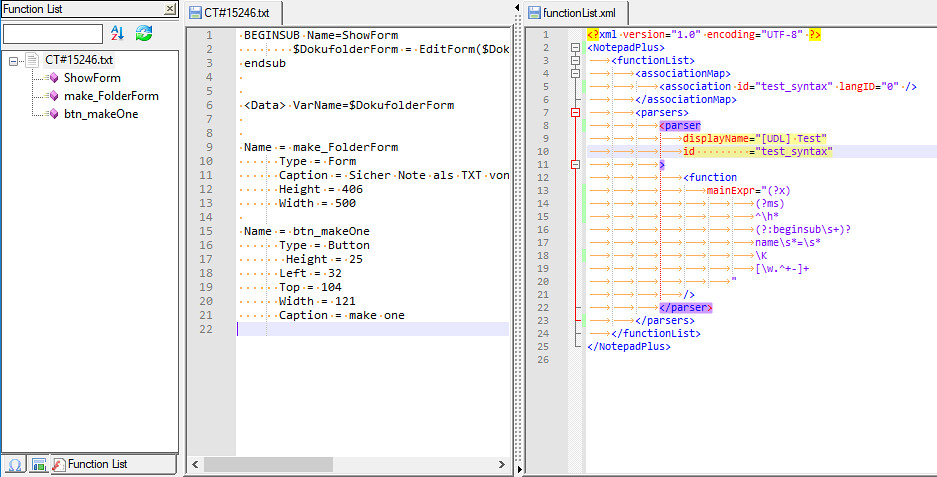
-
Hello MAPJe71!!!
I’m so sorry.
I do not know what happened, but at first your code did not work, although I tried it more times and started the programm always new.But now I had to start my computer new and then it really worked!!!
So thank you, thank you, thank you.
Now it is really what I needed!
I’m always surpriesed how anybody really can understand the crypto writing of regex behind ‘normal’ usage!
Thank you, solong, Andi -
Hello, gehe-online,
The crypto writing of regexes, as you say, are not that difficult. Just an other language, as thousand other ones !
Regarding the regex, in your functionList.xml file, below :
  mainExpr="
                (?x)                       # free-spacing (see `RegEx - Pattern Modifiers`)
                (?ms)                      # - ^, $ and dot match at line-breaks
                ^\h*                       # optional leading white-space at start-of-line
                (?:beginsub\s+)?
                name\s*=\s*
                \K                         # discard text matched so far
                [\w.^+-]+
           "
Here are some non exhaustive explanations, on this regex :
-
First, the
(?x)modifier tell the regex engine that the free-spacing mode is ON So, any non-escaped space character, as well as comments, beginning with the#symbol, will be ignored -
Then, the
(?ms)modifiers, which could be rewritten(?m)(?s), means that :-
The
^and$assertions represent, respectively, any start and end of line ((?m)) -
The dot
.special character matches any single character, even an End of line one, like\rand\n((?s))
-
-
Now, the part
^\h*represents any sequence, even empty, of horizontal blank characters, at start of line ( note that*is a shortcut for the{0,}quantifier, meaning present 0 or any time ) -
Afterwards, the
(?:beginsub\s+)?searches for the beginsub key-word, in any case, followed by, at least, one blank character, as the+quantifer is a shortcut of the{1,}one. -
As that range is enclosed in a non-capturing group
(?.....), followed with the?quantifier ( which is a shortcut of{0,1}) this implies that the part beginsub\s+ may be present or not -
Then, the
name\s*=\s*part tries to catch the name key-word, followed by optional blanks chars, then the=sign, and followed, again, with optional blanks chars -
Now, The
\Ksyntax, tell the regex engine to forget anything matched, so far ! Note that the previous match was mandatory to get an overall match but, now, the regex engine just has to consider the remaining of the regex -
Thus, the final part, to match, is the regex
[\w.^+-]+which represents a character class feature, that is to say, a single character, enclosed in the[....]structure, which must be present, at least, one time ( remember,+=={1,}quantifier ) -
To end with, any single character, which composes the name, of each key-word NAME, can be, either :
-
A word character (
\w), that is to say, a classical letter, an accentuated letter, a digit or the_symbol -
A circumflex accent (
^) -
A dot punctuation sign (
.) -
A plus mathematical sign (
+) -
A minus mathematical sign (
-)
-
Remark : for further information on Unicode Blank characters, refer, also, to the link, below :
gehe online, I hope that, now, you can figure out the general template of a regular expression !
Best Regards,
guy038
P.S. :
For noob people, about regular expressions concept and syntax, begin with that article, in N++ Wiki :
http://docs.notepad-plus-plus.org/index.php/Regular_Expressions
In addition, you’ll find good documentation, about the Boost C++ Regex library, v1.55.0 ( similar to the PERL Regular Common Expressions, v5.8 ), used by
Notepad++, since its6.0version, at the TWO addresses below :http://www.boost.org/doc/libs/1_55_0/libs/regex/doc/html/boost_regex/syntax/perl_syntax.html
http://www.boost.org/doc/libs/1_55_0/libs/regex/doc/html/boost_regex/format/boost_format_syntax.html
-
The FIRST link explains the syntax, of regular expressions, in the SEARCH part
-
The SECOND link explains the syntax, of regular expressions, in the REPLACEMENT part
You may, also, look for valuable information, on the sites, below :
http://www.regular-expressions.info
http://perldoc.perl.org/perlre.html
Be aware that, as any documentation, it may contain some errors ! Anyway, if you detected one, that’s good news : you’re improving ;-))
-



Hello! It looks like you're interested in this conversation, but you don't have an account yet.
Getting fed up of having to scroll through the same posts each visit? When you register for an account, you'll always come back to exactly where you were before, and choose to be notified of new replies (either via email, or push notification). You'll also be able to save bookmarks and upvote posts to show your appreciation to other community members.
With your input, this post could be even better 💗
Register Login