Menu entry to "replace notepad.exe" in registry
-
You introduced a great way to replace notepad. However it is “way too hard / takes long time” to open command promt and typing the commands there. So I think it would be a great feature to automate this.
You may have these 2 commands in menu, for example “?”, or under “settings>preferences”.
That may be implemented like 2 menu lines or buttons, like “register as notepad.exe” and “restore notepad.exe”
Or even some simple detection code:// todo: add some error checking ;-) HKEY hk; const auto npKeyPath[] = TEXT("SOFTWARE\\Microsoft\\Windows NT\\CurrentVersion\\Image File Execution Options\\notepad.exe"); if(RegOpenKeyEx(HKEY_LOCAL_MACHINE,npKeyPath, 0,KEY_QUERY_VALUE, &hk ) == ERROR_SUCCESS ) { RegDeleteKeyW(hk); RegCloseKey (hk); MessageBox(0, TEXT("Original notepad.exe restored"), TEXT("notepad++"), MB_ICONINFORMATION); } else { RegCreateKey(HKEY_LOCAL_MACHINE, npKeyPath, &hk); //TCHAR szFileName[MAX_PATH + 1]; // = TEXT("C:\Program Files\Notepad++\notepad++.exe"); //GetModuleFileName(NULL, szFileName, MAX_PATH + 1); TCHAR data = TEXT("\"C:\\Program Files\\Notepad++\\notepad++.exe\" -notepadStyleCmdline -z"; RegSetValueEx(hk, TEXT("Debugger"), 0, REG_SZ, data, _tcslen(data)); MessageBox(0, TEXT("Replaced notepad.exe with np++"), TEXT("notepad++"), MB_ICONINFORMATION); }ALSO! to mention this could require admin rights. AS WELL AS shell extenstions registration.
Yes, “Preferences>>Settings>>File Assiciations” was always great source of PITA!
1. run app not as admin.
2. spend 10 minutes adding extensions, thinking what to open with it.
3. press save and close app
4… PROFIT! ;-)There are two solutions:
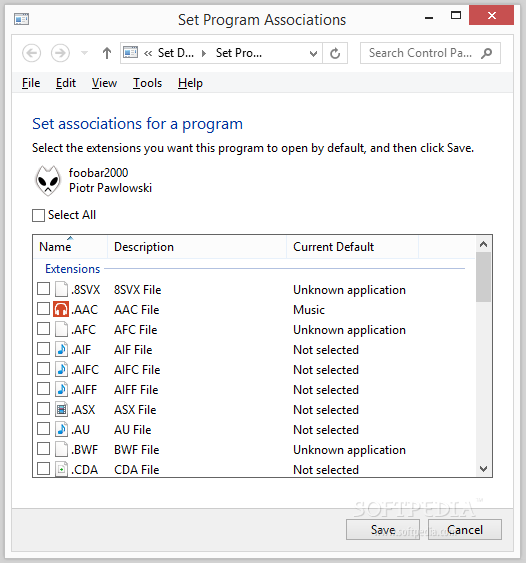
1. “foobar2000 way” - is to open file associations menu. Should look like this
2. notify user ad try to elevate. And a code which shows this approachSecond approach could also allow registry tweak, featured above.
-
@креведко-Ктулху said:
“way too hard / takes long time” to open command prompt and typing the commands
You may have a different sense of what “way too hard” or “takes long time” means than a good number of people…but regardless you will want to do this with your comments.
-
okay, i’ve added this to issue tracker

Hello! It looks like you're interested in this conversation, but you don't have an account yet.
Getting fed up of having to scroll through the same posts each visit? When you register for an account, you'll always come back to exactly where you were before, and choose to be notified of new replies (either via email, or push notification). You'll also be able to save bookmarks and upvote posts to show your appreciation to other community members.
With your input, this post could be even better 💗
Register Login