How to see hex value of character next to cursor?
-
That sounds strange, because normally you have it available.
I’ve never had a problem installing it, and I do it this way with every new npp version. I think I’ve been doing this since 7.9.5, which is how my automated tests run.
The only reason I can think of why it doesn’t show up in the Available tab is if npp thinks it has already found something. -
@Ekopalypse Thanks for your feedback. I’ve got the script working now, and I’ll worry later about getting Python Script running on a new install.
-
A really good up-to-date thread for things PythonScript is HERE. The bulk of your problem might have been trying to follow old, outdated PS information. Not sure how to solve the problem of outdated info in old threads here…
-
Thanks all for your input. I’ve made a few edits to produce the format I wanted for the output, and changes which I think make the code more readable (including adding a few comments). In case this is helpful for anyone else, here it is:
# encoding=utf-8

def callback_sci_UPDATEUI(args):
    # get character (as an integer) at the current position
    c = editor.getCharAt(editor.getCurrentPos())
    if c == 0:
        info = 'END-OF-FILE'
    elif c in [10,13]:
        info = "U+{0:04X} LINE-ENDING".format(c)
    else:
        # not one of the special cases
        if 1 <= c <= 255:
            # simple ANSI character
            s = unichr(c)
        else:
            # more complex case, so get the text range
            pos = editor.getCurrentPos()
            pos2 = editor.positionAfter(pos)
            s = editor.getTextRange(pos,pos2).decode('utf-8')
            # handle wide ordinals https://stackoverflow.com/a/7291240/5508606
            if len(s) != 2:
                c = ord(s)
            else:
                c = 0x10000 + (ord(s[0]) - 0xD800) * 0x400 + (ord(s[1]) - 0xDC00)

        # produce desired format for the status bar
        try:
            info = "U+{0:04X} '{1}'".format(c, s.encode('utf-8'))
        except:
            info = "U+????"

    notepad.setStatusBar(STATUSBARSECTION.DOCTYPE, info)

#callback_sci_UPDATEUI(None)     # per https://community.notepad-plus-plus.org/topic/17799/, want on-demand
editor.callback(callback_sci_UPDATEUI, [SCINTILLANOTIFICATION.UPDATEUI]) # per https://community.notepad-plus-plus.org/topic/14767/, want live
I haven’t tested with any characters outside the BMP, but I think I transformed the code properly. Someone who works with those characters can feel free to test it…
moderator: fixed link to match modern forum linking
-
There is also a plugin (at least one) that can provide the functionality you seek. It’s called
GotoLineColin PluginsAdmin and it shows you this: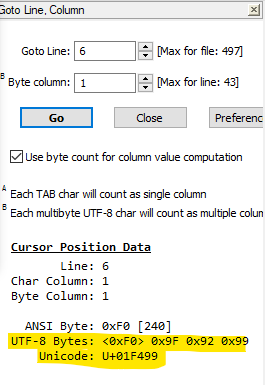
when your caret is next to a 💙 character.
-
@Jeff-Heath said in How to see hex value of character next to cursor?:
I’ve followed the installing PythonScript Guide,
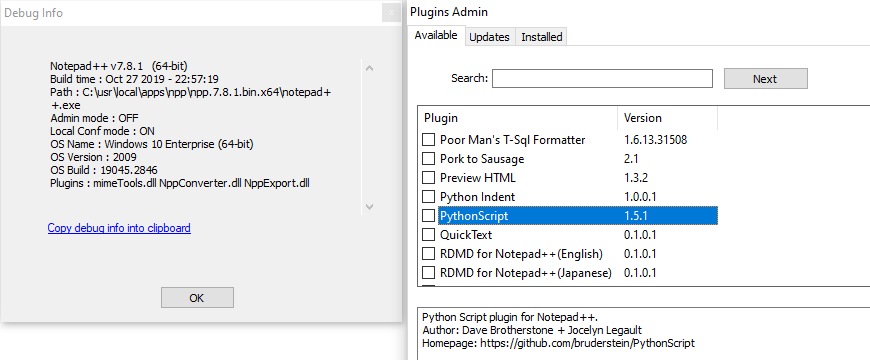
FYI: that guide from 2019 was focused on the brief time when Notepad++ had just come out of a confusing update, and not all plugins (including Python Script) were yet compatible with the new Plugins Admin method of installing plugins.
PythonScript v1.5, released in Oct 2019, was the first PS version compatible with Notepad++'s Plugins Admin interface… but that means that PythonScript has been available through the default interface Since Oct 2019. You no longer need to follow that ancient guide.update: sorry, apparently it wasn’t fully compatible until v1.5.1, also in October 2019; it was first listed in Plugins Admin in Notepad++ v7.8.1 – so from that point on, you don’t need to follow that outdated guide.




Hello! It looks like you're interested in this conversation, but you don't have an account yet.
Getting fed up of having to scroll through the same posts each visit? When you register for an account, you'll always come back to exactly where you were before, and choose to be notified of new replies (either via email, or push notification). You'll also be able to save bookmarks and upvote posts to show your appreciation to other community members.
With your input, this post could be even better 💗
Register Login