Notepad++ was not picking up document changes
-
Hi, I was using an old version of notepad++ and I had 3 documents I regularly had to do a search and replace on. So I just left them open all the time. I would update the documents from another program and with notepad++ already open when I switched to notepad++ in windows it would notify me that the document had been changed by another program. I would then go ahead and do the two search and replace actions and save it and all was good.
So I upgraded notepad++ (not that I needed to) and this automatic detection of another program changing the document stopped working.
I just solved it by uninstalling and reinstalling the old version. I just thought I would let you know.
Thanks,
John -
@John-Bowles
are you knows aboutMonitoring tail -f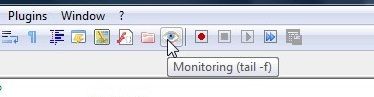
-
Maybe the newer version of Notepad++ has different Preference settings than the earlier version. Maybe all you need to do is adjust the Preference setting to get the old behavior you liked back. Or maybe not…
-
As @Alan-Kilborn said, check your preferences - go to
Settings->Preferences->MISCand on the right checkFile Status Auto-Detectionstate.


Hello! It looks like you're interested in this conversation, but you don't have an account yet.
Getting fed up of having to scroll through the same posts each visit? When you register for an account, you'll always come back to exactly where you were before, and choose to be notified of new replies (either via email, or push notification). You'll also be able to save bookmarks and upvote posts to show your appreciation to other community members.
With your input, this post could be even better 💗
Register Login