Smart Highlighting - Multiline Support
-
Hi.
I am often going through big log files and I would like to be able to see duplicate text spanned over more then 1 line.
EX) Selecting the first 2 lines would also highlight other occurrences:
Testing
1 … 2 … 3
Testing
1 … 2 … 3
4 … 5 … 6
Testing
1 … 2 … 3
4 … 5 … 6
7 … 8 … 9Currently the smart highlighting dies as soon as you select Cr/Lf or characters from 2nd line:
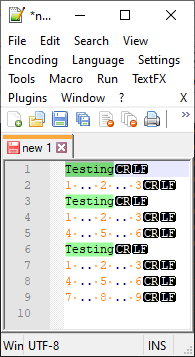
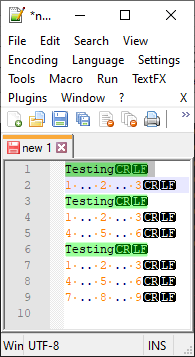
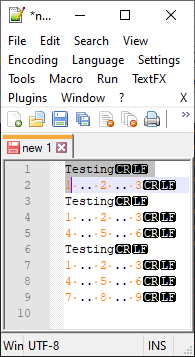
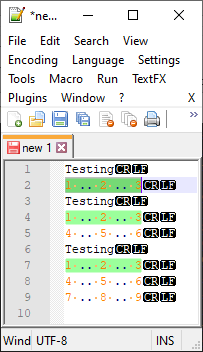
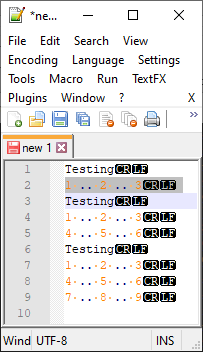
-
@Joël-Sabourin-Poirier said in Smart Highlighting - Multiline Support:
Testing
1 … 2 … 3
Testing
1 … 2 … 3
4 … 5 … 6
Testing
1 … 2 … 3
4 … 5 … 6
7 … 8 … 9Currently you can mark those lines (e.g. Search->MarkAll->using 1st style)
and jump through the matches with Search->Jump down->1st style -
Thanks for the suggestion @Ekopalypse.
The thing is that I do not want to permanently highlight them. I just want to go through and quickly find the occurrences as I go through the logs. I just want to use the Smart Highlighting feature.
-
Did anybody managed to make it work on multi-line selection?
-
If this is a missing feature or defect, should I post this somewhere else so it gets implemented or fixed? Where should I port it?
-
@Joël-Sabourin-Poirier said in Smart Highlighting - Multiline Support:
If this is a missing feature or defect, should I post this somewhere else so it gets implemented or fixed? Where should I port it?
My guess is that Smart Highlighting was intentionally designed to not do multi-line (probably easier to implement that way); but that’s just a guess.
If you would like to request a feature, see our FAQ about feature requests, and please understand that just requesting a feature, even in the official location, is not a guarantee that it will be implemented.
-
I do not want to permanently highlight them
I think @Ekopalypse 's suggested method is actually better than Smart Highlighting for this purpose. And…it isn’t really permanent, you can clear it later.
Plus you can make it really fast to implement and clear by using keyboard combinations rather than mousing through the menus.
And the killer feature part: Even if Smart Highlighting did what you wanted, you couldn’t quickly navigate to far apart versions of the duplicate text sections, you’d have to visually look for them. With Eko’s method, and he pointed this out, you can quickly jump to the next occurrence, even if very far away from the original.
I’m not a developer on Notepad++, but I really don’t see Smart Highlighting being changed to cross line-boundaries.
-
March 2026, by the fact there is still no smart highlighting over lines, would fully indicate there is no intention to add such a feature.
I tried the Mark All method, worked nicely. However, one important note, one needs to make sure exact words in the find box is turned off, any non-alphanumericals, including space, and definitely EOL chars, will cause a non-match.
-
@Phil-pascal said in Smart Highlighting - Multiline Support:
March 2026, by the fact there is still no smart highlighting over lines, would fully indicate there is no intention to add such a feature.
… or, at the least, that nobody asked for it. I pointed out how to make an official feature request 6 years ago, but if nobody followed those instructions and actually made an official feature request, then the developer never saw that anyone wanted that feature. Making the request doesn’t guarantee that it will be implemented; but if no one makes a request, that effectively guarantees that it won’t be implemented.
-
@PeterJones Thank you. I just found this forum after searching about the multiple line issue. I’ve been using Notepad++ for years, fantastic program. First text editor I’d found that did search and replace on end of line charaters since good old Wordstar.





Hello! It looks like you're interested in this conversation, but you don't have an account yet.
Getting fed up of having to scroll through the same posts each visit? When you register for an account, you'll always come back to exactly where you were before, and choose to be notified of new replies (either via email, or push notification). You'll also be able to save bookmarks and upvote posts to show your appreciation to other community members.
With your input, this post could be even better 💗
Register Login