How to enable highlighting when working in html // Как включить подсветку при работе в html
-
Всем доброго времени суток
Подскажите ответ на такой вопрос: Как включить подсветку тега " " при работе с языком html?— Translation from Google —
Good day to all
Tell me the answer to this question: How to enable the highlighting of the " " tag when working with html? -

That looks highlighted to me (italic, non-bold, which is different than the bolded plaintext around it)To change the highlighting for entities, Settings > Style Configurator > HTML > ENTITY, and set the Foreground, Background, and Font Style as you would like.
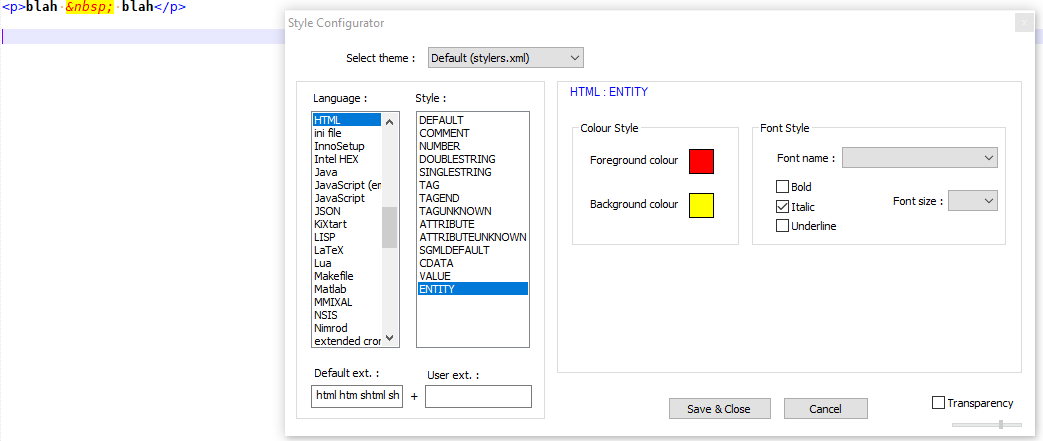
Note: all entities use the same styling. If you don’t like this, you can add extra highlighting to a builtin lexer (like the HTML lexer) using regexes via the script
EnhanceAnyBuiltinLexer.pythat @Ekopalypse shares in this linked post -
@PeterJones Thanks, it helped \\ Спасибо, помогло


Hello! It looks like you're interested in this conversation, but you don't have an account yet.
Getting fed up of having to scroll through the same posts each visit? When you register for an account, you'll always come back to exactly where you were before, and choose to be notified of new replies (either via email, or push notification). You'll also be able to save bookmarks and upvote posts to show your appreciation to other community members.
With your input, this post could be even better 💗
Register Login