Change the font color of status bar message on "Find" dialog
-
I can hardly figure out how to change the status bar message/font color of find dialog window.
All I found was justvoid FindReplaceDlg::setStatusbarMessage(const generic_string & msg, FindStatus staus) {
//…
if (isVisible()) {
_statusbarFindStatus = staus;
_statusBar.setOwnerDrawText(msg.c_str());
}
//…
and invocation leads to:bool StatusBar::setOwnerDrawText(const TCHAR* str)
{
if (str != nullptr)
_lastSetText = str;
else
_lastSetText.clear();return (::SendMessage(_hSelf, SB_SETTEXT, SBT_OWNERDRAW, reinterpret_cast<LPARAM>(_lastSetText.c_str())) == TRUE);}
and honestly I barely have knowledge in SendMessage() usages, even if this gives good information:
https://docs.microsoft.com/en-us/windows/win32/winmsg/about-messages-and-message-queues
How is actually to change the Find dialog status bar message color?
Any helpful guidance is gratified. Thanks in advance -
So the possible existing colors are red, green and blue.
Searching the Notepad++ codebase for
bluequickly yields a hit inFindReplaceDlg.cpp:void FindReplaceDlg::drawItem(LPDRAWITEMSTRUCT lpDrawItemStruct) { //printStr(TEXT("OK")); COLORREF fgColor = RGB(0, 0, 0); // black by default PCTSTR ptStr =(PCTSTR)lpDrawItemStruct->itemData; if (_statusbarFindStatus == FSNotFound) { fgColor = RGB(0xFF, 00, 00); // red } else if (_statusbarFindStatus == FSMessage) { fgColor = RGB(0, 0, 0xFF); // blue } else if (_statusbarFindStatus == FSTopReached || _statusbarFindStatus == FSEndReached) { fgColor = RGB(0, 166, 0); // green } else if (_statusbarFindStatus == FSNoMessage) { ptStr = TEXT(""); } SetTextColor(lpDrawItemStruct->hDC, fgColor); COLORREF bgColor = getCtrlBgColor(_statusBar.getHSelf()); ::SetBkColor(lpDrawItemStruct->hDC, bgColor); RECT rect; _statusBar.getClientRect(rect); ::DrawText(lpDrawItemStruct->hDC, ptStr, lstrlen(ptStr), &rect, DT_SINGLELINE | DT_VCENTER | DT_LEFT); }Not sure, but is that what you’re asking about?
-
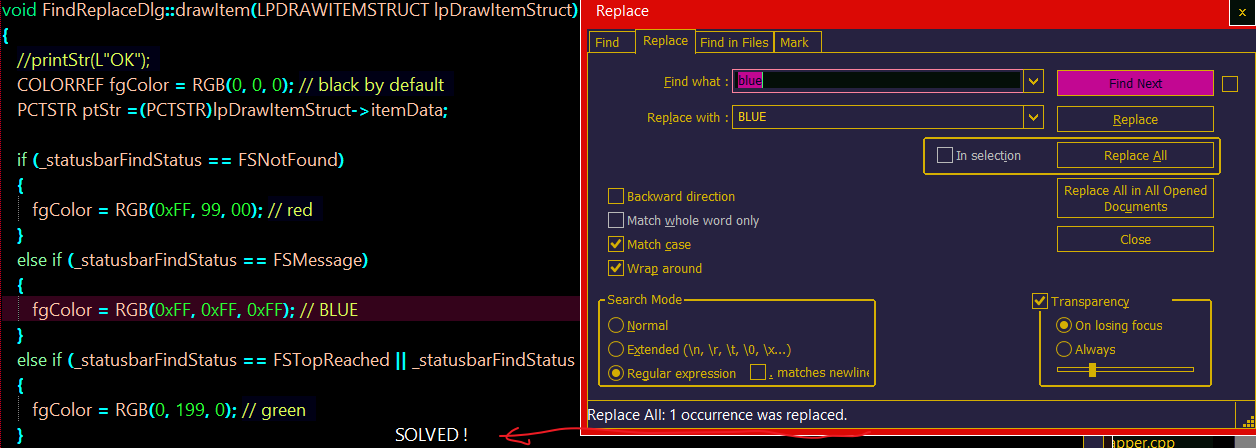
THANKS BILLIONS !
How had I to be dumb -
M mkupper referenced this topic on


Hello! It looks like you're interested in this conversation, but you don't have an account yet.
Getting fed up of having to scroll through the same posts each visit? When you register for an account, you'll always come back to exactly where you were before, and choose to be notified of new replies (either via email, or push notification). You'll also be able to save bookmarks and upvote posts to show your appreciation to other community members.
With your input, this post could be even better 💗
Register Login