Spaces for Tabs?
-
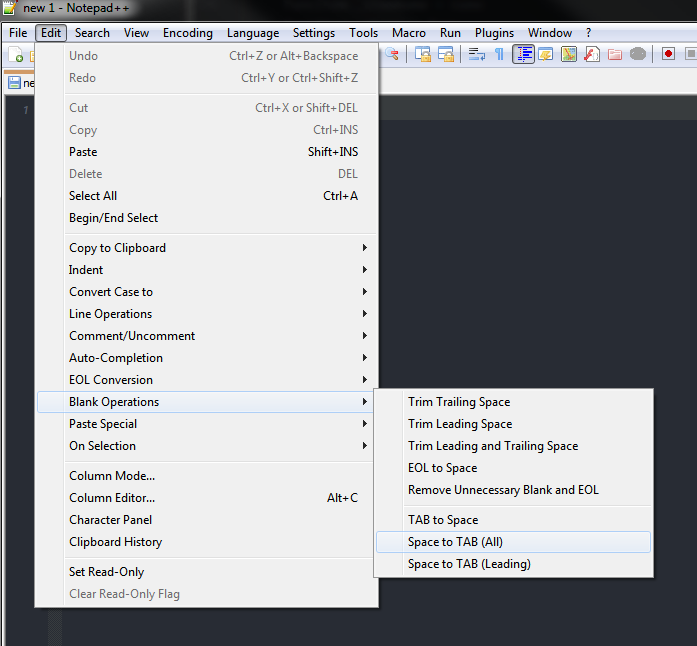
What happened to spaces for tabs option? My old Win7 machine died (SSD fried) a few months back so I had to replace a number of apps including Notepad++. The two or three year old version had a N spaces for tabs option. Please replace it!
Bruce
-
-
@obparham said in Spaces for Tabs?:
What happened to spaces for tabs option? My old Win7 machine died (SSD fried) a few months back so I had to replace a number of apps including Notepad++. The two or three year old version had a N spaces for tabs option. Please replace it!
Bruce
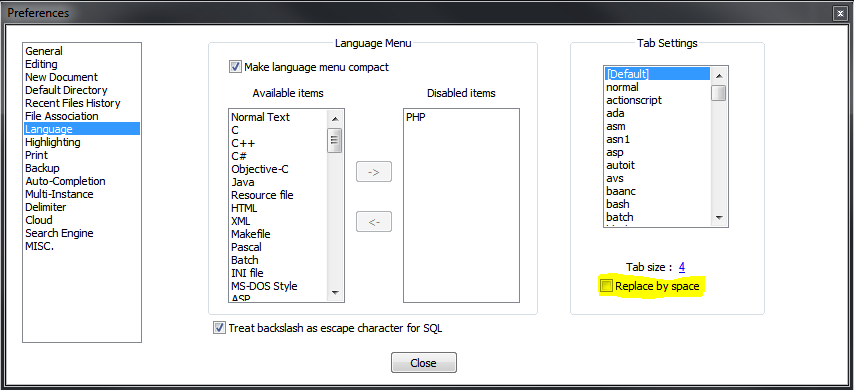
It didn’t go away: Settings > Preferences > Language has the Replace by space setting, configurable on default and on a per-language basis.
That’s the same place (*) it was in v6.0 in 2012. (*: same place, except that NPP transitioned from a tabbed Preferences dialog to a ListView-style selector for the tabs; v6.0 called it Settings > Preferences > Language Menu / Tab Settings, but it was still essentially the same page of the dialog box.)
My next older was v4.0, and that doesn’t seem to have the replace-by-space setting at all, that I can find; I don’t have any of the versions between 4.0 and 6.0.
Oh, sorry: Doing some more research in the still-downloadable past versions between 6.0 and 7.8.4, I see that 6.2.3 is the last-downloadable to use tab-style preferences dialog; v6.6.4 (Jun 2014) uses the new ListView selector, and has separate pages for the Language and the Tab settings; thru at least 7.0 (sep 2016), Tab settings was a separate page in the preferences; but by 7.3.3 (Mar 2017), it was merged. So there was a 2-year period there where Language and Tabs had separate pages in the preferences dialog.
Anyway, the option still exists; it’s just in the Languages menu.
-
Thanks you two,
It has been so long since I had to config a new install, I forgot where it was.
I’m way over 65. That’s my excuse and I’m sticking to it!
Bruce



Hello! It looks like you're interested in this conversation, but you don't have an account yet.
Getting fed up of having to scroll through the same posts each visit? When you register for an account, you'll always come back to exactly where you were before, and choose to be notified of new replies (either via email, or push notification). You'll also be able to save bookmarks and upvote posts to show your appreciation to other community members.
With your input, this post could be even better 💗
Register Login