open selected file in default application
-
I assume OP wants to open the selected text with the default application.
If this is the case there are two steps involved to make it work
with context.menu.- create a run menu entry:
cmd /c "start $(CURRENT_WORD)"
and save it with a meaningful name. I chose OpenWithDefaultApp - Settings->Edit Popup Context Menu and add
<Item MenuEntryName="Run" MenuItemName="OpenWithDefaultApp"/>
Restart npp.
- create a run menu entry:
-
How about relative paths in the selected text? :-)
-
Depends whether the path is always relative to one directory I guess.
-
I found a problem with the suggested Run menu entry. It doesn’t work for folders with embedded spaces. :-(
-
@Ekopalypse said
cmd /c "start $(CURRENT_WORD)"@Alan-Kilborn said,
It doesn’t work for folders with embedded spaces
This variant works for me:
cmd /c "$(CURRENT_WORD)", even when both the folder and filename have a space, like with:C:\Users\peter.jones\AppData\Local\Temp\space folder\space name.bmp -
@PeterJones, @Alan-Kilborn, @Edificio-Rascacielos-Tenerife
it seems that even cmd is not required, just
"$(CURRENT_WORD)",
at least on windows7 this is working for me. -
-
I have opened a txt file with another text editor …
I put a screenshot : http://imagizer.imageshack.com/img924/4857/uZvuc1.png
do you see the option ?
I have selected in the text file a path to the desktop
and when selecting the option I can open that pathThe same with a path to a pdf file : open the pdf with the default program
The same with a path to an image : open the image with the default program to see the images… -
@Ekopalypse said in open selected file in default application:
I assume OP wants to open the selected text with the default application.
If this is the case there are two steps involved to make it work
with context.menu.- create a run menu entry:
cmd /c "start $(CURRENT_WORD)"
and save it with a meaningful name. I chose OpenWithDefaultApp - Settings->Edit Popup Context Menu and add
<Item MenuEntryName="Run" MenuItemName="OpenWithDefaultApp"/>
Restart npp.
Ufff. I was thinking in an addon or something. In the example I put above that option comes with the text editor . Surely must be something similar for npp
- create a run menu entry:
-
@Edificio-Rascacielos-Tenerife said in open selected file in default application:
I was thinking in an addon or something.
Apparently you didn’t understand. @Ekopalypse solution used two builtin features of Notepad++.
- Use Run > Run
- type
"$(CURRENT_WORD)"(with the quotes) in the The Program to Run box
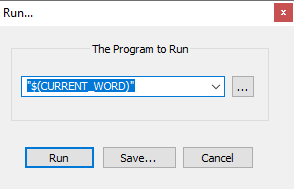
- Click Save…. Give it the name
OpenWithDefaultAppand hit OK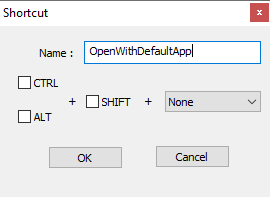
- hit cancel to get out of that box
- Settings > Edit Popup Context Menu
- Down near the end, maybe just before
</ScintillaContextMenu>, add<Item MenuEntryName="Run" MenuItemName="OpenWithDefaultApp"/> - Save
- Exit
- Reload Notepad++
Now that you’ve set it up, highlight your filename, right click to bring up the context menu, and select
OpenWithDefaultApp. If the filename was a.png, it will open up your default png-image editing application with that filename. I thought that’s what you wanted. -
@Edificio-Rascacielos-Tenerife
there is no need for an addon as npp can do it using run menu.
Run->run… and add
"$(CURRENT_WORD)"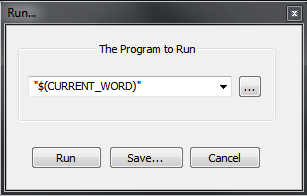
press
Save...and give it a meaningful name likeOpenWithDefaultApp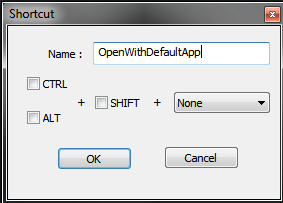
Now you can already open selected paths with run menu
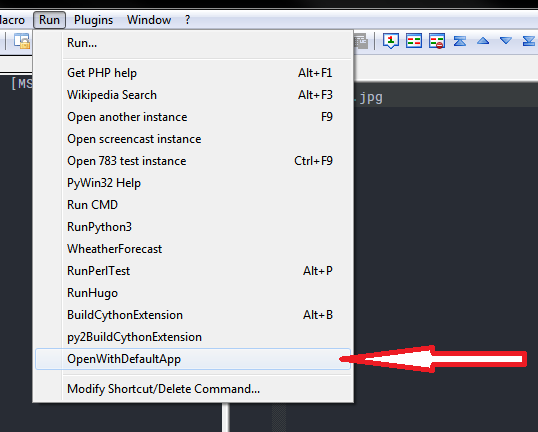
If you want to add it to the context menu do
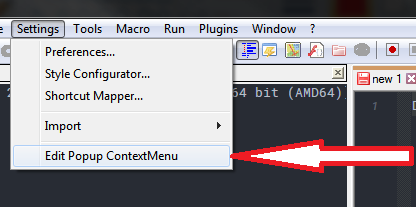
and put the following into it
<Item MenuEntryName="Run" MenuItemName="OpenWithDefaultApp"/>Then you have
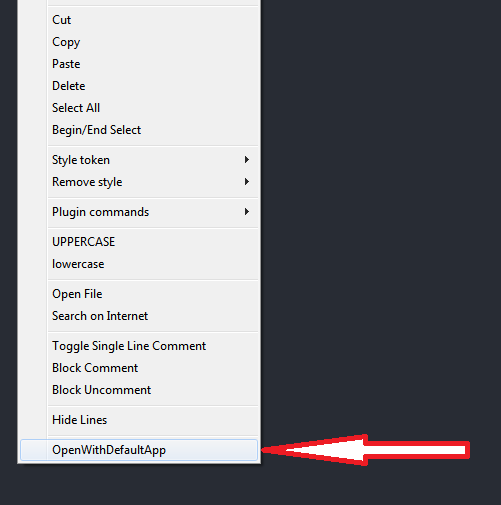
-
Hello, @edificio-rascacielos-tenerife, @peterjones, @alan-kilborn, @ekopalypse and All,
I tested the various syntaxes, to put in the The Program to Run box, after hitting the
F5key, on my old WindowsXP SP3laptop !And it happened that using the
cmdand/or theStartcommands did not work properly, in some cases, when filename and/or path contain spaces !
Finally, using the simple syntax
"$(CURRENT_WORD)"and, even, the syntax$(CURRENT_WORD), without the double quotes"are just fine, in all cases :-
when selecting an absolute path with/without space(s) ( for instance,
Drive Letter:\----\-- --\----\-- --.jpg) -
when selecting a relative path with/without space(s) ( for instance (
\----\-- --\----\-- --.jpg) -
when selecting only a filename with/without space(s) ( for instance,
-- --.jpg)
Remark : Even if these paths or filenames are, themselves, embedded between double quotes
", the result is still correct, with the two syntaxes"$(CURRENT_WORD)"or$(CURRENT_WORD)and the filename is opened with its default application ;-))Best Regards,
guy038
-
-
Well I am going to try.
I think above is the answer.
Why don’t you put this in the contextual menu for the npp version ? for no programmers like me may be the best solution !Nevertheless I gonna try and comments.
It seems to me easier at a first glance try to follow the Ekopalypse’s instructions…
-
Done !
My first attempt was not good. I try only vary the contextual menu but runs nothing.
Then I put the environment in english and try to create the script to run the program OpenWithDefaultApp
with the line : “$(CURRENT_WORD)”Then reopen the program all began to work.
Best regards
-
@Edificio-Rascacielos-Tenerife said in open selected file in default application:
Why don’t you put this in the contextual menu for the npp version ? f
Two reasons.
First, because the “you” you are talking to are fellow Notepad++ users; we aren’t employees of the Notepad++ Corporation (which doesn’t exist); while some of us have contributed to the codebase, mostly, we are just users, like you.
Second, the development team (and especially the lead developer) have made Notepad++ highly configurable; as they cannot read the mind of every single user to know exactly how each individual wants all the context menus, and because multiple users disagree on what they want = you might want OpenWithDefaultApp in the context menu by default, but somebody else, or thousands of somebody else, might not want something so useless cluttering the already-full context menu; it’s a matter of opinion. So the developers put in what they think are reasonable defaults, and make it configurable. And they don’t consider editing a configuration file to be “programming”, so they don’t expect that it would be too difficult, especially when people in this forum give you the step-by-step instructions on how to do it, tailored to your individual desires.
Done !
Then reopen the program all began to work.Glad it’s working for you.
-
Didn’t there used to be such an thing, in an earlier version of Notepad++? I can’t find it now anywhere in 7.8.5.
-
@PeterJones said in open selected file in default application:
@Edificio-Rascacielos-Tenerife said in open selected file in default application:
Why don’t you put this in the contextual menu for the npp version ? f
Two reasons.
First, because the “you” you are talking to are fellow Notepad++ users; we aren’t employees of the Notepad++ Corporation (which doesn’t exist); while some of us have contributed to the codebase, mostly, we are just users, like you.
Second, the development team (and especially the lead developer) have made Notepad++ highly configurable; as they cannot read the mind of every single user to know exactly how each individual wants all the context menus, and because multiple users disagree on what they want = you might want OpenWithDefaultApp in the context menu by default, but somebody else, or thousands of somebody else, might not want something so useless cluttering the already-full context menu; it’s a matter of opinion. So the developers put in what they think are reasonable defaults, and make it configurable. And they don’t consider editing a configuration file to be “programming”, so they don’t expect that it would be too difficult, especially when people in this forum give you the step-by-step instructions on how to do it, tailored to your individual desires.
Done !
Then reopen the program all began to work.Glad it’s working for you.
Owww Peter. Understood. For me that feature is important because let me use the txt file like a connecting panel with everything. The url are native clickable, so I use clickable folder (by selection) , clickable file.
From the txt file I can go everywhere.
But that is my freedom now.
Thanks Everybody !!! -
Cross-link to similar info: https://community.notepad-plus-plus.org/topic/19192/launch-in-default-web-browser





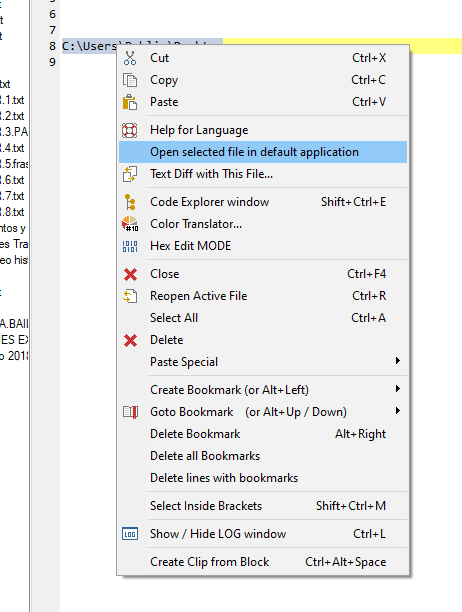
Hello! It looks like you're interested in this conversation, but you don't have an account yet.
Getting fed up of having to scroll through the same posts each visit? When you register for an account, you'll always come back to exactly where you were before, and choose to be notified of new replies (either via email, or push notification). You'll also be able to save bookmarks and upvote posts to show your appreciation to other community members.
With your input, this post could be even better 💗
Register Login