"Tab X of Y" in Title Bar
-
Suggestion for Npp future release: In the title bar, where the filename/path and “Notepad++” is displayed, indicate how many tabs are open, and which one of them the current one is.
I work with 100-200 text files at a time, and it can get tricky remembering which tab has which file. I think a numbering system would help - especially if it could work when both “views” are open. Apologies if this is the wrong place for suggestions.
-
You can like what you like, but I see no value in such a feature.
But feel free to make a real feature request by following the instructions here: https://community.notepad-plus-plus.org/topic/15741/faq-desk-feature-request-or-bug-report
-
@Stefan-Travis said in "Tab X of Y" in Title Bar:
it can get tricky remembering which tab has which file
There was a post started about a year ago related to a plugin which may well help you identify which tab you want.
Read
https://community.notepad-plus-plus.org/topic/17182/how-to-change-order-of-document
A later post in that article from @guy038 has the github link. I don’t personally use this plugin but it seems to have some merit.Terry
-
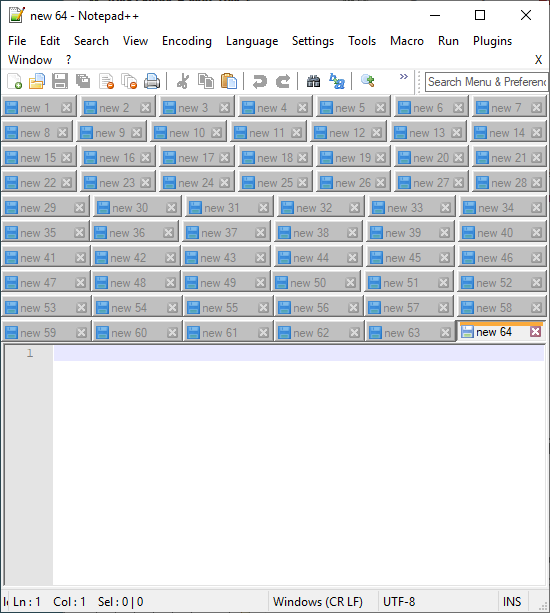
@Stefan-Travis said in "Tab X of Y" in Title Bar:
it can get tricky remembering which tab has which file. I think a numbering system would help
Isn’t there already a numbering system?:


Hello! It looks like you're interested in this conversation, but you don't have an account yet.
Getting fed up of having to scroll through the same posts each visit? When you register for an account, you'll always come back to exactly where you were before, and choose to be notified of new replies (either via email, or push notification). You'll also be able to save bookmarks and upvote posts to show your appreciation to other community members.
With your input, this post could be even better 💗
Register Login