How to set a UDL as the default
-
New to NPP.
Version: 7.8.5
Every time I open a file I have to set the Language to my custom UDL.
When I search across files and jump from into a file that was opened the Language is not applied and I have to go select it every timeIn Settings, New Document you can select from the Default Language pick list but my UDL is not listed.
How can I get my UDL to be in the list?Note: I had to create a UDL because the structure of log files I’m examining is customer to my company.
Mark
-
You cannot set the default language to a UDL.
When you defined your UDL, did you remember to set the ext box? Because if that’s set, anytime a new file is saved with that extension, or a file with that extension is opened, it should apply your UDL syntax highlighting to the file.
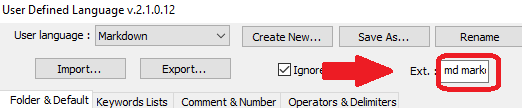
As the docs (https://npp-user-manual.org/docs/user-defined-language-system/#udl-dialog-box-or-window) point out , that list is a space-separated list of extensions without the dot
If you log file ends in
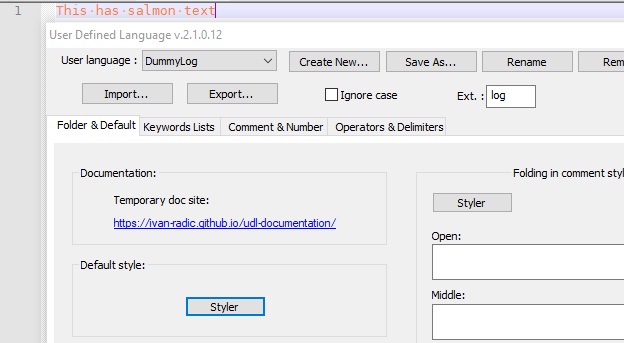
.log, then you would set your UDL Ext. box tolog– every time you save a.logor open a.log, it should apply that language.For example, I just followed the steps:
- Language > User Defined Language > Define Your Language
- Create New >
DummyLog - Ext.:
log - Default Style: Styler: set color to salmon/pink/orange
- File > New, File > Save As
dummy.log - Type something: it uses the salmon/pink/orange
If you have a builtin lexer with
logas an extension already, the UDL generally overrides that (“generally” = I’ve never seen it not override that, though I have vague recollections of reports that it doesn’t). If you have two UDL with the same extension defined, it is indeterminate which UDL will “own” that extension: in such a circumstance, I highly recommend removing the extension from the one you don’t want.If Notepad++ still isn’t applying your UDL, try creating a new one like I just did (those were literally the 6 steps I took) and it should work for you. If you have a precise sequence of events that still doesn’t work for you, you might have some plugin interfering with normal behavior, so please go to the ? menu and give us the Debug Info, and include that along with the precise sequence of events that doesn’t work.
-—
ps: here’s my Debug Info:Notepad++ v7.8.5 (64-bit) Build time : Mar 3 2020 - 17:39:56 Path : C:\usr\local\apps\notepad++\notepad++.exe Admin mode : OFF Local Conf mode : ON OS Name : Windows 10 Enterprise (64-bit) OS Version : 1903 OS Build : 18362.720 Plugins : ComparePlugin.dll LuaScript.dll MarkdownViewerPlusPlus.dll mimeTools.dll NppConsole.dll NppConverter.dll NppEditorConfig.dll NppExec.dll NppExport.dll NppFTP.dll PreviewHTML.dll PythonScript.dll QuickText.dll XMLTools.dll -
Hello Peter
Thank you for the clear explanation and details.
Mark
-
This post is deleted!



Hello! It looks like you're interested in this conversation, but you don't have an account yet.
Getting fed up of having to scroll through the same posts each visit? When you register for an account, you'll always come back to exactly where you were before, and choose to be notified of new replies (either via email, or push notification). You'll also be able to save bookmarks and upvote posts to show your appreciation to other community members.
With your input, this post could be even better 💗
Register Login