Find & Replace Not Working
-
I am not new to Notepad++ or complex searches but, for some reason, a simple N++ search across multiple files yields no results. Is there a known issue that possibly prevents N++ from searching inside of Word tables? It is all I can think of.
My .docx files all contain the following:
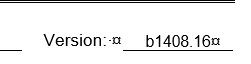
And my Find&Replace params are:
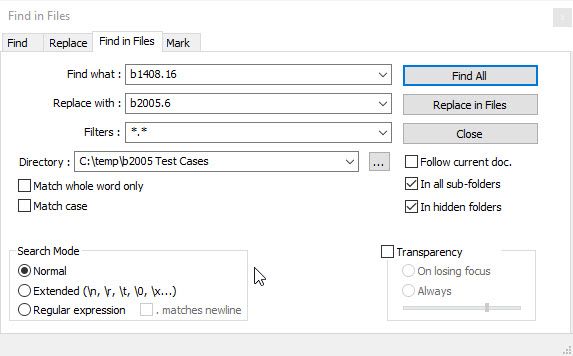
And yet F&R always results in “0 hits in 0 files”. I have tried changing the filter to *.docx and *.doc, changing search modes, and yes the directory is correct. Looking at the search results seems to indicate that it is not the table that is the issue but locating the fail? I even moved the folder from a OneDrive share to my C: drive to ensure that the files could be located but nothing is working.
Any suggestions/help would be greatly appreciated!
-
I’m not sure this is going to work. M$ Word .doc and .docx files are binary files (not plain text) and Notepad++ is a text editor. The Find in Files function searching may not find the “plain text” in your “Find what” text box in a bunch of binary (not “plain text”) files.
Cheers.
-
There’s a FAQ for that: in short, docx aren’t text files, and you cannot expect Notepad++ (a Text Editor) to be able to search for literal text in a binary-encoded format like docx.
Notepad++ search-in-files searches for literal bytes (or multibyte characters) in the files on disk, but the docx compresses and otherwise encodes text so that the bytes in the docx file are indistinguishable from random noise to Notepad++.


Hello! It looks like you're interested in this conversation, but you don't have an account yet.
Getting fed up of having to scroll through the same posts each visit? When you register for an account, you'll always come back to exactly where you were before, and choose to be notified of new replies (either via email, or push notification). You'll also be able to save bookmarks and upvote posts to show your appreciation to other community members.
With your input, this post could be even better 💗
Register Login