Jagged text, align column
-
Hello Notepad ++ Guru’s,
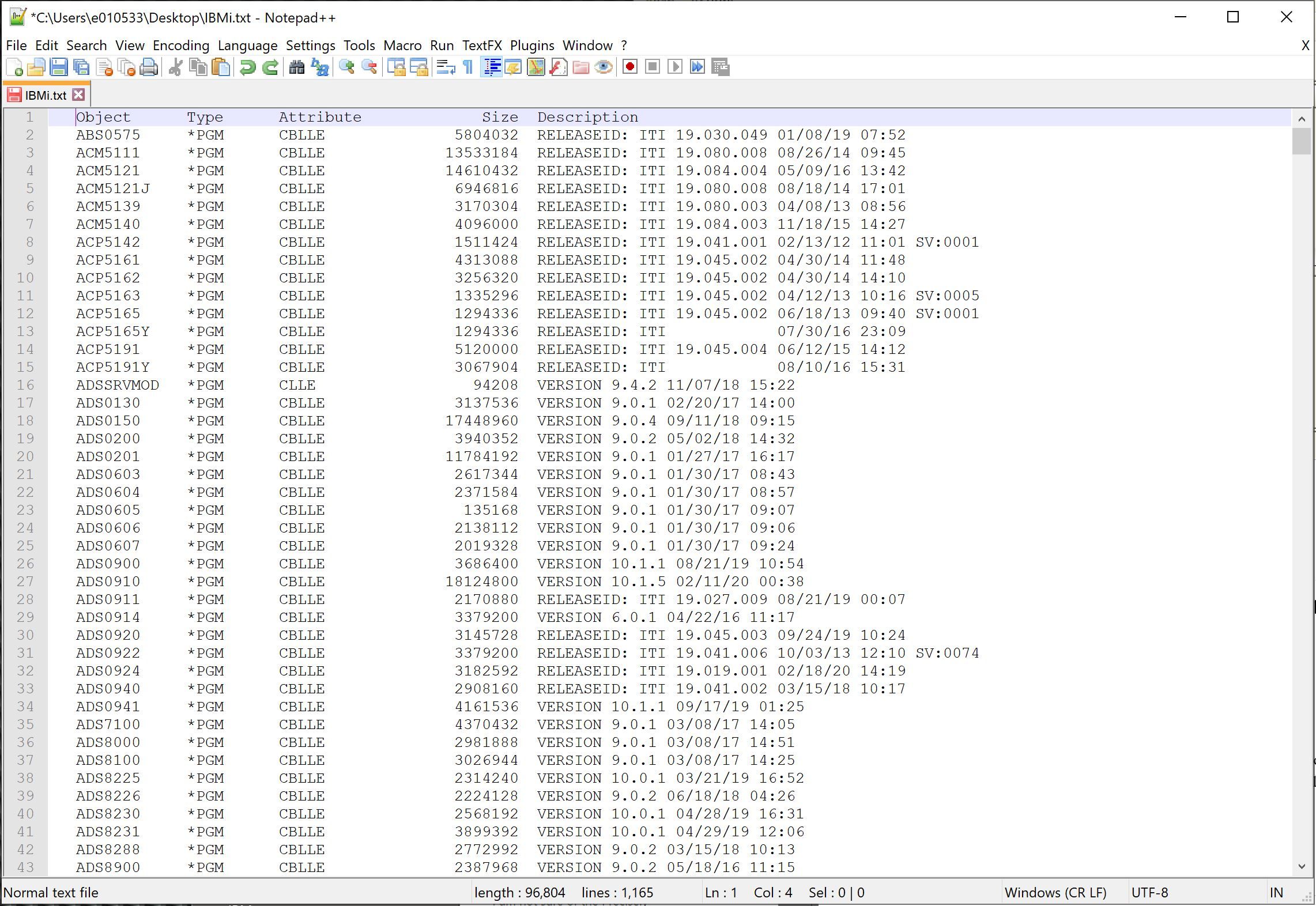
I am trying to line up the versions numbers under Description to get a clean column. No amount of googling and reading has gotten me a solid solution. Seeing if anyone here has any ideas
Thank you so much
-Dan
-
@Daniel-Lysk said in Jagged text, align column:
I am trying to line up the versions numbers under Description to get a clean column
The “Description” column looks lined up to me. What specifically don’t you like about it? I see “VERSION” for some of the lines, not all and they all look aligned amongst themselves as well. Perhaps a before and after?
Maybe also pasting the text in you next follow-up post in between sets of three backticks like so:
```
Put your text here
```… or linking a sample file so we don’t have to type to get a file that looks like yours to experiment with.
Cheers.
-
@Michael-Vincent Thank you so much for your reply and help.
See for example ACP5191 on the left. Has a version number of 19.045.004. I need that version to line up with ADS0130 version 9.0.1 for example… I need all those version numbers to line up alike in one column. I would like the version number line up like the Object for example, all down one column. I hope that makes sense. Ultimately all information will be deleted except for Object and it’s version number from the Description column.
-
@Daniel-Lysk said in Jagged text, align column:
Ultimately all information will be deleted except for Object and it’s version number from the Description column.
Depending on the real data this
find what:
^\s+([A-Z]+[[:alnum:]]+).+((?!VERSION|RELEASEID: ITI)\s\d+?\.\d+?\.\d+?)\s.*
replace with:$1\t\t$2with Regular expression checked might do what you want.
-
@Ekopalypse Holy Smokes! That was it! That gives me perfect results. I owe you a cup of coffee :-) Thank you so much!
-
Hello @daniel-lysk, @michael-vincent, @ekopalyse and All,
First, here is an other regex, may be less complicated, to achieve the @daniel-lysk ultimate goal :
SEARCH
(?-si)^\h+(\w+).+(RELEASEID: ITI|VERSION)(.+)\x20\d\d/.+REPLACE
$1\t\t$3
Now, I would like to develop the general regex way to line up the columns of a table :
Let’s work with this sample table, below : ( the last record is from mime ! )
   ACP5191     *PGM      CBLLE              5120000  RELEASEID: ITI 19.045.004 06/12/15 14:12
   ADS0130     *PGM      CBLLE              3137536  VERSION 9.0.1 02/20/17 14:00
   ADS0910     *PGM      CBLLE             18124800  VERSION 10.1.5 02/11/20 00:38
   GUY0000     *PGM      CBLLE            123456789  RELEASEID: ITI 3.020.074 08/15/17 10:30
It is obvious that the first four columns are lined up ! Now, It’s rather easy to locate the places where we have to insert
spacecharacters :-
Right after the strings
RELEASEID: ITIandVERSION -
Right before the
spacechar, followed by the date##/##/##
So the following regex S/R searches for these two zero-length locations and add
10space for each :-
SEARCH
(?-i)(RELEASEID: ITI|VERSION)\K|(?=\x20\d\d/) -
REPLACE
\x20\x20\x20\x20\x20\x20\x20\x20\x20\x20
Remarks :
-
Of course, you may, instead, just hit ten times the
Spacekey, in theReplace with:zone -
It’s always better to choose a fair amount of
spacecharacters ! Further processes work whatever the number ofspacecharacters inserted -
You may, as well, run the regex S/R twice to get the insertion of
20space characters, in case the size of each value, in a specific column, is very variable !
So, we get :
   ACP5191     *PGM      CBLLE              5120000  RELEASEID: ITI           19.045.004           06/12/15 14:12
   ADS0130     *PGM      CBLLE              3137536  VERSION           9.0.1           02/20/17 14:00
   ADS0910     *PGM      CBLLE             18124800  VERSION           10.1.5           02/11/20 00:38
   GUY0000     *PGM      CBLLE            123456789  RELEASEID: ITI           3.020.074           08/15/17 10:30
Now, by moving the caret right after the longest string
RELEASEID: ITI, you’ll see, in the status bar, that the cursor is at column68Thus, we’ll use the following regex S/R to get the next
Version Numbercolumn lined up :-
SEARCH
^.{68}\K\x20+ -
REPLACE
Leave EMPTY
=>
   ACP5191     *PGM      CBLLE              5120000  RELEASEID: ITI 19.045.004           06/12/15 14:12
   ADS0130     *PGM      CBLLE              3137536  VERSION        9.0.1           02/20/17 14:00
   ADS0910     *PGM      CBLLE             18124800  VERSION        10.1.5           02/11/20 00:38
   GUY0000     *PGM      CBLLE            123456789  RELEASEID: ITI 3.020.074           08/15/17 10:30
Again, by moving the caret right after the first version number
19.045.004, you’ll see, in the status bar, that the cursor is at column79Thus, we’ll use the following regex S/R to get the next
Date-Hourcolumn lined up :-
SEARCH
^.{79}\K\x20+ -
REPLACE
Leave EMPTY
=>
   ACP5191     *PGM      CBLLE              5120000  RELEASEID: ITI 19.045.004 06/12/15 14:12
   ADS0130     *PGM      CBLLE              3137536  VERSION        9.0.1      02/20/17 14:00
   ADS0910     *PGM      CBLLE             18124800  VERSION        10.1.5     02/11/20 00:38
   GUY0000     *PGM      CBLLE            123456789  RELEASEID: ITI 3.020.074  08/15/17 10:30
Here we are ! Now, all the columns seem to be lined up ;-))
Note that you may also increase the column value, seen in the status bar, by
nunits, to get a gap of morespacesbetween two columns !Best Regards,
guy038
-
-
Hi @daniel-lysk, @michael-vincent, @ekopalyse and All,
An other useful little trick :
Let’s imagine that our previous table has the size file values left justified, as below :
   ACP5191     *PGM      CBLLE            5120000    RELEASEID: ITI 19.045.004 06/12/15 14:12
   ADS0130     *PGM      CBLLE            3137536    VERSION        9.0.1      02/20/17 14:00
   ADS0910     *PGM      CBLLE            18124800   VERSION        10.1.5     02/11/20 00:38
   GUY0000     *PGM      CBLLE            123456789  RELEASEID: ITI 3.020.074  08/15/17 10:30
Now, in order to get the same values right justified, move the caret right before the left-justified numbers and note its column number
C, in the status bar. Then, use the numberC-1in the regex S/R, below :-
SEARCH
^.{42}\K(\d+)(\x20+)(?=\x20) -
REPLACE
\2\1 -
Click on the
Replace Allbutton
And… voila ! Even, if you have
1,000,000records, it would have been the same !ACP5191 *PGM CBLLE 5120000 RELEASEID: ITI 19.045.004 06/12/15 14:12 ADS0130 *PGM CBLLE 3137536 VERSION 9.0.1 02/20/17 14:00 ADS0910 *PGM CBLLE 18124800 VERSION 10.1.5 02/11/20 00:38 GUY0000 *PGM CBLLE 123456789 RELEASEID: ITI 3.020.074 08/15/17 10:30
Note that the regex S/R, below, does the opposite. It left-justifies the size files. So you get, again, the original file !
-
SEARCH
^.{42}\K(\x20+)(\d+)(?=\x20) -
REPLACE
\2\1
Cheers,
guy038
-




Hello! It looks like you're interested in this conversation, but you don't have an account yet.
Getting fed up of having to scroll through the same posts each visit? When you register for an account, you'll always come back to exactly where you were before, and choose to be notified of new replies (either via email, or push notification). You'll also be able to save bookmarks and upvote posts to show your appreciation to other community members.
With your input, this post could be even better 💗
Register Login