Selected text
-
@PeterJones said in Selected text:
Otherwise, you can use SCI_SETREPRESENTATION through
editor.setRepresentation(' ', 'SP'), and it will change the visual display of the space character toSPin a black box. Change the'SP'to a string containing whatever black-boxed character(s) you’d like to see. (This is technically not part of the view-whitespace setting; however, it accomplishes the goal of changing what you see instead of the dot.) If you want to undo this change, useeditor.clearRepresentation(' ')Like I wrote before , I’m looking for a way to use (a small version of) the underscore as White space symbol .
In the Python Script documentation :
file:///C:/Program%20Files/Notepad++/plugins/PythonScript/doc/scintilla.html#scintilla-methodsI found 3 promising Python Script commands to achieve this :
editor.setRepresentation(encodedCharacter, representation)
editor.setWhitespaceFore(useSetting, fore)
editor.setWhitespaceBack(useSetting, back)Then I did some testing (I used ‘-’ instead of ‘_’ for testing purposes) .
Original code :
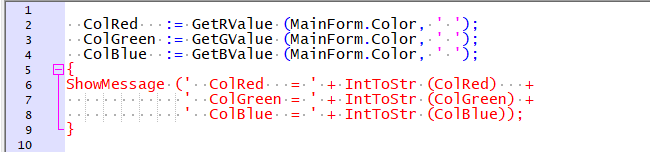
Script 1
editor.setRepresentation(’ ', ‘-’)
editor.setWhitespaceFore(1,( 64, 64, 64))
editor.setWhitespaceBack(1,(255,255,255))Result after running Script 1 :
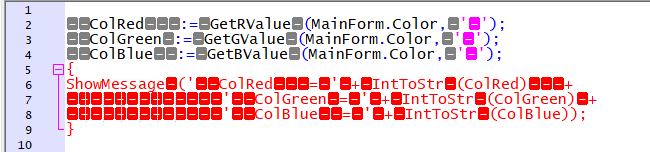
• the first command has been executed
• the second and third have been ignoredScript 2
editor.setWhitespaceFore(1,( 64, 64, 64))
editor.setWhitespaceBack(1,(224,224,224))
editor.setRepresentation(’ ', ‘-’)Result after running Script 2:
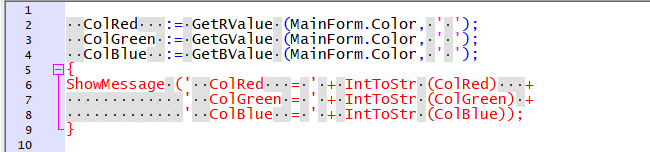
• the first and second command have been executed .
• the third has been ignored .I’m obviously doing something wrong .
Are those commands commands mutually exclusive ? -
A bit off the trail of this thread now, but when you said:
The dots in the middle of the space-character can be a bit confusing . Changing the color of the White space symbols is not always enough .
I would rather have (a small version of) the underscore as White space symbol .My reply to that is: I don’t know if you’ll be able to achieve something for this that isn’t overwhelmingly intrusive.
I thought of maybe a “squiggle” like spell-checker plugins use for misspelled words; could be the best thing (IMO) here, but it seems like that would make knowing how many whitespace characters are there a bit difficult…
-
@Ruud-Schmeitz said in Selected text:
Are those commands commands mutually exclusive ?
Effectively, yes. Because the setWhitespaceX commands affect the dot-drawing; when you have a representation for the ASCII space character, then it is not displaying the dot-drawing, it is displaying that character in the black-box reverse-video representation. I don’t think there’s a way to manually define the black-box stylings, but I could be wrong.
As to why your script 2 was still showing the whitespace dots rather than the black-box representation, I don’t know… maybe there was a typo (since you just pasted the code in the forum, rather than using the
</>button to mark the code as plain text, the forum changed ASCII single-quotes into “smart ‘quotes’” some of the time, and I don’t know – maybe you had a syntax error in script 2 that you didn’t notice the error message for.So, I think your choices are
- Use the representation to set the black-boxed hyphen or underscore as the display character of choice for the space character, but give up on independent control of the color
- Use the “dot” drawing with whatever colors you want, and maybe choosing a bigger size to make it slightly more like a small horizontal rectangle
- Apply the squiggle, like Alan suggested
- Rather than squiggle, maybe you could apply a normal underline feature to the normal space character – you can add extra highlighting to a builtin lexer or to a User Defined Language (UDL) using regexes via the script
EnhanceAnyLexer.pythat @Ekopalypse shares in his github repo. I am not sure, when using the “indicator” method that Ekopalypse shows, whether you can influence the underlining property of the match, but I would think so; if so, and you did a regex searching for the space character and applied that indicator, that might do what you want.
I don’t know whether any of these solutions are going to make you happy, but I think they are your best options.
-
@Alan-Kilborn said in Selected text:
My reply to that is: I don’t know if you’ll be able to achieve something for this that isn’t overwhelmingly intrusive.
You’re right , the character replacing the White space symbol shouldn’t be intrusive : that’s why I chose the underscore .
Back in the days , when you couldn’t use capitals in variable-names , the use of underscores was very common , and the result was quite readable .
For example :
new : ObjectPascalUserManual
old : object_pascal_user_manualI thought of maybe a “squiggle” like spell-checker plugins use for misspelled words; could be the best thing (IMO) here, but it seems like that would make knowing how many whitespace characters are there a bit difficult…
And again you’re right : being able to know the number of whitespaces is important . That’s why I wanted a small version of the underscore .
-
@Ruud-Schmeitz said in Selected text:
Back in the (old) days … old : object_pascal_user_manual
I guess I am trapped in the “old days” as this is still my preferred way to name things, in Python.
-
@PeterJones said in Selected text:
So, I think your choices are
- Use the representation to set the black-boxed hyphen or underscore as the display character of choice for the space character, but give up on independent control of the color
- Use the “dot” drawing with whatever colors you want, and maybe choosing a bigger size to make it slightly more like a small horizontal rectangle
- Apply the squiggle, like Alan suggested
- Rather than squiggle, maybe you could apply a normal underline feature to the normal space character – you can add extra highlighting to a builtin lexer or to a User Defined Language (UDL) using regexes via the script
EnhanceAnyLexer.pythat @Ekopalypse shares in his github repo. I am not sure, when using the “indicator” method that Ekopalypse shows, whether you can influence the underlining property of the match, but I would think so; if so, and you did a regex searching for the space character and applied that indicator, that might do what you want.
I don’t know whether any of these solutions are going to make you happy, but I think they are your best options.
Thanks for your suggestions , Peter .
I guess , I’ll have to do some more testing .
🙂 -
@PeterJones said in Selected text:
for.So, I think your choices are
- Use the representation to set the black-boxed hyphen or underscore as the display character of choice for the space character, but give up on independent control of the color
- Use the “dot” drawing with whatever colors you want, and maybe choosing a bigger size to make it slightly more like a small horizontal rectangle
(…)
I don’t know whether any of these solutions are going to make you happy, but I think they are your best options.
Using the representation , resulting in colour-boxed (not only black , also gray , magenta , red etc.) characters , is unacceptable because the result is way to intrusive .
So I’ve decided to go for this option :
editor.setWhitespaceSize(1)
editor.setWhitespaceFore(1,( 64, 64, 64))
editor.setWhitespaceBack(1,(255,255,255))I hope that makes me happy .
😀 -
Concerning the help page issue, I guess you suffer from this issue, don’t you?
-
@Ekopalypse said in Selected text:
Concerning the help page issue, I guess you suffer from this issue, don’t you?
You’re right .
My HTML-files are indeed associated with N++ , and I still get the error-message with Plugins > Python Script > Context-Help .
For testing purposes , I temporarily associated HTML-files with Edge (my default browser) , and then Plugins > Python Script > Context-Help correctly opens the PythonScript HTML help-files in Edge .
But I prefer HTML-files associated with NPP , so as a workaround , I opened file :
C:\Program Files\Notepad++\plugins\PythonScript\doc\index.html
in Edge , and added the opened index-file to Favorites .Because Edge is almost always open on my PCs, this works just as quick as Plugins > Python Script > Context-Help in N++ .
Perhaps even quicker ! 😄 -
@Ruud-Schmeitz said in Selected text:
So I’ve decided to go for this option :
editor.setWhitespaceSize(1)
editor.setWhitespaceFore(1,( 64, 64, 64))
editor.setWhitespaceBack(1,(255,255,255))I hope that makes me happy .
😀Actually it did not !
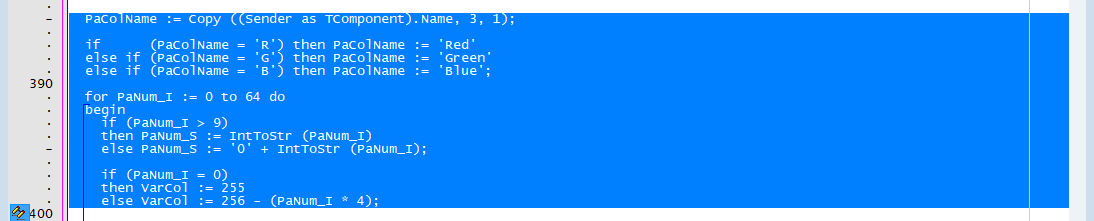
Selecting the 8 lines of code results in :
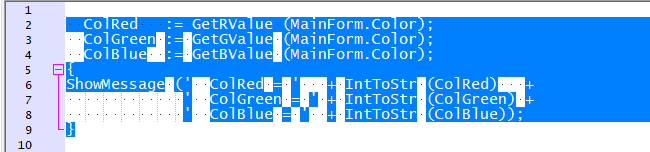
Because that’s not what I want , I deleted editor.setWhitespaceBack(1,(255,255,255)) in the startup.py file .
The remaining PythonScript commands :
editor.setWhitespaceSize(1)
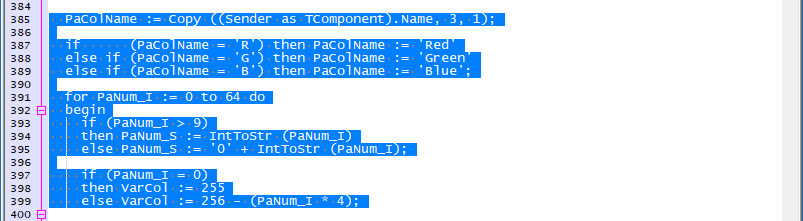
editor.setWhitespaceFore(1,( 64, 64, 64))make the selected lines of code look like :
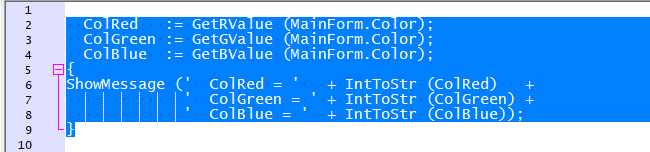
Now I’m happy .
😄




Hello! It looks like you're interested in this conversation, but you don't have an account yet.
Getting fed up of having to scroll through the same posts each visit? When you register for an account, you'll always come back to exactly where you were before, and choose to be notified of new replies (either via email, or push notification). You'll also be able to save bookmarks and upvote posts to show your appreciation to other community members.
With your input, this post could be even better 💗
Register Login