Backtick javascript strings in Notepad++
-
Notepad++ can’t handle the new backtick javascript strings correctly. The text displays with white text on a light cyan color. Someone suggested on Gitter that I use a user defined language, but I don’t know how to use the editor and I’d want to start with an existing language. It doesn’t seem to have the ability to import an existing predefined language.
-
I certainly don’t know much about Javascript, so I’m just making a stab at what “backtick strings” are, but this was a simple test after setting Language to Javascript:
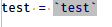
Should it do something different than that?
-
This is Scintilla problem: https://github.com/notepad-plus-plus/notepad-plus-plus/issues/3822#issuecomment-697275450
-
just because of interest , is it possible to easily extract a udl-file out of the lexer-files of scintilla ? it could be a easy way to modify implemented language-syntax in npp .
-
@carypt said in Backtick javascript strings in Notepad++:
just because of interest , is it possible to easily extract a udl-file out of the lexer-files of scintilla ? it could be a easy way to modify implemented language-syntax in npp .
Nope. Completely different beasts.
However, you can add extra highlighting to a builtin lexer (like the JavaScript lexer) using regexes via the script
EnhanceAnyLexer.pythat @Ekopalypse shares in his github repo -
ok , ty for guidance.




Hello! It looks like you're interested in this conversation, but you don't have an account yet.
Getting fed up of having to scroll through the same posts each visit? When you register for an account, you'll always come back to exactly where you were before, and choose to be notified of new replies (either via email, or push notification). You'll also be able to save bookmarks and upvote posts to show your appreciation to other community members.
With your input, this post could be even better 💗
Register Login