Hiding the line numbers column
-
I sometimes use Notepad++ outside of the programming context. I would like to turn OFF the line numbers column in these situations. I’m running the latest v7.9.2 64bit. After “scouring” the web, I’ve found various suggestions that all seem to not apply anymore. I searched keyboard shortcuts, preferences, etc. Does anyone know how to hide the line numbers column? Is this a matter of interference from the default plug-ins? Thanks.
-
In versions before v7.9.2, that was Settings > Preferences > Editing, disable
☐ Display Line Number, which is probably what your scouring of the internet told you to use.But in v7.9.2, that moved to a separate entry, Settings > Preferences > Margins/Border/Edge, where you can not only toggle whether or not line numbers are displayed (upper right in dialog), but whether the line number margin changes width depending on the number of digits in the current line numbers, or whether it stays the same width whether you’re looking at line 1 or line 1,000,000.
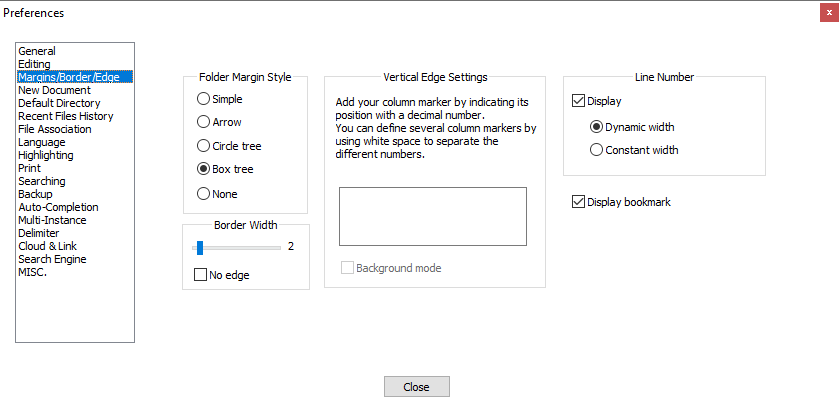
Next time you scour the internet for Notepad++ information, start with the official online docs, using the ? menu’s Notepad++ Online Documentation menu entry. https://npp-user-manual.org/docs/preferences/#editing would have told you all of the above.
-
I searched keyboard shortcuts… preferences
I’m all about listening to complaints about a bad user interface, but not this time. This one is 100% PEBKAC.



Hello! It looks like you're interested in this conversation, but you don't have an account yet.
Getting fed up of having to scroll through the same posts each visit? When you register for an account, you'll always come back to exactly where you were before, and choose to be notified of new replies (either via email, or push notification). You'll also be able to save bookmarks and upvote posts to show your appreciation to other community members.
With your input, this post could be even better 💗
Register Login