Function list does not Work With VBS-files / VB-Files.
-
Hi
I have followed this guide:
Notepad++ VB FunctionListThis Test Code is working:
Module myfunctions
   Function factorial(ByVal num As Integer) As Integer
      ' local variable declaration */
      Dim result As Integer

      If (num = 1) Then
         Return 1
      Else
         result = factorial(num - 1) * num
         Return result
      End If
   End Function
   Sub Main()
      'calling the factorial method
      Console.WriteLine("Factorial of 6 is : {0}", factorial(6))
      Console.WriteLine("Factorial of 7 is : {0}", factorial(7))
      Console.WriteLine("Factorial of 8 is : {0}", factorial(8))
      Console.ReadLine()
   End Sub
End Module
This file from my VB-Project is not working?:
Public Class Activate

    Private Sub btnOK_Click(sender As Object, e As EventArgs) Handles btnOK.Click
        If Main.Chk(EnteredKey.Text) Then
            My.Settings.KEY = EnteredKey.Text
            My.Settings.Save()
            Main.A = True
            MessageBox.Show("Key OK Thanks!", "MD", MessageBoxButtons.OK, MessageBoxIcon.Asterisk)
            Me.Hide()
        Else
            MessageBox.Show("Key Incorrect!", "MD, MessageBoxButtons.OK, MessageBoxIcon.Error)
        End If
    End Sub


    Private Sub btnCancel_Click(sender As Object, e As EventArgs) Handles btnCancel.Click
        Me.Hide()
    End Sub
End Class
Here is the vb.xml file used for the functionList:
<?xml version="1.0" encoding="UTF-8" ?> <NotepadPlus> <functionList> <!-- ========================================================= [ VB ] --> <parser displayName="Visual Basic (.NET|Script|for Applications)" id ="vb_function" commentExpr="(?m:((?<=').*?$)|((?i:REM)([\t ].*?)?$))" > <classRange mainExpr="(?s:(?<SCOPE>(?i:CLASS|TYPE)).*?(?i:END[\t ]\k<SCOPE>))" displayMode="node" > <className> <nameExpr expr="(?i:CLASS|TYPE)[\t ]+(?:[A-Za-z_][\w]*\b)(?:.*?[\r\n])" /> <nameExpr expr="[\t ]+(?:[A-Za-z_][\w]*\b)" /> <nameExpr expr="[A-Za-z_][\w]*" /> </className> <function mainExpr="(?m:^[\t ]*(?i:(?:(?:PUBLIC|PRIVATE|PROTECTED|FRIEND|PROTECTED FRIEND)[\t ]+)?(?:(?:STATIC|SHARED|SHADOWS|OVERRIDABLE|OVERRIDES|READONLY|WRITEONLY)[\t ]+)?(?:SUB|FUNCTION|PROPERTY)).*?(?:\(|$))" > <functionName> <funcNameExpr expr="(?i:(?:(?:PUBLIC|PRIVATE|PROTECTED|FRIEND|PROTECTED FRIEND)[\t ]+)?(?:STATIC[\t ]+)?(?:SUB|FUNCTION|PROPERTY)).*?(?:\(|$)"/> <funcNameExpr expr="(?i:(?:SUB|FUNCTION|PROPERTY)).*?(?:\(|$)"/> <funcNameExpr expr="(?i:(?:GET|LET|SET)[\t ]+)?[A-Za-z_][\w]*(?=[\t ]*\()"/> </functionName> </function> </classRange> <function mainExpr="^[\t ]*(?i:(?:(?:PUBLIC|PRIVATE|PROTECTED|FRIEND|PROTECTED FRIEND)[\t ]+)?(?:(?:STATIC|(?:DECLARE(?:[\t ]+(ANSI|UNICODE|AUTO))?))[\t ]+)?(?:SUB|FUNCTION|PROPERTY)).*?(?:\(|$)" displayMode="$functionName"> <functionName> <nameExpr expr="(?i:(?:(?:PUBLIC|PRIVATE|PROTECTED|FRIEND|PROTECTED FRIEND)[\t ]+)?(?:(?:STATIC|(?:DECLARE(?:[\t ]+(?:ANSI|UNICODE|AUTO))?))[\t ]+)?(?:SUB|FUNCTION|PROPERTY)).*?(?:\(|$)"/> <nameExpr expr="(?i:(?:SUB|FUNCTION|PROPERTY)).*?(?:\(|$)"/> <nameExpr expr="(?i:(?:GET|LET|SET)[\t ]+)?[A-Za-z_][\w]*(?i:[\t ]+(LIB|ALIAS)[\t ]+[\w"\.]+)*(?=[\t ]*\()"/> </functionName> </function> </parser> </functionList> </NotepadPlus>Seems like something in the VB.xml is not handling the vb file from VS correctly?
BRGRDS
-
@Robin-Melin said in Function list does not Work With VBS-files / VB-Files.:
Seems like something in the VB.xml is not handling the vb file from VS correctly?
Are you sure you got everything right? Because I just updated my vb.xml to match the one you pasted, then restarted Notepad++, and got the following when I use your second blah.vb file…
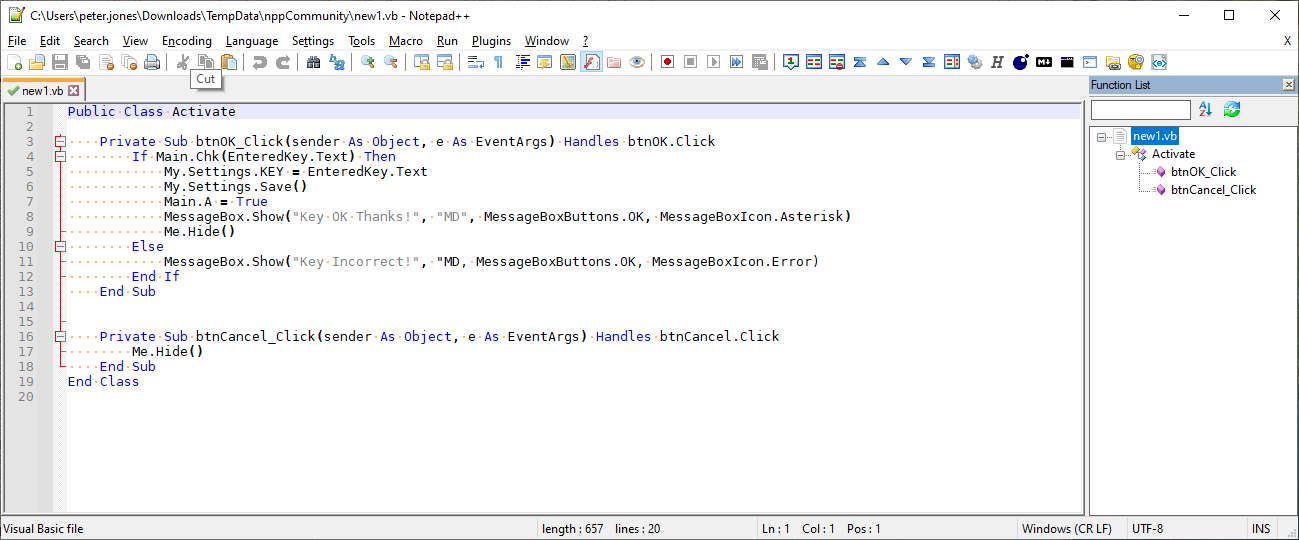
Could you share your ?-menu Debug Info (mine is here):
Notepad++ v7.9.4   (64-bit)
Build time : Mar 15 2021 - 01:03:10
Path : C:\usr\local\apps\notepad++\notepad++.exe
Admin mode : OFF
Local Conf mode : ON
OS Name : Windows 10 Enterprise (64-bit)
OS Version : 1903
OS Build : 18362.1256
Current ANSI codepage : 1252
Plugins : ComparePlugin.dll ExtSettings.dll HexEditor.dll LuaScript.dll MarkdownViewerPlusPlus.dll mimeTools.dll NppConsole.dll NppConverter.dll NppEditorConfig.dll NppExec.dll NppExport.dll NppFTP.dll NppUISpy.dll PreviewHTML.dll PythonScript.dll QuickText.dll TagLEET.dll XMLTools.dll
Also, what is the full path of your
VB.xmlfile? -
Thanks for the reply,
Here’s my ?-menu info:
Notepad++ v7.9.1   (64-bit)
Build time : Nov  2 2020 - 01:07:46
Path : C:\Program Files\Notepad++\notepad++.exe
Admin mode : OFF
Local Conf mode : OFF
OS Name : Windows 10 Pro (64-bit)
OS Version : 2004
OS Build : 19041.867
Current ANSI codepage : 1252
Plugins : mimeTools.dll NppConverter.dll NppExport.dll XMLTools.dll
Here’s the path to the vb.xml:
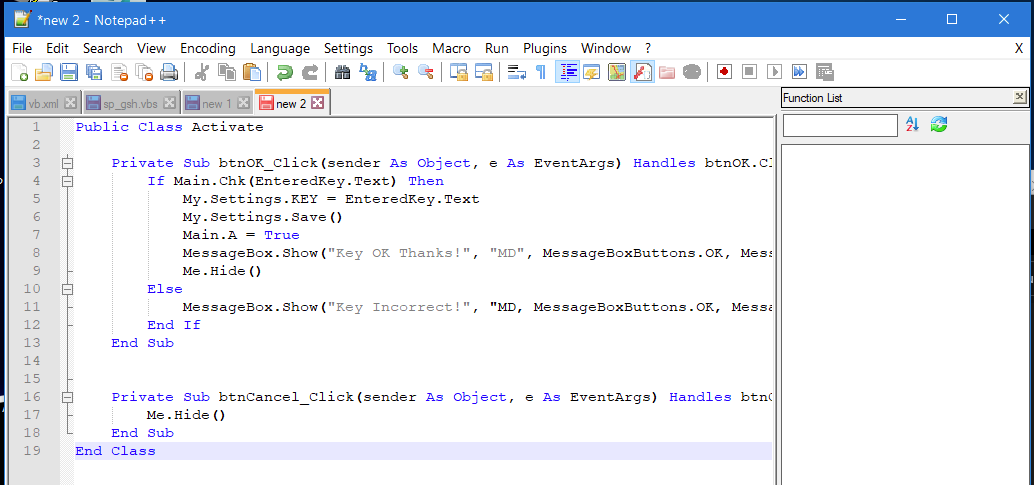
"C:\Users\Admin\AppData\Roaming\Notepad++\functionList\vb.xml"Here’s how it look with the blah.vb (Nothing in the functionlist):
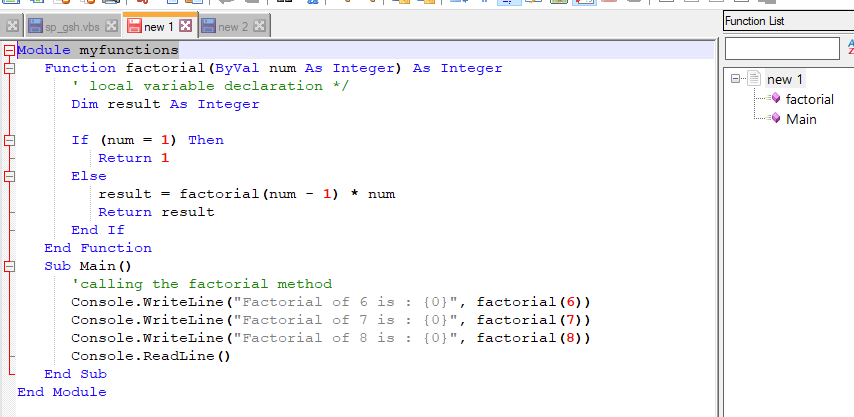
Here’s how it looks with the other VB file (that is working):
BRGRDS
-
Unfortunately, you gave a snippet rather than a full window in your screenshots, so I cannot see the lower-left of the status bar, which would tell us whether or not your files are being properly interpreted as Visual Basic code. I notice you are using unsaved files, so for those to show up as Visual Basic, you would have to have manually set Language > Visual Basic. I mean, based on the colors shown, it looks like it’s selected, but I have to ask.
I just did a brand new unzip of v7.9.1 portable, removed doLocalConf.xml so that it used %AppData% instead, and copied over the
vb.xmlandoverrideMap.xmlto%AppData%\Notepad++\functionList\folder. I then ran the v7.9.1 executable and opened up my new1.vb from the previous example. The screenshot here shows it’s working for me:
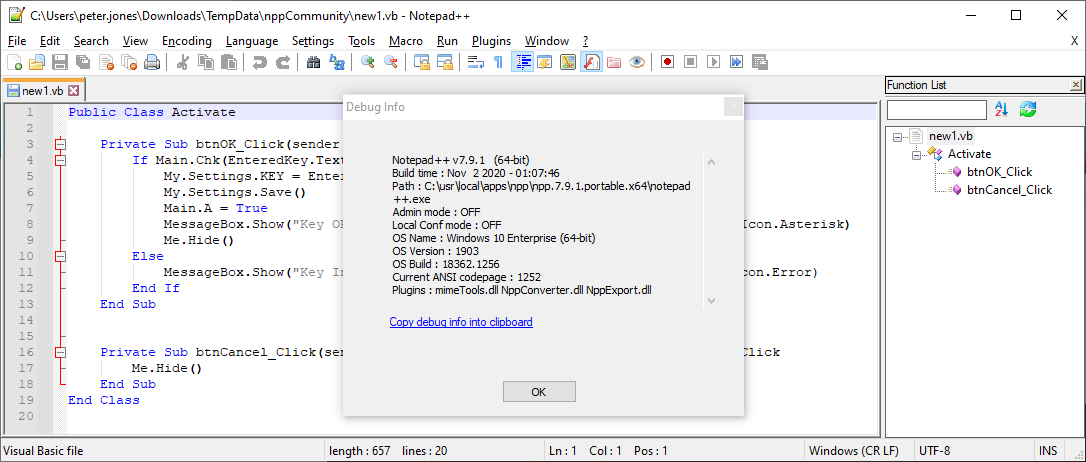
If I create a new file, and assign Language > Visual Basic, and paste the same text in, nothing happens right away and the Function List box is empty, like you showed. So then I hit the refresh double-arrow-circle button
 , and after the reload, it shows:
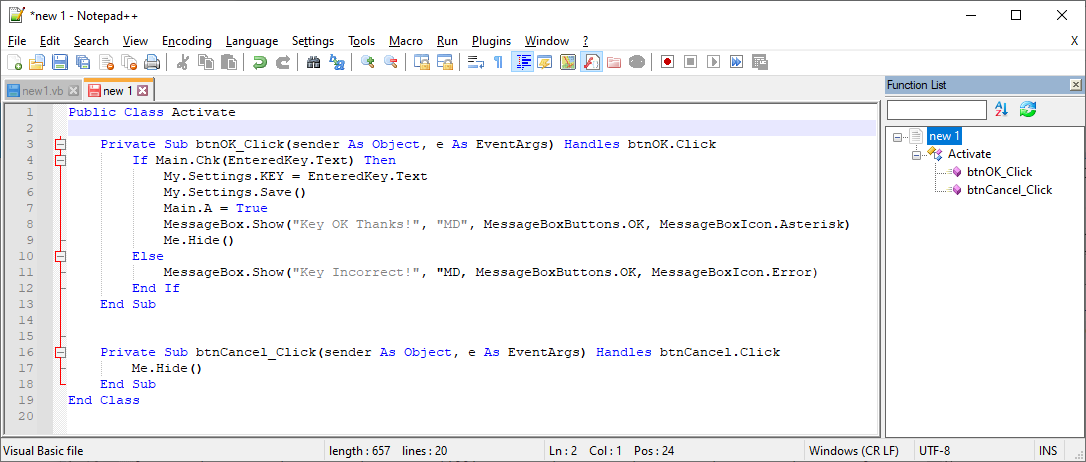
So it’s working for me.
The one thing I notice about yours is that your username is
Admin(based on"C:\Users\Admin\AppData\Roaming\Notepad++\functionList\vb.xml", but that Notepad++ doesn’t think it’s in administrator mode. Your everyday user might be calledAdmin, but I thought I’d ask to make sure, because maybe Notepad++ is looking in a different folder for its%AppData%\Notepad++settings.If that’s not it, would you mind trying a portable version to verify it can work on your system: download the zipfile for v7.9.1 64bit; unzip to a folder with write access (like a folder on your desktop); then copy your vb.xml and overrideMap.xml into the
...unzippath...\notepad++\functionList\folder, and run Notepad++ from in there. Also, for this experiment, use saved .vb files, rather than relying onnew 1tabs.If anyone else has any debug hints, feel free to chime in… Everything I do shows “it works for me”, so I’m not sure why it’s not working for @Robin-Melin.
-
@PeterJones said in Function list does not Work With VBS-files / VB-Files.:
%AppData%\Notepad++\functionList\
I Tried the standalone version, and it started to worked:)
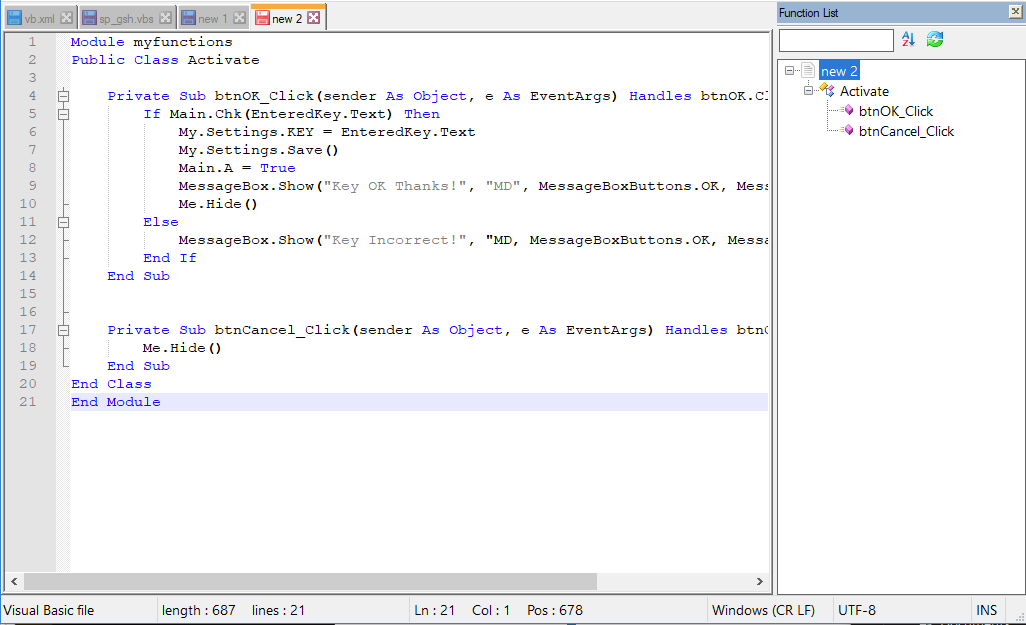
For a vb script file where Sub’s and Functions don’t have () (like the below example) it does not work is this easy to fix?
sub commonOnchange
on error resume next
	if (document.readyState = "complete") then
		if window.external.Application.environment.id = 110 then
			dbsPath = page.GetStyleClassProperty("File","Filename")
		elseif window.external.Application.environment.id = 500 then
			dbsPath = page.GetStyleClassProperty("eFile","Filename")
		end if
	End if
end sub

sub OnSelectStart
dim IndName
on error resume next
	InpName=window.event.SrcElement.TagName
	if IndName <> "IN" and InpName<>"TEXT" then returnvalue = false
end sub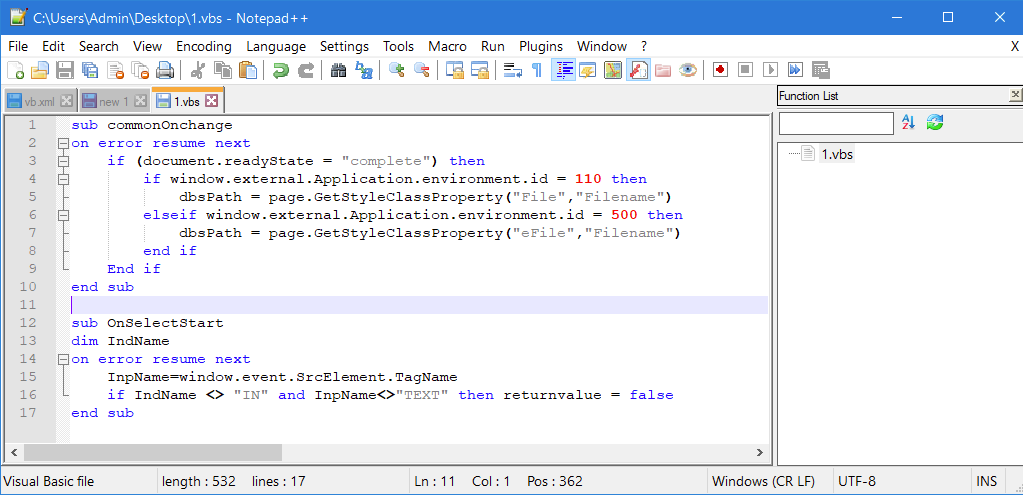
-
Sorry, when I look at the regex used for the function names, it sure looks to me like it should match the subs whether they’ve got parenthetical arguments or not.
@MAPJe71 or @guy038 (or anyone else who can see what I cannot), could you lend your function list and/or regex expertise?
With the simplified VB file to
Public Class AnotherActivate

    Private Sub btnOK_Click(sender As Object, e As EventArgs) Handles btnOK.Click
    End Sub

    Private Sub btnCancel_Click(sender As Object, e As EventArgs) Handles btnCancel.Click
    End Sub

    Private Sub btnCancel_NoArgs
    End Sub
End Class

sub commonOnchange
end sub

sub OnSelectStart
end sub

sub withParens(blah)
end sub
we would like all 6 subroutines to be listed in the function list viewer.
I tried with both the
vb.xmlthat @Robin-Melin quoted, and with @MAPJe71’s vb-3.0.FL.xml, and neither one of them grabbed the functions/subs that don’t have parentheses.I thought that the
(?:\(|$)at the end of the expressions would look for either an open-parenthesis or the end of line, and that it would thus allow either style of sub definition. So I don’t know how I’m misunderstanding the regex in those expressions, and why it’s not finding the subs without parentheses.https://docs.microsoft.com/en-us/office/vba/language/reference/user-interface-help/sub-statement makes it clear that the arglist is optional, including the parentheses.
-
Hello, @robin-melin, @peterjones and All,
Okay, I understood the problem ! In two locations of, both, the @robin-melin’s
vb.xmlfile and the @MAPJe71’svb-3.0.FL.xmlfile, we have an ending regex part(?=[\t ]*\()The correct regex should be
(?=[\t ]*\(|$)!!
So, here is, first, the corrected contents of the @MAPJe71’s
vb-3.0.FL.xmlfile, where I used a4spaces indentation :<?xml version="1.0" encoding="UTF-8" ?> <NotepadPlus> <functionList> <!-- =================================================== [vb_function] --> <parser id="vb_function" displayName="Visual Basic (.NET|Script|for Applications)" commentExpr="(?m:((?<=').*?$)|((?i:REM)([\t ].*?)?$))"> <classRange mainExpr="(?s:(?<SCOPE>(?i:CLASS|TYPE)).*?(?i:END[\t ]\k<SCOPE>))" displayMode="node" > <className> <nameExpr expr="(?i:CLASS|TYPE)[\t ]+(?:[A-Za-z_][\w]*\b)(?:.*?[\r\n])" /> <nameExpr expr="[\t ]+(?:[A-Za-z_][\w]*\b)" /> <nameExpr expr="[A-Za-z_][\w]*" /> </className> <function mainExpr="(?m:^[\t ]*(?i:(?:(?:PRIVATE|PROTECTED|PUBLIC)[\t ]+)?(?:STATIC[\t ]+)?(?:SUB|FUNCTION|PROPERTY)).*?(?:\(|$))" > <functionName> <funcNameExpr expr="(?i:(?:(?:PRIVATE|PROTECTED|PUBLIC)[\t ]+)?(?:STATIC[\t ]+)?(?:SUB|FUNCTION|PROPERTY)).*?(?:\(|$)"/> <funcNameExpr expr="(?i:(?:SUB|FUNCTION|PROPERTY)).*?(?:\(|$)"/> <funcNameExpr expr="[A-Za-z_][\w]*(?=[\t ]*\(|$)"/> </functionName> </function> </classRange> <function mainExpr="^[\t ]*(?i:(?:(?:PRIVATE|PROTECTED|PUBLIC)[\t ]+)?(?:STATIC[\t ]+)?(?:SUB|FUNCTION|PROPERTY))[\t ].*?[A-Za-z_][\w]*(?:[\t ]*\(|$)" displayMode="$functionName"> <functionName> <nameExpr expr="(?i:(?:(?:PRIVATE|PROTECTED|PUBLIC)[\t ]+)?(?:STATIC[\t ]+)?(?:SUB|FUNCTION|PROPERTY))[\t ].*?[A-Za-z_][\w]*(?:[\t ]*\(|$)"/> <nameExpr expr="(?i:(?:SUB|FUNCTION|PROPERTY))[\t ].*?[A-Za-z_][\w]*(?:[\t ]*\(|$)"/> <nameExpr expr="[A-Za-z_][\w]*(?=[\t ]*\(|$)"/> </functionName> </function> </parser> </functionList> </NotepadPlus>
And secondly, here is the corrected contents of the @robin-melin’s
vb.xmlfile, where I used a1tabulation indentation :<?xml version="1.0" encoding="UTF-8" ?> <NotepadPlus> <functionList> <!-- ========================================================= [ VB ] --> <parser id ="vb_function" displayName="Visual Basic (.NET|Script|for Applications)" commentExpr="(?m:((?<=').*?$)|((?i:REM)([\t ].*?)?$))"> <classRange mainExpr="(?s:(?<SCOPE>(?i:CLASS|TYPE)).*?(?i:END[\t ]\k<SCOPE>))" displayMode="node" > <className> <nameExpr expr="(?i:CLASS|TYPE)[\t ]+(?:[A-Za-z_][\w]*\b)(?:.*?[\r\n])" /> <nameExpr expr="[\t ]+(?:[A-Za-z_][\w]*\b)" /> <nameExpr expr="[A-Za-z_][\w]*" /> </className> <function mainExpr="(?m:^[\t ]*(?i:(?:(?:PUBLIC|PRIVATE|PROTECTED|FRIEND|PROTECTED FRIEND)[\t ]+)?(?:(?:STATIC|SHARED|SHADOWS|OVERRIDABLE|OVERRIDES|READONLY|WRITEONLY)[\t ]+)?(?:SUB|FUNCTION|PROPERTY)).*?(?:\(|$))" > <functionName> <funcNameExpr expr="(?i:(?:(?:PUBLIC|PRIVATE|PROTECTED|FRIEND|PROTECTED FRIEND)[\t ]+)?(?:STATIC[\t ]+)?(?:SUB|FUNCTION|PROPERTY)).*?(?:\(|$)"/> <funcNameExpr expr="(?i:(?:SUB|FUNCTION|PROPERTY)).*?(?:\(|$)"/> <funcNameExpr expr="(?i:(?:GET|LET|SET)[\t ]+)?[A-Za-z_][\w]*(?=[\t ]*\(|$)"/> </functionName> </function> </classRange> <function mainExpr="^[\t ]*(?i:(?:(?:PUBLIC|PRIVATE|PROTECTED|FRIEND|PROTECTED FRIEND)[\t ]+)?(?:(?:STATIC|(?:DECLARE(?:[\t ]+(?:ANSI|UNICODE|AUTO))?))[\t ]+)?(?:SUB|FUNCTION|PROPERTY)).*?(?:\(|$)" displayMode="$functionName"> <functionName> <nameExpr expr="(?i:(?:(?:PUBLIC|PRIVATE|PROTECTED|FRIEND|PROTECTED FRIEND)[\t ]+)?(?:(?:STATIC|(?:DECLARE(?:[\t ]+(?:ANSI|UNICODE|AUTO))?))[\t ]+)?(?:SUB|FUNCTION|PROPERTY)).*?(?:\(|$)"/> <nameExpr expr="(?i:(?:SUB|FUNCTION|PROPERTY)).*?(?:\(|$)"/> <nameExpr expr="(?i:(?:GET|LET|SET)[\t ]+)?[A-Za-z_][\w]*(?i:[\t ]+(LIB|ALIAS)[\t ]+[\w"\.]+)*(?=[\t ]*\(|$)"/> </functionName> </function> </parser> </functionList> </NotepadPlus>
Robin, I tested your two examples as well as the Peter’s one and everthing is OK, whatever the
vbparsing rules file used !Best Regards,
guy038


Hello! It looks like you're interested in this conversation, but you don't have an account yet.
Getting fed up of having to scroll through the same posts each visit? When you register for an account, you'll always come back to exactly where you were before, and choose to be notified of new replies (either via email, or push notification). You'll also be able to save bookmarks and upvote posts to show your appreciation to other community members.
With your input, this post could be even better 💗
Register Login