Find paragraph of X words containing multiple keywords ?
-
Hello, @n_antiyou, @peterjones, @alan-kilborn and All
For
6keywords, you can use that mono-line regex , below, in free-spacing mode, which enables you to place any space within this long regex for a better readability !SEARCH / MARK
(?xs-i) (?=(\W+ \w+){0,299} \W+ Word_1) (?=(?1){0,299} \W+ Word_2) (?=(?1){0,299} \W+ Word_3) (?=(?1){0,299} \W+ Word_4) (?=(?1){0,299} \W+ Word_5) (?=(?1){0,299} \W+ Word_6) (?1){300}
Now, you may use the
Search > Mark All > Using #th stylein order to highlight your keywords with a specific color. Note that, for your6thkeyword, you’ll have to cheat a bit by applying two successive highlightings to the same word ! Just try to mix two styles ;-))Best Regards,
guy038
P.S. :
Note that the syntax
(\W+ \w+), near the beginning of the regex, defines the group1containing the sub-regex\W+\w+, which is re-used, further on, thanks to the simple syntax(?1)You’ll find some links to improve yourself in regexes here !
-
Hi, @n_antiyou and All,
As I said in my previous post, you may mix some styles, from the
5styles, available by default, to get other colors, in order to color all your keywords !Refer to this post by @Claudia-Frank, who, unfortunately, is no longer active on this forum ! Her contribution was quite important and she provided quantity of excellent
Pythonscripts, too ! Let’s wish her the best and good coding moments ;-))https://community.notepad-plus-plus.org/post/27621
With the help of the
NppQCPplugin ( Quick Color Plugin ), I built up aWordimage which recapitulates the main style combinations, with significant colors and theirRGBcoordinates
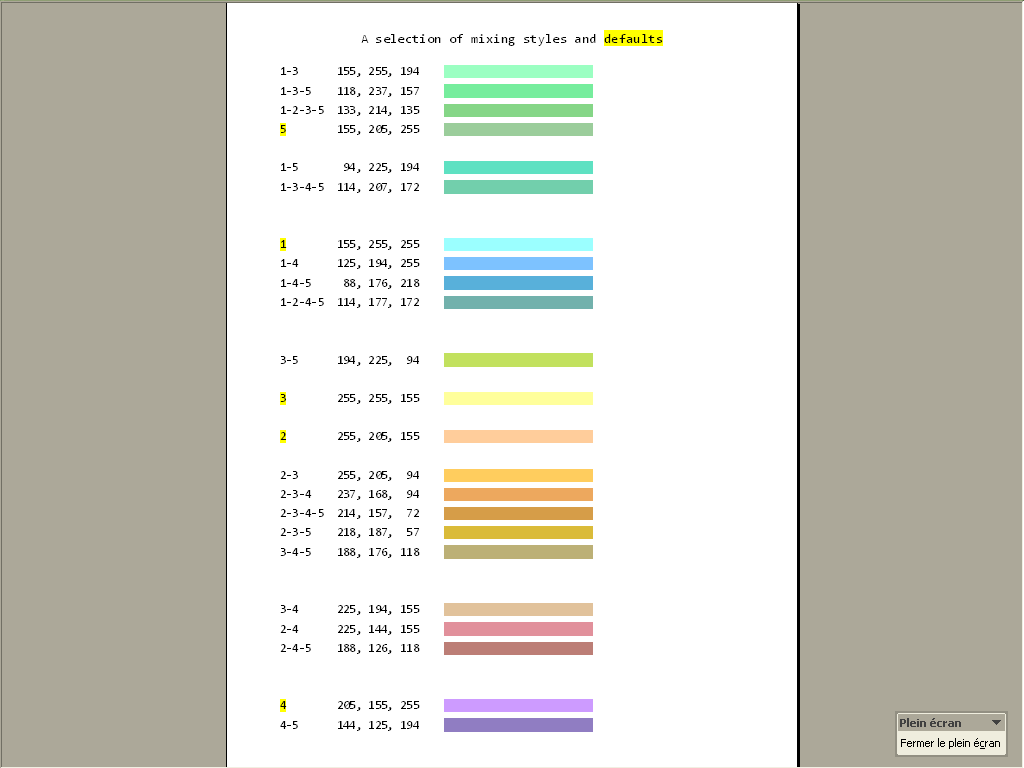
Best Regards,
guy038

Hello! It looks like you're interested in this conversation, but you don't have an account yet.
Getting fed up of having to scroll through the same posts each visit? When you register for an account, you'll always come back to exactly where you were before, and choose to be notified of new replies (either via email, or push notification). You'll also be able to save bookmarks and upvote posts to show your appreciation to other community members.
With your input, this post could be even better 💗
Register Login