Darken the ctrl-tab file list in dark mode
-
Hi Don I’ve used your NPP for a number of years but only started to use it regularly in the past couple of years for programming. It’s a great too I’d say. Deserves my donation. I program with a 43" TV so I can spread out my stuff, not just code but also hardware analyzer windows etc.
So to protect my eyes, I use dark theme on everything, including NPP. I usually have 30-40 files open, on split window, with multi-line tabs so I can easily view files in my project. I notice that the list of files when I ctrl-tab is displayed in very bright yellow background. So I had to close my eyes when doing ctrl-tab and I can feel the light through my eyelids. Plus I can’t see which file I’m tabbing into so it’s counter-productive. I wonder if you could make some change to display a dark-themed file list when ctrl-tabbing. It would be great.
Also if you would consider custom color on the white line that represents folded code, that would be great. I have some code that I need to keep most of the if-else if logic folded to easily navigate but those bright white lines, when drawn in very close to each other, like every 3 lines of code, in large numbers, are very glaring. Thanks.
-
There are some developers working hard to bring Windows 10 “Dark Mode” to Notepad++. You can track progress on this if you’d like by searching the ISSUES LIST for “dark” or “dark mode”.
ctrl-tab is displayed in very bright yellow background
This might be worth a note to the devs so that they check this feature as part of doing the implementation.
So I had to close my eyes when doing ctrl-tab and I can feel the light through my eyelids.
LOL. Most people say their eyes are “bleeding”.
Here’s an animated short you might enjoy. I like to think of it as when the main character clicks on “light mode” he is actually starting up the current (7.9.5) version of Notepad++.
-
@Alan-Kilborn Thanks! Could you recommend a proper keyword to search regarding this ctrl tab file list? There’s over a thousand issues listed ;)
-
@John-Liudr said in Darken the ctrl-tab file list in dark mode:
Could you recommend a proper keyword to search regarding this ctrl tab file list?
I thought I already did that…?
I would use “dark” or “dark mode” as a search term: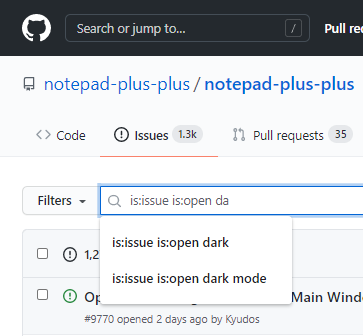
As to something specific relating to Ctrl+Tab functionality, I don’t think you’ll find anything…because I think you are the first to mention it.
There’s over a thousand issues listed
Yes, indeed. Sometimes it takes a bit of work to find what you’re looking for.
-
OK thanks. I read all the dark related hits. Only one mentioned about the tabs aren’t respecting win 10 dark mode. So I raised a new issue. Hope someone will respond to it. I can’t imagine people feeling happy with that bright menu/list.
-
One thing that people don’t really seem to understand is that Notepad++ existing long before Windows 10 created Dark Mode. Now, sure, programs should “keep up with the times” but Notepad++ is not a “paid for” software, so its maintainers have limited time to develop, and I for one, care not about “colors” over “text editing” features.
-
Thanks for the recent dark mode update! The boarders are no longer searing into my eyes and to decorator boarder is also dark. Except for the ctrl-tab file list which is still quite bright (not as bright as starting up npp), I’m very happy with the update. I use a deep black theme and the dark mode is so great with the deep black theme! I know this is free software so don’t expect every wishes granted. I donated to it to make the authors feel appreciated for their good work. Anyone who uses the software regularly and has a few dollars to spare should do that. Separately, this ctrl-tab continues to be an issue. I hope with the arrival of dark mode, the ctrl-tab rendering could depend on whether we’re in dark mode.


Hello! It looks like you're interested in this conversation, but you don't have an account yet.
Getting fed up of having to scroll through the same posts each visit? When you register for an account, you'll always come back to exactly where you were before, and choose to be notified of new replies (either via email, or push notification). You'll also be able to save bookmarks and upvote posts to show your appreciation to other community members.
With your input, this post could be even better 💗
Register Login