How to get file paths from all open tabs
-
I needed to get the filepaths from all of my open tabs into a text file. I was stumped for a second and thought I must have a script to do this somewhere – a quick search turned up nothing.
Then I thought of a relatively new feature of N++ that could help: The ability to copy pathnames from the Search results window.
Here’s how I did it:
- if Search results panel is open, right click in it, choose Clear all from the popup menu
- run a Find All in All Opened Documents search, with following setup: Find what =
\z, Search mode = Regular expression - right click in the Search results panel, choose Copy Pathname(s) from the popup menu
- paste the pathnames wherever desired
Here’s what it looks like to do it (red dot = right click point):
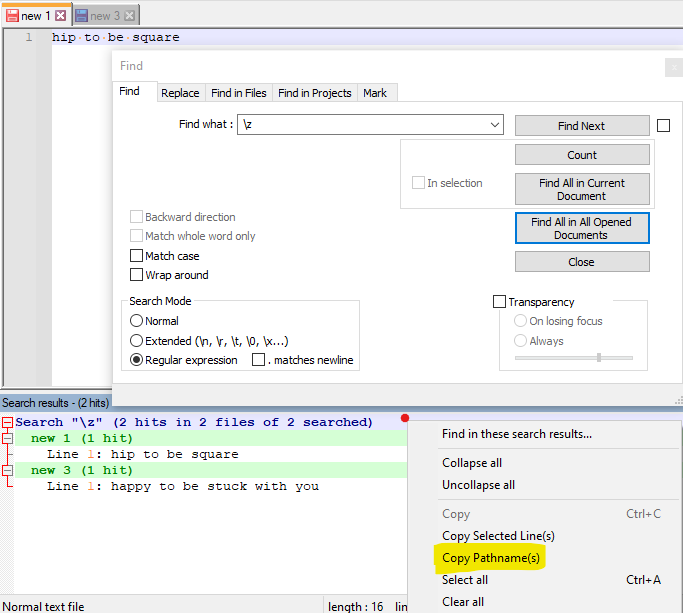
and the result in the clipboard (after selecting the command in yellow) was:
new 1
new 3
Of course, if these had been real, saved files in the file system, we’d see pathnames here instead of
new 1andnew 3. -
In a “Perfect World” everyone would use a scripting language like NppExec to do this sort of thing, “But It’s Alright” if not. I had a “Couple Days Off” with the holiday so while I wasn’t “Workin’ for a Livin’”, I poured my “Heart and Soul” into this script:
::buffers
IF "$(ARGC)">"1" THEN
    IF "$(ARGV[1])"~="--gui" THEN
        NPP_MENUCOMMAND Window\Window...
    ELSE IF "$(ARGV[1])"~="--id" THEN
        NPP_SENDMSG NPPM_GETCURRENTBUFFERID 0 0
        ECHO $(MSG_RESULT)
    ELSE IF "$(ARGV[1])"~="help" THEN
        GOTO USAGE
    ENDIF
ENDIF

NPP_SENDMSG NPPM_GETNBOPENFILES 0 0
SET LOCAL BUFFERS = $(MSG_RESULT)
SET LOCAL START = 1

:LOOP
SET LOCAL LINE = 0
IF "$(#$(START))"=="$(FULL_CURRENT_PATH)" THEN
    SET LOCAL LINE ~ $(CURRENT_LINE) + 1
ENDIF
IF "$(ARGC)">"1" THEN
    SET LOCAL TEST ~ strfind "$(#$(START))" "$(ARGV[1])"
    IF "$(TEST)"!="-1" THEN
        ECHO $(#$(START)):$(LINE):
    ENDIF
ELSE
    ECHO $(#$(START)):$(LINE):
ENDIF
IF "$(START)"=="$(BUFFERS)" GOTO END
SET LOCAL START ~ $(START) + 1
GOTO LOOP

:USAGE
ECHO Usage:
ECHO   \$(ARGV[0]) [F]   = list filename for all current buffers, in clickable list, matching optional filter F
ECHO   \$(ARGV[0]) --id  = current buffer ID
ECHO   \$(ARGV[0]) --gui = open 'Window\Window...' menu item

:END
Cheers.
-
I have another idea. We could make the text from Window > Windows copyable.
It already supports multi-select. The only thing missing is Ctrl+C and put a list of of file paths to clipboard.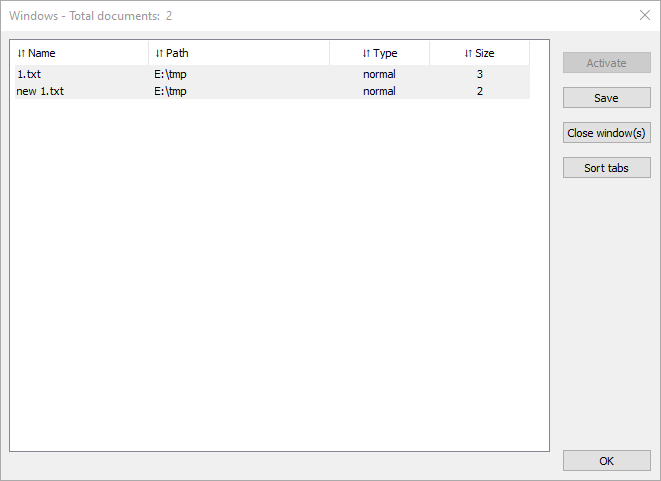
What do you think? -
@mere-human said in How to get file paths from all open tabs:
What do you think?
I think it would be useful, of course it would, so much so that last year I made an AutoHotkey script to get some information like that. From that script I extracted the following:
F4::
WinMenuSelectItem,A,,12&,Windows...
WinActivate ahk_exe notepad++.exe ahk_class Notepad++
if WinExist("Windows") {
	ControlGet, FilesVar, List,, SysListView321, A
	Sleep, 300                      ; needed if there are many files open
	WinClose
} else {
	MsgBox, Failed!
	return
}

Output := ""
Template := "{2}\{1}`n"

For _, files in StrSplit(FilesVar, "`n") {
	ArrFiles := StrSplit(files, "`t")
	Output .= (ArrFiles[2] = "") ? ArrFiles[1] "`n" : Format(Template, ArrFiles*)
}

MsgBox, % Clipboard := Output
return

/* Output:

new 1*
new 2
D:\Applications\npp.7.9.5.portable.x64\change.log
D:\Applications\npp.7.9.5.portable.x64\readme.txt
D:\Applications\npp.7.9.5.portable.x64\license.txt
 */
BR
-
Using jN plugin…
// trdm 2021-07-08 12:30:21 function test1() { //debugger; var vText = ''; var vFiles = Editor.currentView.files; for(var i = 0; i<vFiles.length; i++) { if(vText.length == 0) { vText = vFiles[i]; } else vText = vText + '\r\n'+ vFiles[i]; } alert(vText); var vFso = new ActiveXObject("Scripting.FileSystemObject"); var vTxt = vFso.CreateTextFile("c:\\testfile.txt",true); vTxt.Write(vText); vTxt.Close(); } -
-
@mere-human said in How to get file paths from all open tabs:
I have another idea. We could make the text from Window > Windows copyable.
It already supports multi-select. The only thing missing is Ctrl+C and put a list of of file paths to clipboard.Or how about making it even more explicit and having an additional button in the UI:
Copy Pathnames. It could operate on all if nothing is selected, or only what is selected.The Ctrl+c idea as the only way of doing it is fine, but someone will come along and want just the “name” part of the files to be copied. Thus I’d suggest a dedicated UI element for paths and second UI button
Copy Names.




Hello! It looks like you're interested in this conversation, but you don't have an account yet.
Getting fed up of having to scroll through the same posts each visit? When you register for an account, you'll always come back to exactly where you were before, and choose to be notified of new replies (either via email, or push notification). You'll also be able to save bookmarks and upvote posts to show your appreciation to other community members.
With your input, this post could be even better 💗
Register Login