Strange window layout in new installation of 8.1.3
-
I’ve just set up a brand new computer for work, with a completely fresh installation of Windows 10. After installing Notepad++ with the default options, my editor window has a very strange layout. There are HUGE empty margins around the document editor, some with close buttons (x) in them, almost like they are docked tool windows, but they contain no text or other controls, and “closing” them has no effect. How do I fix this? Is this a bug for fresh installs?
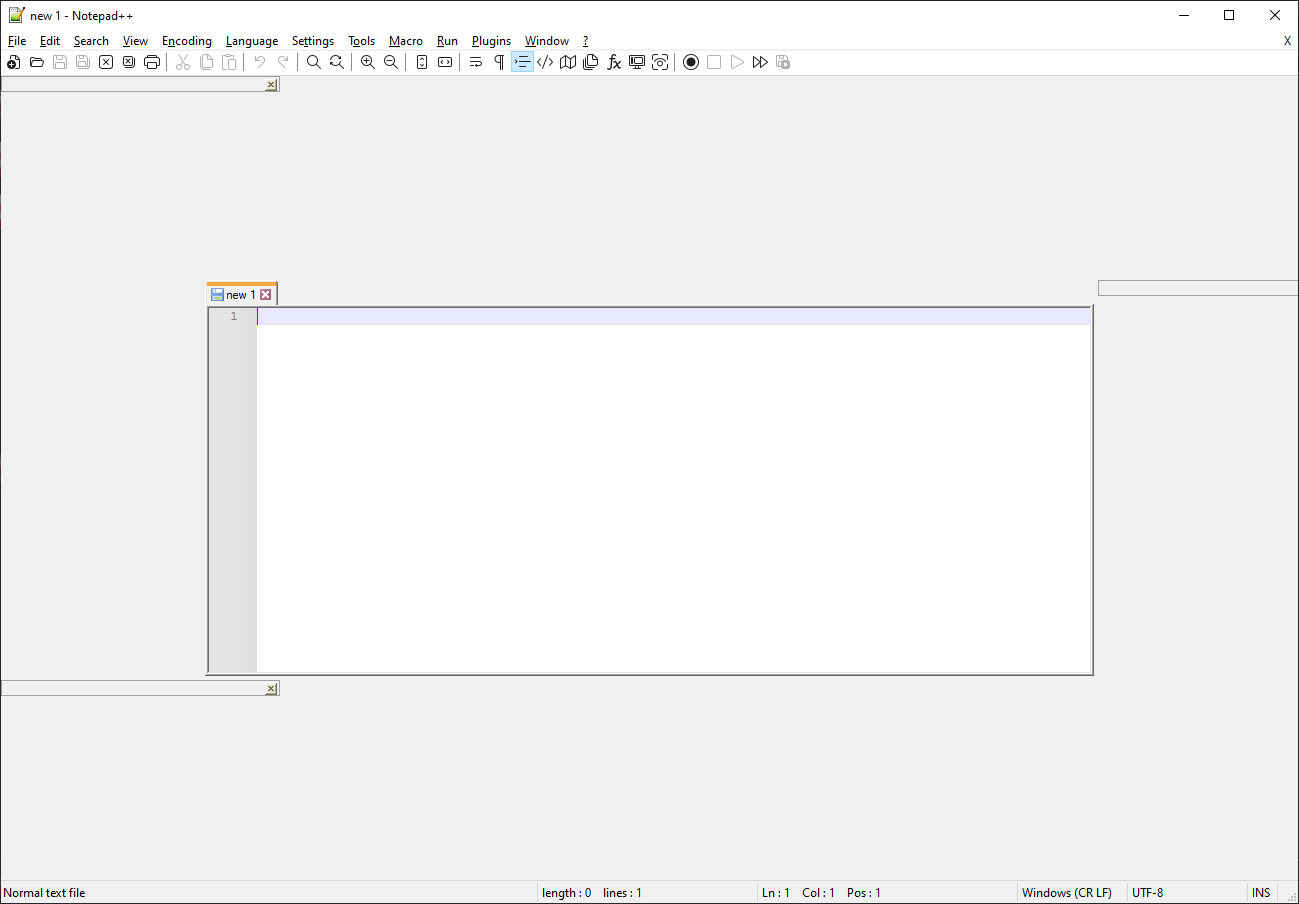
-
As an extra note, I just noticed that I can try to grab that rectangle that the close button is in and drag,which seems to start some kind of window tool window drag operation, but as soon as I do it, the UI and mouse get choppy, then a few seconds later NPP crashes without displaying any kind of error.
-
See this post for a list of official issues (in the github repo) and other posts in this forum that talk about the same thing. There have probably been other mentions since then.


Hello! It looks like you're interested in this conversation, but you don't have an account yet.
Getting fed up of having to scroll through the same posts each visit? When you register for an account, you'll always come back to exactly where you were before, and choose to be notified of new replies (either via email, or push notification). You'll also be able to save bookmarks and upvote posts to show your appreciation to other community members.
With your input, this post could be even better 💗
Register Login