New release: Notepad++ v8.1.4
-
Hey, great job with the release, but can we please get back “Standard icons: Large”? Not everyone likes Fluent UI (even in large) :)
-
Ctrl+Shift+F5 is a long awaited feature!!!
lol, i use date as version and this was annoying to not have it built-in.Thank you a lot!
Have a very nice day! -
@Simon-0 said in New release: Notepad++ v8.1.4:
Ctrl+Shift+F5 is a long awaited feature!!!
Hmmm. There’s no feature tied to Ctrl+Shift+F5. Try to get your facts correct before posting.
-
close tag auto-completion should cover PHP and jsp files too (not only html and xml files)
hi guys, thank you very much for this fabulous text editor.
I think that close tag auto-completion should cover PHP and jsp files (not only html and xml files).
the reason behind this: html tags are used in abundance inside PHP and jsp filethank you very much
-
To quote Peter from above:
As far as I can tell, the behavior is nothing new to Notepad++ v8.1.4, so the question doesn’t really belong in this thread. This topic is for regressions – changes of behavior that came about in v8.1.4 that weren’t present in previous versions.
-
@Alan-Kilborn
thank you for your remark -
Whenever the window of Notepad++ is started or restored after minimizing, Notepad++ does not check if the remembered coordinates are still valid (e.g. after changing screen resolution, switching off an external monitor on a laptop etc.). So the window can be restored to an invisible coordinate.
Getting the Notepad++ window back into the viewport is hard (my solution: Change another programs’ window with Windows+CursorLeft, so Windows will ask for a window to be displayed on the right side, chose Notepadd++)
-
@Tom-Stein Thanks for the tip about Win+Cursor to move a window between monitors (I’d never heard of that before). This helps when one of the monitors uses DVI-D which has no way of telling Windows that the monitor is switched off **. Another way to put Notepad++ onto an available screen without the “ask to put on the right side” question is to click on it on the taskbar, or ALT+TAB to select NotePad++, and then use WIN+Cursor to move Notepad++ over to a powered screen.
** So the issue can never be fully solved, since some display connection protocols have no physical way to tell Windows that a monitor isn’t switched on. -
A Very Happy Notepad++ user for many years … Thanks!
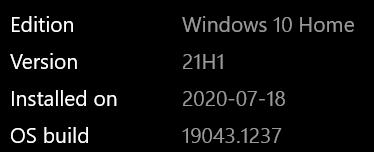
As of this morning, Notepad++ refuses to open properly. I get a window that remains all white, then a “Not responding” error message, and have to kill the process.
I’m running Windows 10, OS Build 19043.1237.
Any suggestions would be greatly appreciated.
-
See if the suggestions in the recent “Notepad++ Not Respondong” discussion help you.
-
After the update, I lost all open documents and settings that I did .
-
P PeterJones locked this topic on





Hello! It looks like you're interested in this conversation, but you don't have an account yet.
Getting fed up of having to scroll through the same posts each visit? When you register for an account, you'll always come back to exactly where you were before, and choose to be notified of new replies (either via email, or push notification). You'll also be able to save bookmarks and upvote posts to show your appreciation to other community members.
With your input, this post could be even better 💗
Register Login