Replace line end symbols?
-
Is there a way replace line end symbols?
Currently CR/LF symbols are very large and distracting:
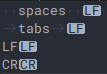
I’d like make look like in UEStudio:

Thank you.
-
Not a reasonable way (NPP is open source so you could probably develop a way if you are a programmer).
I am quite sure that these symbols come from Scintilla so you should check out there.
Or just use UEStudio. -
@gstavi said in Replace line end symbols?:
these symbols come from Scintilla so you should check out there.
They are Scintilla representations and there are Scintilla commands to change them, but I have not been able to find a simple way to make changes persist across files and tabs.
Scintilla is embedded in Notepad++ and the default representations are easy to find in the .exe with a hex editor. They are two and three character representations, which makes them distracting. I editted a few that I use a lot - “NUL” "LF “CR” and “ESC” to “0” “n” "r and “e” - and that makes them permanent.
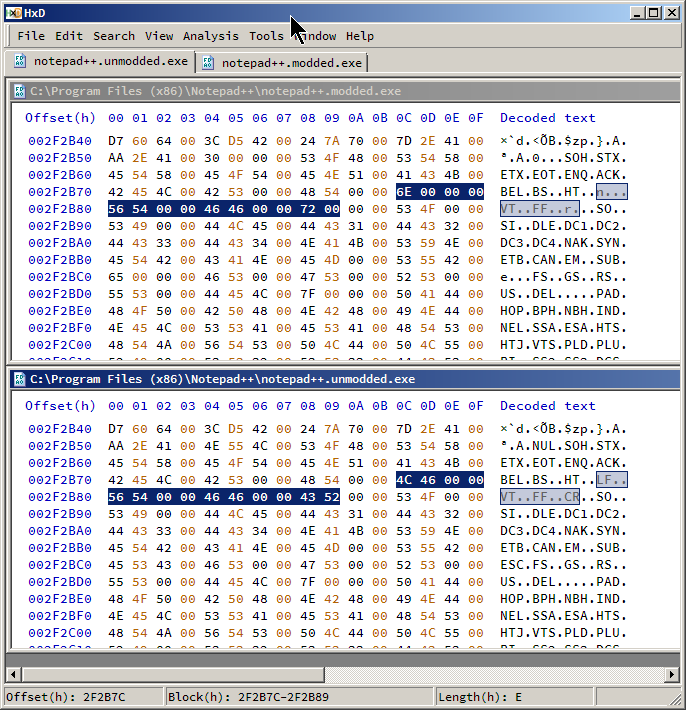
Highlight above is from LF to CR / “n” to “r” They are still shown with a reverse background, but only one character wide.Of course, you’d have to do the edit again for each Notepad++ update.
-
@astewart77 said in Replace line end symbols?:
easy to find in the .exe with a hex editor. They are two and three character representations, which makes them distracting. I editted a few
Now THAT is an ambitious approach to solving the problem! :-)
-
@astewart77 said in Replace line end symbols?:
They are Scintilla representations and there are Scintilla commands to change them, but I have not been able to find a simple way to make changes persist across files and tabs.
Seems like there should be a way to use SCI_SETREPRESENTATION with NppExec or PythonScript to do this?
Cheers.
-
@Michael-Vincent said in Replace line end symbols?:
Seems like there should be a way to use SCI_SETREPRESENTATION with NppExec or PythonScript to do this?
Yes, it can be done, with the complication that it has to be done on every tab switch, because N++ “resets” this aspect of Scintilla when the active document changes. IMO it is better than hacking the exe.
-
All,
For most characters, re-asserting at every tab switch is sufficient.
However, in my experience, setRepresentation doesn’t work as expected for the CR and LF characters… when I tried
editor.setRepresentation("\r", "x"), it gives
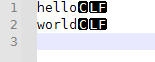
– it shrinks the box width down to 1 character rather than two, but still tries to say
CRinstead ofx. Similarly, a longer replacement likecarriage returnallocates enough space for the extras, but still uses theCRtext.
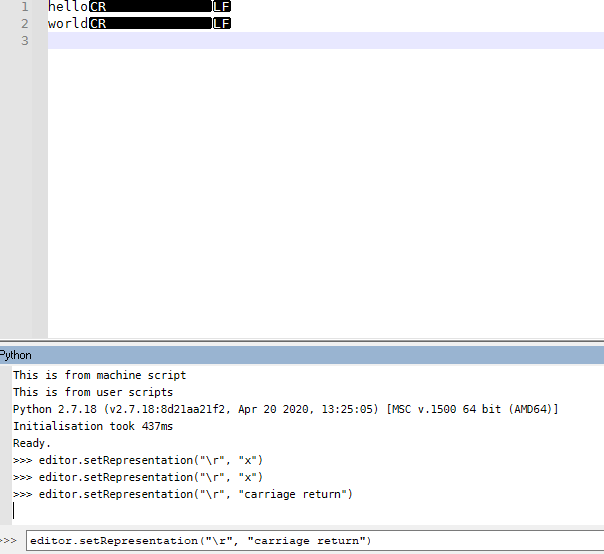
(the results on
\nfor LF are similarly ineffective and unhelpful) -
@PeterJones said in Replace line end symbols?:
However, in my experience, setRepresentation doesn’t work as expected for the CR and LF characters
I had this exact same behavior attempting to do this from LuaScript as well (thought it was a bug in the plugin). Setting it for some other character such as
"h"worked but not"\r"or"\n"Newer versions of Scintilla have better support for line end representations. A snippet from the changelog of Scintilla v5.1
Add APIs for setting appearance (traditional blob or plain text) and colour of representations and support setting a representation for the “\r\n” line end sequence.
-
@dail said in Replace line end symbols?:
Newer versions of Scintilla have better support for line end representations.
… another reason to hope that Don and team are working toward the newer Scintilla in the not-too-distant future. :-)





Hello! It looks like you're interested in this conversation, but you don't have an account yet.
Getting fed up of having to scroll through the same posts each visit? When you register for an account, you'll always come back to exactly where you were before, and choose to be notified of new replies (either via email, or push notification). You'll also be able to save bookmarks and upvote posts to show your appreciation to other community members.
With your input, this post could be even better 💗
Register Login