Subtractive searching.
-
I’m looking for a way to perform the following when using notepad++ to search logs.
Lets say I open a log and am searching for the word DELETE, now from those results I wish to exclude any lines with the word SYSTEM. Is there an easy way to do this?
My current workaround is to search for the term I want. Copy the results into a new page, search for the term I don’t want, bookmark those lines, then remove the bookmarked lines. While this method works, it’s extremely tedious.
I’ve tried looking for ways to do this with regex but I’m terrible at it. Any suggestions would greatly help.
Thanks!!
-
What you want are lookahead expressions – positive for the match, and negative for the do-not-match.
(?-s)^(?=.*\bDELETE\b)(?!.*\bSYSTEM\b).*$will match lines that contain DELETE but do not contain SYSTEM, in either order, possibly with text between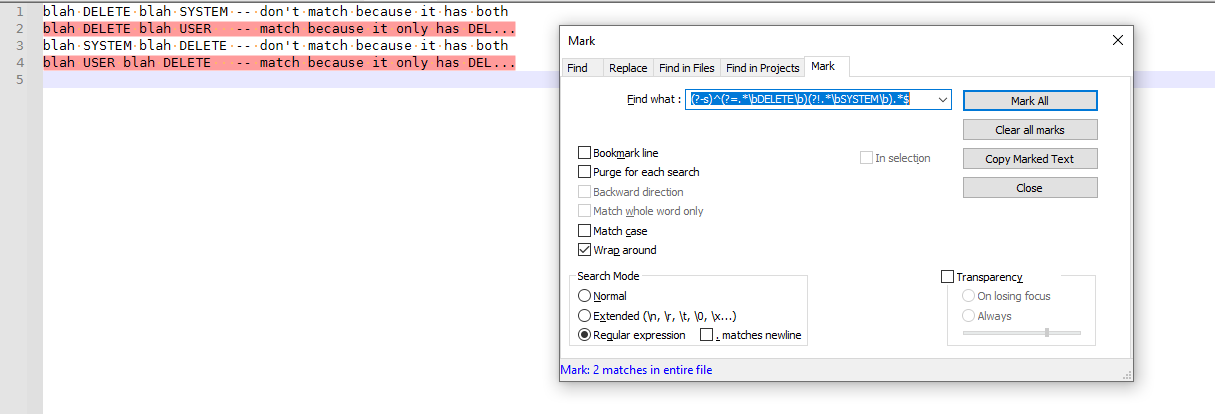
I used a positive lookahead to match anything followed by the whole word
DELETE, and a negative lookahead to exclude anything that matches anything followed by the whole wordSYSTEM. I then do the.*$at the end to make it select the whole line that contains DELETE without SYSTEM -
This is great, thank you very much


Hello! It looks like you're interested in this conversation, but you don't have an account yet.
Getting fed up of having to scroll through the same posts each visit? When you register for an account, you'll always come back to exactly where you were before, and choose to be notified of new replies (either via email, or push notification). You'll also be able to save bookmarks and upvote posts to show your appreciation to other community members.
With your input, this post could be even better 💗
Register Login