Notepad++ 8.2.1 Release Candidate
-
Notepad++ v8.2.1 Release Candidate is available for testing:
http://download.notepad-plus-plus.org/repository/8.x/8.2.1.RC/Notepad++ v8.2.1 new features and bug-fixes:
- Fix regression of loaded session being empty on exit. (Fix #10986)
- Add Find/Replace text swap button in Find replace dialog. (Fix #6010)
- Add an option for inserting auto-completion selection to fix hitting twice ENTER to go to next line. (Fix #4799, #4631, #8389, #10915)
- Fix installer x64 not detected the previous installation location. (Fix #7946)
- Add copy name/path commands to DocList and Edit menu. (Fix #10394)
- Fix Recent Files List not revised issue after “Save As” command. (Fix #10946)
- Fix Windows 11 detected wrongly issue in “Debug information”. (Fix #11011)
- Fix “Save As” command cannot be used as “Save” issue. (Fix #10965)
- Fix visual glitch regression of fg/bg color disabling. (Fix #11051)
- Fix wrong keywords (of preprocessor in C) highlighting in Java. (Fix #11026)
-
D donho pinned this topic on
-
-
@donho
There is 1px cut from left border in non-dark mode. All tabs are affected. It is more visible on Win7.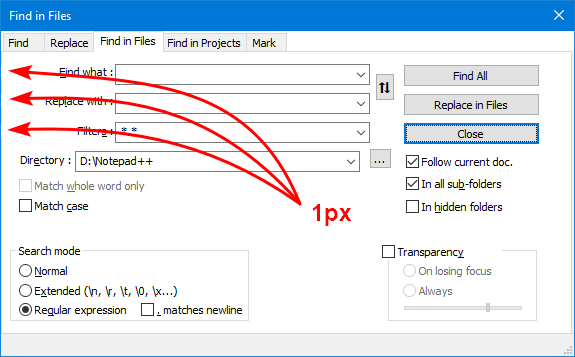
-
@rddim
Do you mean that there’s less room for the translation?
If yes, please provide before-after screenshots. -
@donho
No, bulgarian translation is OK. This is only visual report. In dark mode it seems correct. -
@rddim
The fix will be in v8.2.2:
https://github.com/notepad-plus-plus/notepad-plus-plus/pull/11067 -
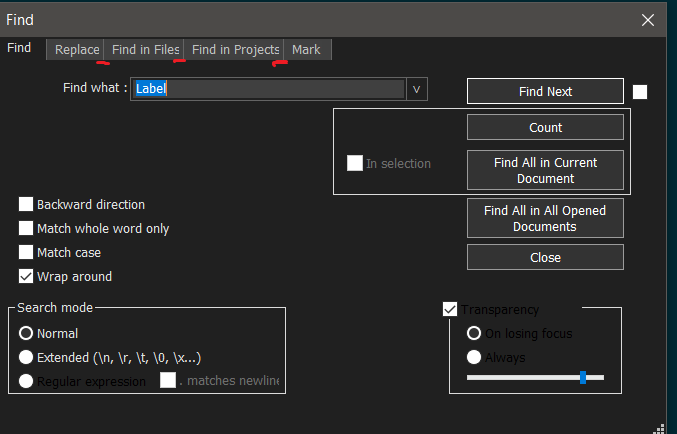
I don’t know, is it just me?
Notepad++ v8.2.1 (64-bit)
Build time : Jan 19 2022 - 18:43:05
Path : C:\Program Files\Notepad++\notepad++.exe
Command Line :
Admin mode : ON
Local Conf mode : OFF
Cloud Config : OFF
OS Name : Windows 10 Pro (64-bit)
OS Version : 2009
OS Build : 19043.1466
Current ANSI codepage : 1251
Plugins : ComparePlugin.dll DSpellCheck.dll NavigateTo.dll NppDocShare.dll NppQrCode64.dll SelectToClipboard.dll zoomdisabler_x64.dll _CustomizeToolbar.dll -
-
@donho
No! If you turn off the dark theme, the problem disappears.
May be problen in 125% scaling in windows setings? -
-


Hello! It looks like you're interested in this conversation, but you don't have an account yet.
Getting fed up of having to scroll through the same posts each visit? When you register for an account, you'll always come back to exactly where you were before, and choose to be notified of new replies (either via email, or push notification). You'll also be able to save bookmarks and upvote posts to show your appreciation to other community members.
With your input, this post could be even better 💗
Register Login