TagsView is back! :)
-
Oh boy! The most complicated part of the “Go to tag” is not dealing with the tags themselves - no, the most complicated part is related to a popup list with the tags similar to the one shown by Sublime Text or VS Code!
First, this list should be a popup one; next, it should support multi-line items (e.g. the first line is the function/variable itself and the second line is the context); next, it should be possible to apply colors of the editor for the selected item plus the colors other items.
So far I’ve been experimenting with a custom-draw ListBox (with the LBS_OWNERDRAWFIXED style), which gives the full responsibility of drawing of each item. I’ve been spending a lot of time to understand what and how needs to be done there, and it is still far from completion.If someone has experience with LBS_OWNERDRAWFIXED or LBS_OWNERDRAWVARIABLE ListBox, please let me know!
I’d be happy to re-use some existing code rather than doing it all from scratch! -
I’m a crap coder, but was able to modify TagLEET pop-up box to do some nice stuff:
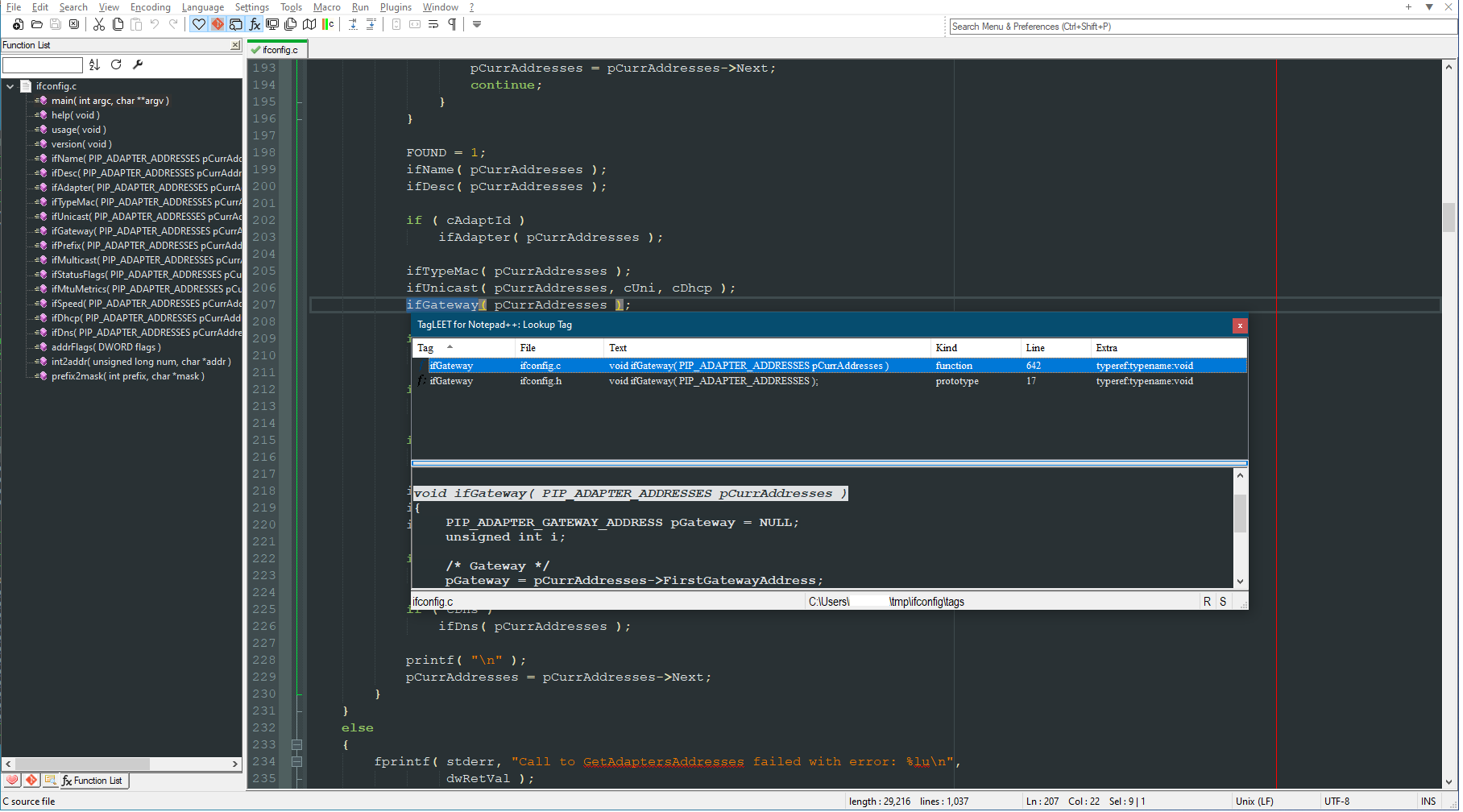
Instead of just the list of tags and context (which I added a bit from the original TagLEET, I added that bottom “peek” window which updates as you scroll the tags in the upper half. It’s only a RichEdit control - I would have loved to make it a Scintilla edit component and lex the text in there as well, but alas, I’m a crap coder!
https://github.com/vinsworldcom/nppTagLEET
Cheers.
-
Guys,
It seems like TagsView doesn’t work on Notepad++ v8.4.4. On Notepad start it claims the plugin needs to be disabled.
Do you experience the same? -
@pnedev said in TagsView is back! :):
Guys,
It seems like TagsView doesn’t work on Notepad++ v8.4.4. On Notepad start it claims the plugin needs to be disabled.
Do you experience the same?No. It’s working fine for me. You have @Vitalii-Dovgan latest version?
Cheers.
-
I’m using TagsView v0.5 beta 64-bit version with:
Notepad++ v8.4.4   (64-bit)
Build time : Jul 15 2022 - 17:54:42
Path : C:\Program Files\Notepad++\notepad++.exe
Command Line :
Admin mode : ON
Local Conf mode : OFF
Cloud Config : OFF
OS Name : Microsoft Windows 10 (64-bit)
OS Build : 17134.0
Current ANSI codepage : 1252
WINE : 5.0
Plugins :
    ComparePlus (1)
    NppEditorConfig (0.4)
    NppGTags (5)
    QuickText (0.2.4.1)
    SessionMgr (1.4.4)
    TagsView (0.5)
    XMLTools (3.1.1.13)
    _CustomizeToolbar (5.3)
On Notepad++ start I get a message “Access violation”.
Maybe it is because of Wine / Linux, I don’t know.I will try it on native Win10, thanks.
BR
-



Hello! It looks like you're interested in this conversation, but you don't have an account yet.
Getting fed up of having to scroll through the same posts each visit? When you register for an account, you'll always come back to exactly where you were before, and choose to be notified of new replies (either via email, or push notification). You'll also be able to save bookmarks and upvote posts to show your appreciation to other community members.
With your input, this post could be even better 💗
Register Login