improve SCI_LINEDELETE shortcut
-
-
Who doesn’t like a bit of praise :)
From my tests of your script, in following cases:- put caret on start of a line, press shift+Down one or more times; the script doesn’t delete the line where the caret end
- Similarly for the line where anchor is at column0, when press shift+Up 1+ times.
It appears you did so on purpose with these lines:
if sel_start_pos != sel_end_pos and sel_end_pos == editor.positionFromLine(sel_line_end):
    # adjust for case where there is some selected text and caret is on a line by itself, i.e., no actual selected text on line of caret:
    sel_line_end -= 1
Although, I agree it’s debatable whether that line should be deleted in case 2. above : in that case, it doesn’t look like the second line has been touched by selection at all. It looks almost same as when fully select first line from End to Start:
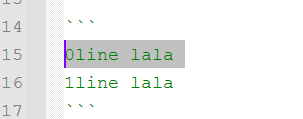
On the other hand, in case 1. above, it is clear that the line has been marked:
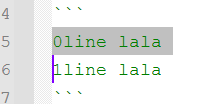
So, perhaps the ideal rule would be:
Delete all lines either with selection within or where caret resides.But, for patch to Scintilla, I’ll probably have to delete the line in both cases, for consistency with SCI_LINECOPY and SCI_LINECUT.
-
@Victorel-Petrovich said in improve SCI_LINEDELETE shortcut:
It appears you did so on purpose with these lines
Indeed. If I can see a selection (in “inverse video”), then only likes where I can see that inverse video are the ones I’d want to be deleted.
That’s my preference, but it is also the way a lot of Notepad++ line operations work.
-
Well, but since caret by itself can be accepted as marker of line, then it also makes sense to accept it after one(or more)fully selected lines. (second pic above).
Which “inverse video”?
EDIT: it’s not about your script per see (anymore). Just exchanging opinions. Maybe one day I’ll suggest this to Scintilla about all of SCI_ COPY/CUT/DELETE.
-
@Victorel-Petrovich said in improve SCI_LINEDELETE shortcut:
but since caret by itself can be accepted as marker of line, then it also makes sense to accept it after one(or more)fully selected lines
For you maybe; not for me. And, as I said, not for a lot of of Notepad++ functions that work for lines in selection.
One of the virtues of scripts; everyone can easily have what they want, by tweaking the code.
The “caret by itself” situation is handled to delete its line. Just not “caret by itself on an otherwise non-selected line”.
inverse video
Just a quick way of saying what the text that is selected looks like.
-
@Victorel-Petrovich said in improve SCI_LINEDELETE shortcut:
for patch to Scintilla, I’ll probably have to delete the line in both cases, for consistency with SCI_LINECOPY and SCI_LINECUT.
Please tell me you aren’t prototyping a Scintilla patch using these scripts you’ve submitted in this thread. Such a patch should be much simpler than that.
-
@Alan-Kilborn said in improve SCI_LINEDELETE shortcut:
The “caret by itself” situation is handled to delete its line. Just not “caret by itself on an otherwise non-selected line”.
I prefer less exceptions; but to each his own.
Indeed, scripting solves the differences.@Alan-Kilborn said in improve SCI_LINEDELETE shortcut:
Please tell me you aren’t prototyping a Scintilla patch using these scripts you’ve submitted in this thread. Such a patch should be much simpler than that.
I know.

Hello! It looks like you're interested in this conversation, but you don't have an account yet.
Getting fed up of having to scroll through the same posts each visit? When you register for an account, you'll always come back to exactly where you were before, and choose to be notified of new replies (either via email, or push notification). You'll also be able to save bookmarks and upvote posts to show your appreciation to other community members.
With your input, this post could be even better 💗
Register Login