Notepad++ v8.4.3 Release Candidate
-
Notepad++ v8.4.3 Release Candidate:
http://download.notepad-plus-plus.org/repository/8.x/8.4.3.RC/There are a lot of most wanted features in this release, so enjoy!
Notepad++ v8.4.3 crash/regression-fixes, bug-fixes & new enhancement:
- Add an option which allows to show only 1 entry per found line in search result. (Fix #2481, #1499, #5547, #2987, #4525, #3224)
- Make EOL (CRLF) display customizable (via Editing section of Preferences dialog). (Fix #11413)
- Add 2 more shortcuts “plus” (new file) and “arrow” (drop down list of opened files) buttons on menu bar. (Fix #11229)
- Update Lexilla to 5.1.7 & Scintilla to 5.2.3 and use new API for large files. (Implement #11734)
- Fix Find in files performance regression since updating Scintilla 5. (Fix #11814)
- Add dark mode support for plugins - support dark mode for plugins with docking GUI. (Fix #11710, implement #11767)
- Fix a crash issue due to opening an empty .NFO file. (Fix #11820)
- Fix language fonts regression in Style Configurator (make font definition possible again). (Fix #11786)
- Add NPPM_CREATELEXER message for plugins to instantiate lexers. (Fix #11789)
- Enhance dark mode (edge colors). (Fix #11207, #11376)
- Fix “CMD Here” command open Explorer issue. (Fix #11818)
- Fix crash issue of “Style Configurator…” command if “stylers.xml” is absent. (Fix #11812)
- Fix Selected text changes color issue when editor window loses focus. (Fix #11743)
- Skip save all warning dialog if only current editing file is dirty. (Fix #10995)
- Fix a small regression in DebugInfo dialog. (Fix #11752)
Thank you for testing and reporting bugs!
-
D donho pinned this topic on
-
I rarely use EOL.
Different color, so intended? -
I rarely use EOL.
Different color, so intended?If you want your problem/question to get solved/replied, you have to ask more smartly. Provide more information, will you?
-
@donho said in Notepad++ v8.4.3 Release Candidate:
Add an option which allows to show only 1 entry per found line in search result.
One of the most important and useful features since I’ve started using Notepad++.
Thank you for your great work.
-
@donho
I attached a picture, but it’s gone.
If CR LF in body, is have different color.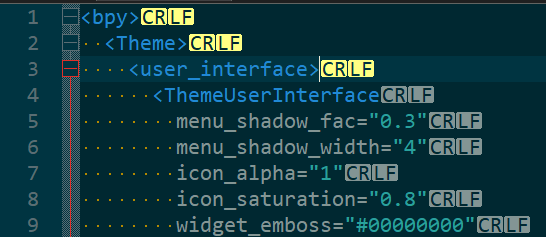
-
@Artur-Harison
What’s your settings in Editing section of Preferences dialog? -
@donho said in Notepad++ v8.4.3 Release Candidate:
@Artur-Harison
What’s your settings in Editing section of Preferences dialog?Default.
If I change to plain text style changes but color remains.
Only on a custom color does it align (color).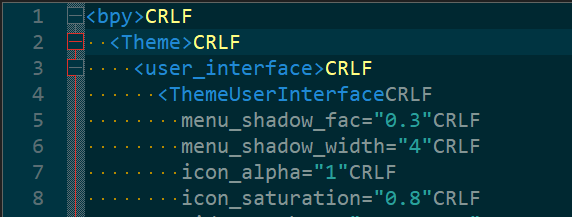
-
A little more information.
CRLF in comment steel obey to Global Styles ->Default Style color.
A ordinary text line obey Default text of language style color (In my case XML->DEFAULT) -
What’s your settings in Editing section of Preferences dialog?
Default.
So you just answered your question by yourself.
It’s the default behaviour in Scintilla. Check the previous versions of Notepad++ then you will see such behaviour remains the same. -
Okay, It was weird for me.
I thought it should be in one style.
Sorry! -
 B Bas de Reuver referenced this topic on
-
Hi there,
seems like in the release candidate the “old” search results are not collapsed in case a new search was started.
Greets -
@jg-van said in Notepad++ v8.4.3 Release Candidate:
Hi there,
seems like in the release candidate the “old” search results are not collapsed in case a new search was started.
GreetsPlease check 5. Fix Find in files performance regression since updating Scintilla (Fix #11814)
-
FYI, the v8.4.3 binaries are updated and included an important performance fix regarding the
5. Fix Find in files performance regression since updating Scintilla (Fix #11814): The folding previous result in Search result window has been added back.Please redownload the binaries if you want to process your tests.
@jg-van & @Alan-Kilborn
You might be interested in this feature’s back. -
Hi Don,
Thanks for improvements!
- Minor issue with using translations. The below language items are not picked up by Notepad++ if running on Hungarian Win10:
<contextMenu-styleAlloccurrencesOfToken value="Style all occurrences of token" />
<contextMenu-styleOneToken value="Style one token" />
<contextMenu-clearStyle value="Clear style" />
<contextMenu-PluginCommands value="Plugin commands" />
Check this screenshot about right-click: (of course it’s translated):
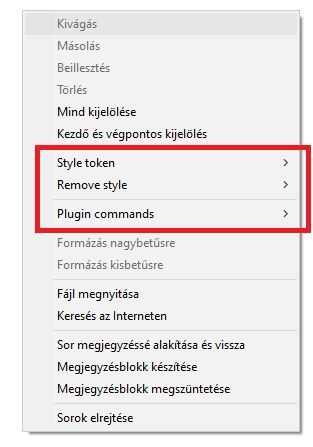
But it’s strange, when I run Notepad++ (with hungarian translation) on English Win10, then those items are displayed in Hungarian! And each 4 displayed, not that 3 in screenshot.
I’m using npp.8.4.3.Installer.x64.exe Build “2022-07-06 02:04”
- Second, only a question. Where these language items are used in program?
<Item id="43501" name="Close Selected"/>
<Item id="43502" name="Close Others"/>
<Item id="43503" name="Copy Selected Names"/>
<Item id="43504" name="Copy Selected Pathnames"/>
Thanks
György -
Ignore second question. I found. Those displayed in ‘Document List’, when multiple tabs are selected , with right click. :)
-
@donho said in Notepad++ v8.4.3 Release Candidate:
Add an option which allows to show only 1 entry per found line in search result. (Fix #2481, #1499, #5547, #2987, #4525, #3224)
awesome, thanks! what’s about #11459?
-
-
P PeterJones locked this topic on




Hello! It looks like you're interested in this conversation, but you don't have an account yet.
Getting fed up of having to scroll through the same posts each visit? When you register for an account, you'll always come back to exactly where you were before, and choose to be notified of new replies (either via email, or push notification). You'll also be able to save bookmarks and upvote posts to show your appreciation to other community members.
With your input, this post could be even better 💗
Register Login