Community
    • Login

    TextFX and word count

    Scheduled Pinned Locked Moved General Discussion
    9 Posts 3 Posters 4.3k Views 2 Watching
    Loading More Posts
    • Oldest to Newest
    • Newest to Oldest
    • Most Votes
    Reply
    • Reply as topic
    Log in to reply
    This topic has been deleted. Only users with topic management privileges can see it.
    • Brigham NarinsB Offline
      Brigham Narins
      last edited by Brigham Narins

      First of all, I just noticed that the TextFX plugin is gone, as though I removed it, but I didn’t. And it isn’t listed among the available titles in the Plugin Admin. Did I miss something in that last few days?

      The two main features I used in TextFX:

      1. Word count, particularly the ability to report the number of words in selected text
      2. Line sorting that eliminates duplicates

      Are these things available in other plugins?

      PeterJonesP 1 Reply Last reply Reply Quote 0
      • PeterJonesP Offline
        PeterJones @Brigham Narins
        last edited by

        @Brigham-Narins ,

        See this FAQ

        Brigham NarinsB 1 Reply Last reply Reply Quote 1
        • Brigham NarinsB Offline
          Brigham Narins @PeterJones
          last edited by

          @PeterJones Thanks. I know about the View > Summary for whole-file word counts, but it doesn’t count the words in selected text. If you know how to do that, or know of another plugin that does it, I’d appreciate it.

          Alan KilbornA 1 Reply Last reply Reply Quote 0
          • Alan KilbornA Offline
            Alan Kilborn @Brigham Narins
            last edited by

            @Brigham-Narins

            Simple Pythonscript, called WordCountInSelectedText.py:

            # -*- coding: utf-8 -*-
            from __future__ import print_function
            
            from Npp import *
            import inspect
            import os
            
            #-------------------------------------------------------------------------------
            
            class WCIST(object):
            
                def __init__(self):
                    self.this_script_name = inspect.getframeinfo(inspect.currentframe()).filename.split(os.sep)[-1].rsplit('.', 1)[0]
                    self.total = 0
                    def match_found(m): self.total += 1
                    editor.research(r'\w+', match_found, 0, editor.getSelectionStart(), editor.getSelectionEnd())
                    self.mb('Words in selected text = {}'.format(self.total))
            
                def mb(self, msg, flags=0, title=''):  # a message-box function
                    return notepad.messageBox(msg, title if title else self.this_script_name, flags)
            
            #-------------------------------------------------------------------------------
            
            if __name__ == '__main__': WCIST()
            
            Brigham NarinsB 1 Reply Last reply Reply Quote 3
            • Brigham NarinsB Offline
              Brigham Narins @Alan Kilborn
              last edited by

              @Alan-Kilborn Thank you! Running such a script is something I’ve never done in NPP. Can you point me to a section of the manual or give me simple instructions?

              PeterJonesP 1 Reply Last reply Reply Quote 1
              • PeterJonesP Offline
                PeterJones @Brigham Narins
                last edited by

                @Brigham-Narins ,

                Running such a script is something I’ve never done

                We have a FAQ on that

                Brigham NarinsB 1 Reply Last reply Reply Quote 1
                • Brigham NarinsB Offline
                  Brigham Narins @PeterJones
                  last edited by

                  @PeterJones @Alan-Kilborn Thank you both

                  1 Reply Last reply Reply Quote 2
                  • Alan KilbornA Offline
                    Alan Kilborn
                    last edited by

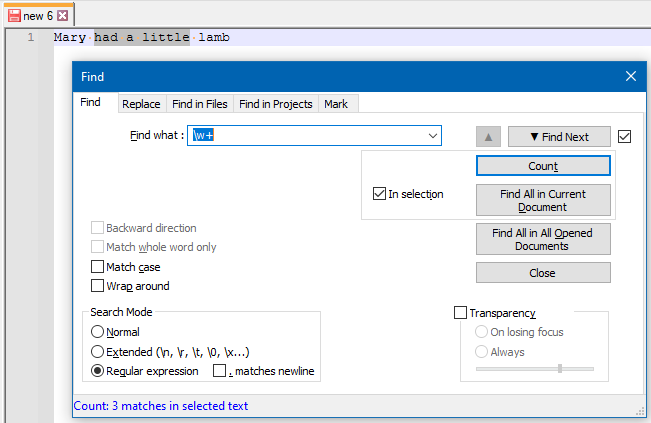
                    Of course, it is arguably even easier to just set up a search and press the Count button in the Find window, like this:
                    efd7c109-68dd-4186-9545-9a1fdd821e79-image.png

                    The result is shown in the status bar of the Find window.

                    This can be macro-recorded for easy running; the downside is that to see the result, the Find window has to be open.

                    Alan KilbornA 1 Reply Last reply Reply Quote 3
                    • Alan KilbornA Offline
                      Alan Kilborn @Alan Kilborn
                      last edited by

                      There’s also a way to put a selection’s word-count in the status bar; see HERE for that.

                      1 Reply Last reply Reply Quote 3

                      Hello! It looks like you're interested in this conversation, but you don't have an account yet.

                      Getting fed up of having to scroll through the same posts each visit? When you register for an account, you'll always come back to exactly where you were before, and choose to be notified of new replies (either via email, or push notification). You'll also be able to save bookmarks and upvote posts to show your appreciation to other community members.

                      With your input, this post could be even better 💗

                      Register Login
                      • First post
                        Last post
                      The Community of users of the Notepad++ text editor.
                      Powered by NodeBB | Contributors
