Subwindow title color
-
Does anyone know, where “Folder as workspace”, “Function list”, “Search results” and other subwindow title background color comes from?
It’s#99B4D1on my screen (Windows 10) and I’d like to change it.
It does not change with Windows accent color.
It does change with N++ Dark Mode but it’s not in stylers.xml and I can’t find it in source code too.
Is it some default color from compiler or combination of some other colors?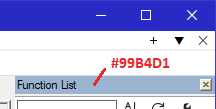
-
In customized Dark Mode, it is controlled by the “Main” color when that pane is inactive, and “Active” when that pane is active.
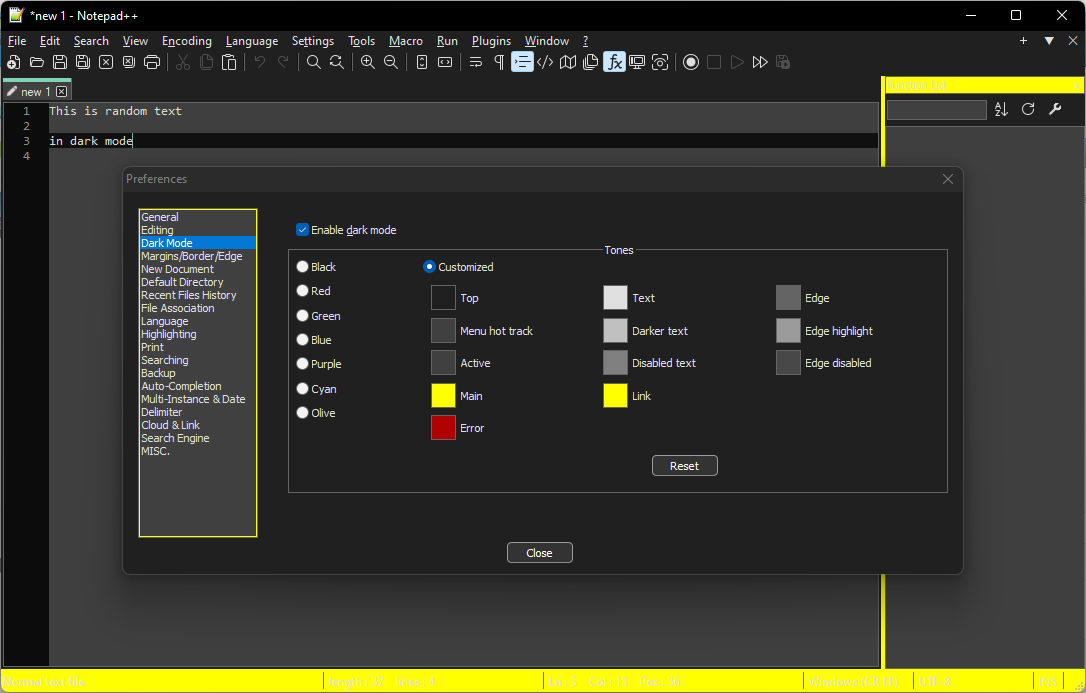
If you really wanted it light, but wanted to control the color, you might be able to set up a list of those 12 colors that would look like the original Light mode, but change the color of Main – though I am not sure you can 100% get back to light mode by just changing those 12 colors (and picking a light theme)… you can probably get close.
-
@PeterJones ,
Yes, clever approach, thanks!
Unfortunately it’s impossible to set Light mode through Dark mode :-)
Now I know that #99B4D1 is ActiveCaption system color in some themes since Windows Vista.


Hello! It looks like you're interested in this conversation, but you don't have an account yet.
Getting fed up of having to scroll through the same posts each visit? When you register for an account, you'll always come back to exactly where you were before, and choose to be notified of new replies (either via email, or push notification). You'll also be able to save bookmarks and upvote posts to show your appreciation to other community members.
With your input, this post could be even better 💗
Register Login