startfunc tip (autocomplete)
-
Hello, i have problem with tips after autocomplete
this works if there are no characters before the word

but it doesn’t work if you do it like this:
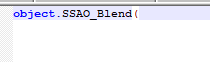
Is it possible to fix this?
P.S. I will also note that in this example, autocomplete works:
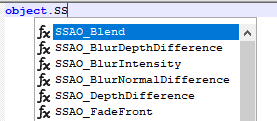
Thanks.
-
It works for me

<?xml version="1.0" encoding="UTF-8" ?>
<NotepadPlus>
	<AutoComplete>
		<Environment ignoreCase="yes" startFunc="(" stopFunc=")" paramSeparator="," terminal=";" />
		<KeyWord name="SSAO_Blend" func="yes">
			<Overload retVal="native static" descr="SSAOAPI.uc">
				<Param name="int Mode" />
			</Overload>
		</KeyWord>
	</AutoComplete>
</NotepadPlus>
What version of Notepad++ are you using? (?-menu, Debug Info, copy from there, paste to here)
Notepad++ v8.4.6 (64-bit) Build time : Sep 25 2022 - 19:51:39 Path : C:\usr\local\apps\npp\npp.8.4.6.portable.x64\notepad++.exe Command Line : Admin mode : OFF Local Conf mode : ON Cloud Config : OFF OS Name : Windows 10 Enterprise (64-bit) OS Version : 20H2 OS Build : 19042.2130 Current ANSI codepage : 1252 Plugins : mimeTools (2.8) NppConverter (4.4) NppExport (0.4) -
@PeterJones said in startfunc tip (autocomplete):
It works for me
very strange
<Environment ignoreCase="no" startFunc="(" stopFunc=")" paramSeparator="," terminal=";" additionalWordChar="."/> ... <KeyWord name="SSAO_Blend" func="yes"> <Overload retVal="native static" descr="...\Classes\SSAOAPI.uc"> <Param name="int Mode"/> </Overload> </KeyWord> ...@PeterJones said in startfunc tip (autocomplete):
What version of Notepad++ are you using? (?-menu, Debug Info, copy from there, paste to here)
Notepad++ v8.4.6 (64-bit) Build time : Sep 25 2022 - 19:51:39 Path : C:\Program Files\Notepad++\notepad++.exe Command Line : Admin mode : ON Local Conf mode : OFF Cloud Config : OFF OS Name : Windows 10 Pro (64-bit) OS Version : 1903 OS Build : 18362.356 Current ANSI codepage : 1251 Plugins : mimeTools (2.8) NppConverter (4.4) NppExport (0.4) -
@VAVoices said in startfunc tip (autocomplete):
additionalWordChar=“.”/>
Note the difference from @PeterJones , you have:
additionalWordChar="."/>in your
<Environment ... />tag. This could be the problem as counting.as a word character, I think you’ll actually needobject.SSAO_Blendas a<KeyWord ... >.Cheers.
-
@Michael-Vincent Yes, you are absolutely right. Removing additionalWordChar from Environment - everything works fine. Thanks.
-
I had just finished confirming, and switched back over to my browser to reply when I saw @Michael-Vincent’s response.
Yes, when I have
<Environment ignoreCase="no" startFunc="(" stopFunc=")" paramSeparator="," terminal=";" additionalWordChar="." />it won’t work. When I don’t have that attribute, it does work.
This is because if.is a word char, thenobject.SSAO_Blenddoes not match any of your KeyWord entries. If.is not a word char, then the word starts at theSandSSAO_Blenddoes match the KeyWord entry.(And by the time I finished typing, you’d already read and confirmed. I’m slow.)
-
@PeterJones said in startfunc tip (autocomplete):
(And by the time I finished typing, you’d already read and confirmed. I’m slow.)
Don’t worry. Your hint was the first and contained the answer, I’m just inattentive and didn’t notice. Thanks to you, too.
-
@PeterJones said in startfunc tip (autocomplete):
I had just finished confirming
Thank you for actually testing my conjecture. Proof that it works and why is certainly more valuable than speculation.
Cheers.


Hello! It looks like you're interested in this conversation, but you don't have an account yet.
Getting fed up of having to scroll through the same posts each visit? When you register for an account, you'll always come back to exactly where you were before, and choose to be notified of new replies (either via email, or push notification). You'll also be able to save bookmarks and upvote posts to show your appreciation to other community members.
With your input, this post could be even better 💗
Register Login