File is not getting minified.
-
Hi Notepad++ Team,
The vendor.js minified file was created when we used yarn build to build our React application. However, when I open it in Notepad++,
it appears un-minified, even though it functions properly in Notepad Editor and VS Code. Could you please explain why this is occurring
to me?Thank you
-
Click
Viewon the option menu, findWord wrap, and remove the ✅ (check mark) if it’s visible: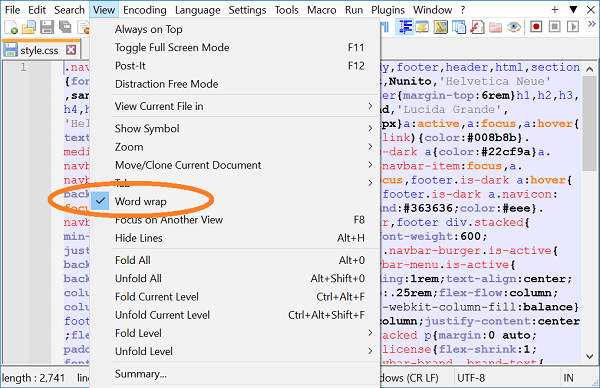
Note that file contents are not altered by word wrapping; the line breaks are only visual.
By default, MS Notepad and VS Code do not have wrapping enabled — although the Notepad version on my system (10.0.19045.3930) does appear to wrap lines after a certain limit:
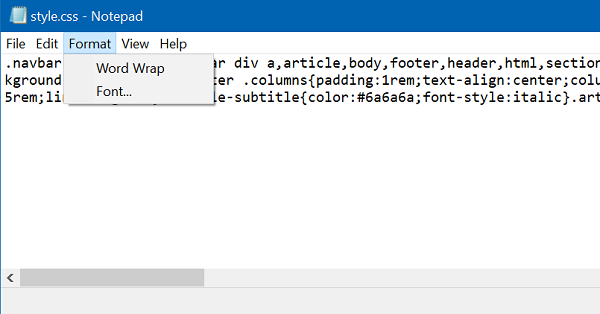
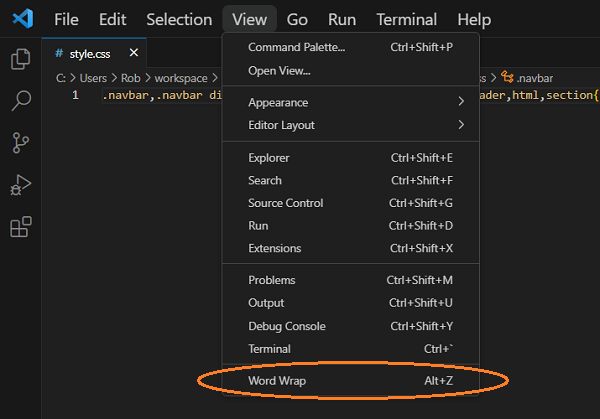
-
I tried the above solution and it works perfectly. Nicely explain with screen shot.Thank you so much for your help. Really grateful.


Hello! It looks like you're interested in this conversation, but you don't have an account yet.
Getting fed up of having to scroll through the same posts each visit? When you register for an account, you'll always come back to exactly where you were before, and choose to be notified of new replies (either via email, or push notification). You'll also be able to save bookmarks and upvote posts to show your appreciation to other community members.
With your input, this post could be even better 💗
Register Login