Broken repeat search using \A
-
I’ve noticed that in N++ 8.6.4, if I do a regular-expression search for
\Aon a non-empty document, all goes well (i.e.,1 hit), but then if I repeat that Find All in Current Document search immediately (i.e, without changing anything) then I get nothing (i.e.,0 hits).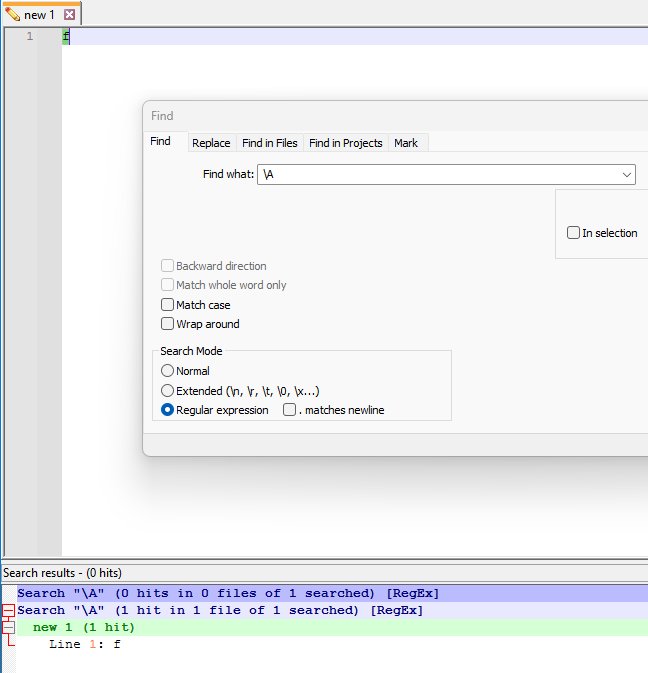
What do others that care to comment think?
Has this oddity been discussed before? -
@Alan-Kilborn I can confirm that this happens in 8.6.5 Release Candidate as well.
Further testing suggests that the odd behavior is triggered by a search that results in a single, zero-length match at the very beginning of a file. (It doesn’t have to be \A; for example, a look-ahead that only matches in that position will do.)
Following that, the next Find All will ignore a zero-length match at the beginning of the file (though other matches, if any, including zero-length matches not at the beginning of the file, will still be reported).
I haven’t found the time and concentration yet to see if there is an identifiable reason in the code. It’s definitely unexpected behavior, but it’s also a very obscure set of circumstances that trigger it.
-
@Coises said in Broken repeat search using \A:
it’s also a very obscure set of circumstances that trigger it.
I noticed it when I was trying to get a hit on every file in a directory tree matching a specific Filter using Find in Files, so that I could use the Copy Pathnames feature of Search results right-click menu.
It was the most “obvious” search I thought of doing, although later (after the strange behavior noticed) I changed to
\zand that worked (on a repetitive basis) to achieve my goal.Neither
\A(first time) nor\zworks on zero-length files, though. I suppose I can accept that a search that is supposed to find something, doesn’t find that certain something, because it is searching a void.
I suppose I should create an official issue about this.
-


Hello! It looks like you're interested in this conversation, but you don't have an account yet.
Getting fed up of having to scroll through the same posts each visit? When you register for an account, you'll always come back to exactly where you were before, and choose to be notified of new replies (either via email, or push notification). You'll also be able to save bookmarks and upvote posts to show your appreciation to other community members.
With your input, this post could be even better 💗
Register Login