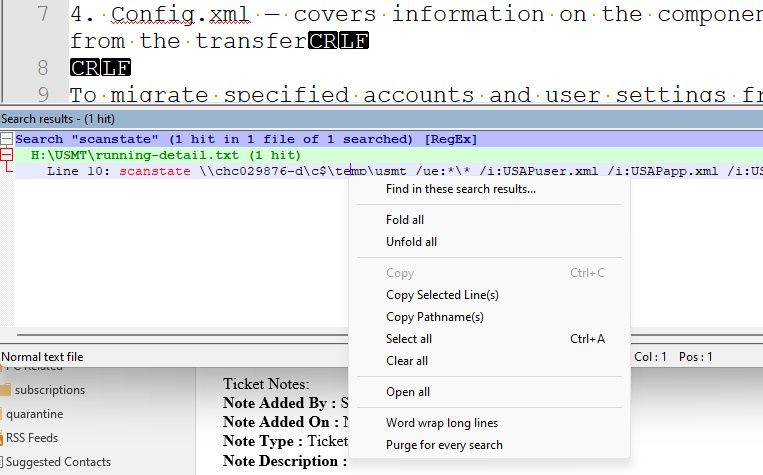
How do we wrap the search results?
-
The Find in Files search result shows me the code I wanna see but I always have to scroll to the right to read what I want. Is there a way to wrap the search results? The main area is wrapped and good though. Can you please also add “Word wrap” as an option to the Search menu?
-
-
@Terry-R thank you so much for pointing that out.
It would still be nice if it was a setting in the menu and search box.
The main area doesn’t have the same right click context menu setting either. It’s a bit strange only having the “Word wrap long lines” setting hidden in the right click menu for search results, but great to be able to wrap the results.
-
@a4jp-com said in How do we wrap the search results?:
It would still be nice if it was a setting in the menu and search box.
Well, likely the developer has only created that option after other queries about needing it. This is how it was implemented. Not sure if a request (which needs to be on GitHub) to include it as a setting will get much traction. But you are certainly welcome to submit a request. Our FAQ section has a post of how to submit requests.
Terry
-
@Terry-R okay. I’ll check that page and request it on GitHub. Again thank you for the help here.
Hello! It looks like you're interested in this conversation, but you don't have an account yet.
Getting fed up of having to scroll through the same posts each visit? When you register for an account, you'll always come back to exactly where you were before, and choose to be notified of new replies (either via email, or push notification). You'll also be able to save bookmarks and upvote posts to show your appreciation to other community members.
With your input, this post could be even better 💗
Register Login