N++ behavior when Windows Update does an unattended restart
-
(I really need to disable Windows Update (EDIT: Windows 11, specifically) so that it doesn’t fire when I’m not around, but…)
What should/can N++ (8.7.9) do to exit “cleanly” when Windows Update restarts my PC?
I know that it isn’t exiting cleanly, because I have (at least) one PythonScript N++ shutdown callback that I know isn’t happening in this circumstance. I can tell this because I get an (intentional) message when I next start up N++…
Of course I never walk away from my PC without saving modified files, so I’m never in danger of losing data I’m working on, but…
@xomx : Didn’t you do some work on N++ that was supposed to ease/fix this problem?
-
Yes, I did my best to N++ behaves in such a situation well (in fact, as close as in the usual WM_CLOSE case - after all, it shares the same code with this N++ exit-handler).
The greatest danger in this case is represented by any non-standard situation in which, while terminating the N++ is in progress, some state requiring action from the user occurs (modal dlg, msgbox, etc.). I tried to adjust all such possible dlgs in N++ in a way that when such a forced logoff/restart/shutdown is in progress, these dlgs behave like the user presed Esc-key on them (and so close itself).
So if you detect that the N++ behaves differently than in the normal manual closing by user, there should be a culprit blocking the standard N++ WM_CLOSE exit.
-
Could you look into your
%APPDATA%\Notepad++\or the portable N++ main dir for the zero-size trigger nppLogNulContentCorruptionIssue.xml ?If it is there, then there might be already a hint for us what is happening - here is content of my nppLogNulContentCorruptionIssue.log generated when there was evidently a blocking modal-dlg (I did not know about) during one of my past Windows restarts:
2024-06-05 22:17:00  WM_QUERYENDSESSION (lParam: 1 - ENDSESSION_CLOSEAPP) =====================================
2024-06-05 22:17:00  Main Notepad++ wnd is disabled by (an active modal-dlg?):  Regex backward search disabled (MessageBox)  -> Main Notepad++ wnd has been successfully reenabled.
2024-06-05 22:17:00  WM_ENDSESSION (wParam: TRUE, lParam: 1 - ENDSESSION_CLOSEAPP)
2024-06-05 22:17:00  C:\Notepad++\config.xml is opened.
2024-06-05 22:17:00  C:\Notepad++\config.xml  8483/8483 bytes are written.
2024-06-05 22:17:00  C:\Notepad++\config.xml is closed.
2024-06-05 22:17:00  C:\Notepad++\session.xml is opened.
2024-06-05 22:17:00  C:\Notepad++\session.xml  193/193 bytes are written.
2024-06-05 22:17:00  C:\Notepad++\session.xml is closed.
2024-06-05 22:17:00  WM_DESTROY (isEndSessionStarted == true)
In the above case, my safety code successfully re-enabled the blocked main N++ wnd, so the N++ code-flow can continue to the required WM_ENDSESSION (from there the code-flow directly goes to the usual WM_CLOSE and finally to the WM_DESTROY exit…).
-
@xomx said :
I tried to adjust all such possible dlgs in N++ in a way that when such a forced logoff/restart/shutdown is in progress, these dlgs behave like the user presed Esc-key on them (and so close itself).
What happens regarding this when the prompt dialog is asking the user to save an unsaved file? I’m just curious, but I’m 99.9% sure this wasn’t my situation, as I’m always all over the save keycombo, and never walk away from my PC with anything unsaved.
-
@xomx said:
Could you look into your %APPDATA%\Notepad++\ or the portable N++ main dir for the zero-size trigger nppLogNulContentCorruptionIssue.xml ?
Here are the final 3 lines in that file, only the last 2 of which are relevant to when this happened very recently:
2025-01-26 01:57:19 WM_ENDSESSION (wParam: TRUE, lParam: 1073741825 - ENDSESSION_CLOSEAPP - ENDSESSION_CRITICAL) 2025-04-09 02:14:28 WM_QUERYENDSESSION (lParam: 1073741825 - ENDSESSION_CLOSEAPP - ENDSESSION_CRITICAL) ===================================== 2025-04-09 02:14:28 WM_ENDSESSION (wParam: TRUE, lParam: 1073741825 - ENDSESSION_CLOSEAPP - ENDSESSION_CRITICAL) -
@Alan-Kilborn said in N++ behavior when Windows Update does an unattended restart:
prompt dialog is asking the user to save an unsaved file?
The exact way depends on the backup snapshots setting (ON/OFF), type of the dlg (dlg or simple msgbox) and timing (has the dlg/msg been already visible when the restart event occurred or that event was the reason this dlg/msg showed up?).
When the N++ backup snapshots is ON, there will be no such dlg/msgbox (N++ will rely purely on its backup engine).
Otherwise (backup OFF) when such a dlg/msgbox has been already there and blocks the N++ main wnd (and thus the N++ graceful exit), it will be hard-closed (when N++ is parent of such wnd … by sending the usual WM_CLOSE to it, when it is only owner … by EndDialog WINAPI). And when the restart event is the reason to show up these dlgs/msgboxes - they will not be shown at all (and behave like the user pressed Esc/Cancel).
@Alan-Kilborn said in N++ behavior when Windows Update does an unattended restart:
final 3 lines in that file
So it shows to us that there really IS a problem, indeed.
ENDSESSION_CLOSEAPP - ENDSESSION_CRITICALis a clear flag-combination signature of the forced Windows Update restarts, this is ok.The fact that there is no log-msg between the
WM_QUERYENDSESSIONandWM_ENDSESSIONcorresponds to your I-always-save statement, ok - no already existing blocking dlgs etc.But the missing usual log-stuff after the
WM_ENDSESSION (wParam: TRUE...means that N++ got stuck somewhere in its standard closing WM_CLOSE-handler, as with thatTRUEit goes here (and then directly toWM_CLOSE):
https://github.com/notepad-plus-plus/notepad-plus-plus/blob/4f649d24dd3ee6e899e5b781df579602cac07583/PowerEditor/src/NppBigSwitch.cpp#L2678So now it’s up to you to find what stuff is blocking your N++ WM_CLOSE exit. Maybe there is still a possibility to launch a N++ (or a plugin!) blocking dlg/msgbox at this stage, which I omitted to safe-adjust (to respect the N++ critical exit safe-flag set on this line). You can simulate the forced critical Windows restarts with the cmdline
shutdown /r /f. Also because of that main-wnd blocked N++ probably crashed (result of the blocked N++ process termination by OS), there should be also a Windows Application event log record about it around the date visible in your log. Maybe that could give us a clue, IDK. -
@xomx said in N++ behavior when Windows Update does an unattended restart:
there should be also a Windows Application event log record about it around the date visible in your log.
I don’t see anything in the Event Viewer:
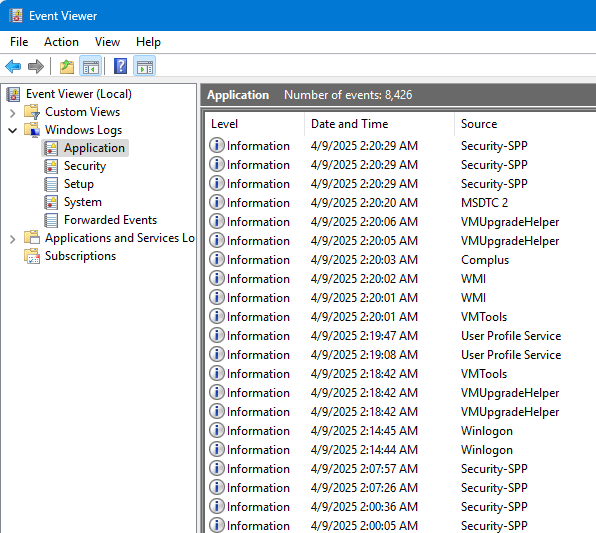
-
Try to run your installation with this notepad++.exe substitute: x64 Release
as usual, then left your N++ instance running and use the Windows forced restart cmdshutdown /r /f. After a minute your comp restarts, then collect the new extended nppLogNulContentCorruptionIssue.log and post it here.Mine, with correct restart:
2025-04-14 13:38:47 WM_QUERYENDSESSION (lParam: 1073741825 - ENDSESSION_CLOSEAPP - ENDSESSION_CRITICAL) ===================================== 2025-04-14 13:38:47 WM_ENDSESSION (wParam: TRUE, lParam: 1073741825 - ENDSESSION_CLOSEAPP - ENDSESSION_CRITICAL) 2025-04-14 13:38:47 WM_NO_22: before _pluginsManager.notify NPPN_BEFORESHUTDOWN 2025-04-14 13:38:47 WM_NO_22: after _pluginsManager.notify NPPN_BEFORESHUTDOWN 2025-04-14 13:38:47 WM_NO_22: isSnapshotMode == true, before LockWindowUpdate & MainFileManager.backupCurrentBuffer 2025-04-14 13:38:47 WM_NO_22: before getCurrentOpenedFiles(currentSession, true) 2025-04-14 13:38:47 WM_NO_22: before fileCloseAll 2025-04-14 13:38:47 WM_NO_22: after fileCloseAll 2025-04-14 13:38:47 WM_NO_22: before g_bNppExitFlag.store(true) 2025-04-14 13:38:47 WM_NO_22: before _pluginsManager.notify NPPN_SHUTDOWN 2025-04-14 13:38:47 WM_NO_22: after _pluginsManager.notify NPPN_SHUTDOWN 2025-04-14 13:38:47 ...\config.xml is opened. 2025-04-14 13:38:47 ...\config.xml 8326/8326 bytes are written. 2025-04-14 13:38:47 ...\config.xml is closed. 2025-04-14 13:38:47 WM_NO_22: after nppParam.saveConfig_xml 2025-04-14 13:38:47 ...\session.xml is opened. 2025-04-14 13:38:47 ...\session.xml 1562/1562 bytes are written. 2025-04-14 13:38:47 ...\session.xml is closed. 2025-04-14 13:38:47 WM_NO_22: after saving session 2025-04-14 13:38:47 WM_NO_22: before DestroyWindow 2025-04-14 13:38:47 WM_DESTROY (isEndSessionStarted == true) -
Here’s mine:
2025-04-17 06:40:04 WM_QUERYENDSESSION (lParam: 1073741824 - ENDSESSION_CRITICAL) ===================================== 2025-04-17 06:40:04 WM_ENDSESSION (wParam: TRUE, lParam: 1073741824 - ENDSESSION_CRITICAL) 2025-04-17 06:40:04 WM_NO_22: before _pluginsManager.notify NPPN_BEFORESHUTDOWN 2025-04-17 06:40:04 WM_NO_22: after _pluginsManager.notify NPPN_BEFORESHUTDOWN 2025-04-17 06:40:04 WM_NO_22: before getCurrentOpenedFiles(currentSession, true) 2025-04-17 06:40:04 WM_NO_22: before fileCloseAll 2025-04-17 06:40:06 C:\NotepadPlusPlus\Portable\Sessions\autosaved.xml is opened. 2025-04-17 06:40:06 C:\NotepadPlusPlus\Portable\Sessions\autosaved.xml 41875/41875 bytes are written. 2025-04-17 06:40:06 C:\NotepadPlusPlus\Portable\Sessions\autosaved.xml is closed. 2025-04-17 06:40:07 C:\NotepadPlusPlus\Portable\Sessions\autosaved.xml is opened. 2025-04-17 06:40:07 C:\NotepadPlusPlus\Portable\Sessions\autosaved.xml 193/193 bytes are written. 2025-04-17 06:40:07 C:\NotepadPlusPlus\Portable\Sessions\autosaved.xml is closed. 2025-04-17 06:40:07 WM_NO_22: after fileCloseAll 2025-04-17 06:40:07 WM_NO_22: before g_bNppExitFlag.store(true) 2025-04-17 06:40:07 WM_NO_22: before _pluginsManager.notify NPPN_SHUTDOWN 2025-04-17 06:40:07 WM_NO_22: after _pluginsManager.notify NPPN_SHUTDOWN 2025-04-17 06:40:07 C:\NotepadPlusPlus\Portable\config.xml is opened. 2025-04-17 06:40:08 C:\NotepadPlusPlus\Portable\config.xml 20507/20507 bytes are written. 2025-04-17 06:40:08 C:\NotepadPlusPlus\Portable\config.xml is closed. 2025-04-17 06:40:08 WM_NO_22: after nppParam.saveConfig_xml 2025-04-17 06:40:08 C:\NotepadPlusPlus\Portable\session.xml is opened. 2025-04-17 06:40:08 C:\NotepadPlusPlus\Portable\session.xml 45103/45103 bytes are written. 2025-04-17 06:40:08 C:\NotepadPlusPlus\Portable\session.xml is closed. 2025-04-17 06:40:08 WM_NO_22: after saving session 2025-04-17 06:40:08 WM_NO_22: before DestroyWindow 2025-04-17 06:40:08 WM_DESTROY (isEndSessionStarted == true) -
It’s visible that unlike my log-example, you do not use the N++ backup snapshots (ok), otherwise your log is the same as in my previous sample. So unlike your previous case, where N++ got stuck at exit, this time all wents ok.
-
I’ll leave Windows updates on (for now) and see if the N++ situation recurs.


Hello! It looks like you're interested in this conversation, but you don't have an account yet.
Getting fed up of having to scroll through the same posts each visit? When you register for an account, you'll always come back to exactly where you were before, and choose to be notified of new replies (either via email, or push notification). You'll also be able to save bookmarks and upvote posts to show your appreciation to other community members.
With your input, this post could be even better 💗
Register Login