Notepad++ 8.8.8 release
-
@SwordReign8 said in Notepad++ 8.8.8 release:
Notepad++ v8.8.8 installed without a hitch. Double-clicking to initiate the installer first required deleting the self-signed certificates that were in place, to avoid Windows’ UAC (User Account Control) warning with the “Don’t Run” button. Also, this might be a bit late, but congratulations on acquiring an official digital certificate
I suppose that you’re talking about Notepad++ EXE installer. Double signed installer works fine to me, and Notepad++ root certificate has been already removed from my laptop.
Is there anyone here has encountered the same problem?
-
@PeterJones
Thank you for adding the MSI-Installer section.The usual switches for silent/passive/… installation work just fine out of the box with the .msi.
@donho
For the .exe installer there are the Notepad++ -specific options, like /noUpdater
These options seem to be missing from the .msi packageFor instance: in the putty installer you have the option to set your own install-directory by changing the property of INSTALLDIR
msiexec /i "putty-64bit-0.83-installer.msi" /q INSTALLDIR="C:\Tools"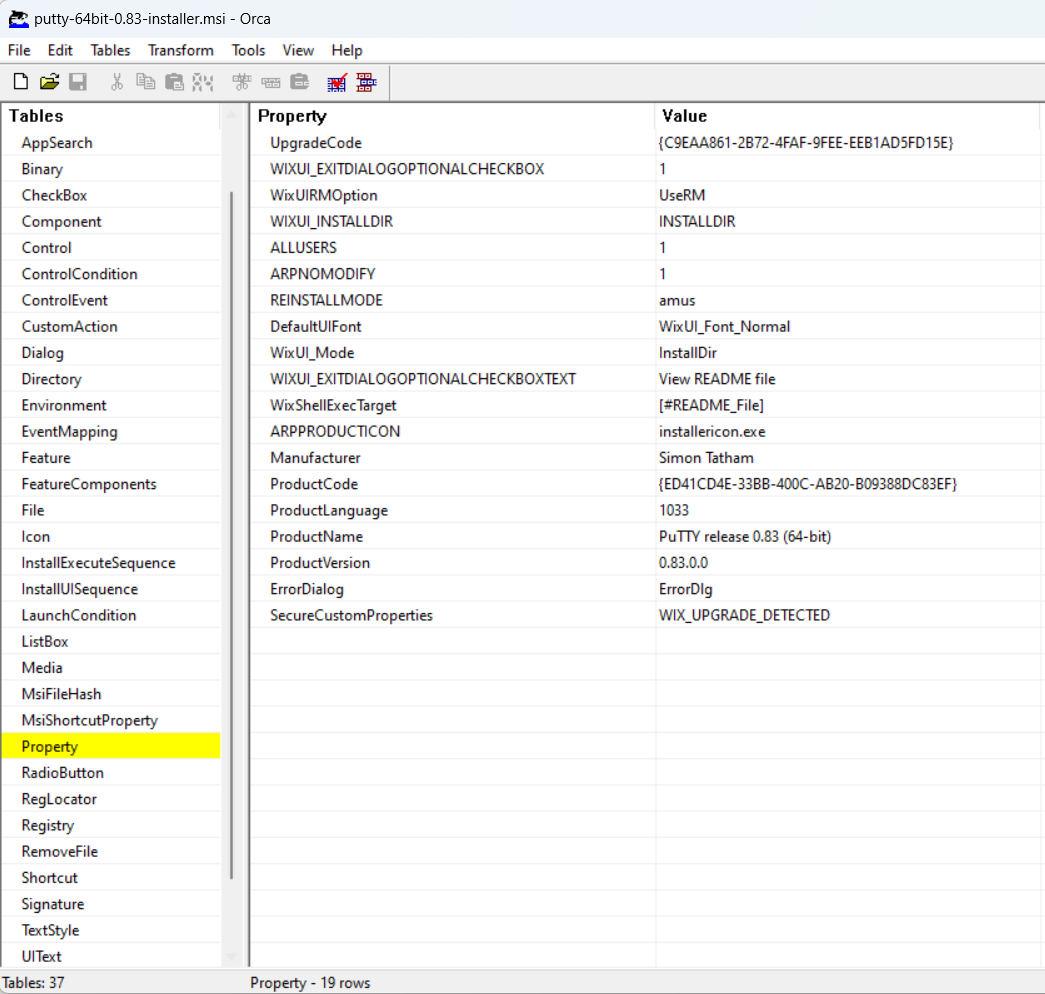
Those Options seem to not yet exist in the npp-msi installer
-
@Lukas-Mayr said in Notepad++ 8.8.8 release:
@PeterJones
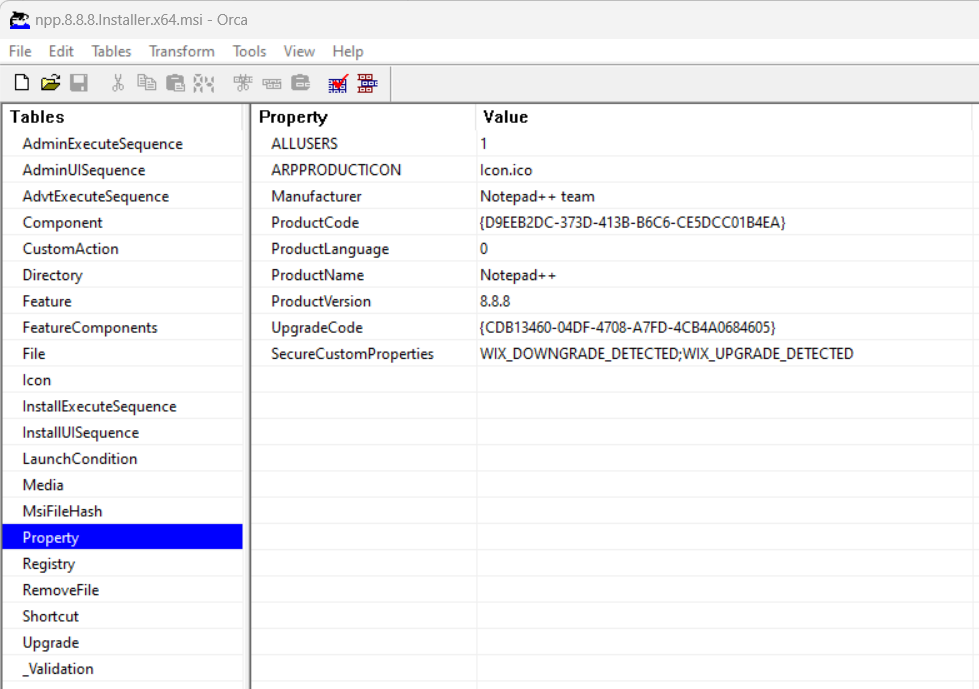
Parsing the installer with Orca shows no proberties that could be changed into that direction and also replacing the .exe options in .msi writing doesn’t seem to work either.i.e. instead of /noUpdater a noUpdater=“1”
OK, I will add this option for the next release.
-
@Lukas-Mayr
Please check if it’s what you need:
https://download.notepad-plus-plus.org/MISC/npp.Installer.x64.msiCommand line:
msiexec /i Notepad++.msi NOUPDATER=1 -
FYI: The auto-update has been triggered for v8.8.8.
-
@donho said in Notepad++ 8.8.8 release:
Please check if it’s what you need:
https://download.notepad-plus-plus.org/MISC/npp.Installer.x64.msiCommand line:
msiexec /i Notepad++.msi NOUPDATER=1that seems to do the trick 👍
i will roll it out for about 100 Users - if i get any feedback, i will relay that, otherwise thank you very much!
-
I am switching to the msi installer from exe installer for our deployments. I have noticed in my initial testing that using the .msi installer does not remove the previous version (.exe installed) on the device.
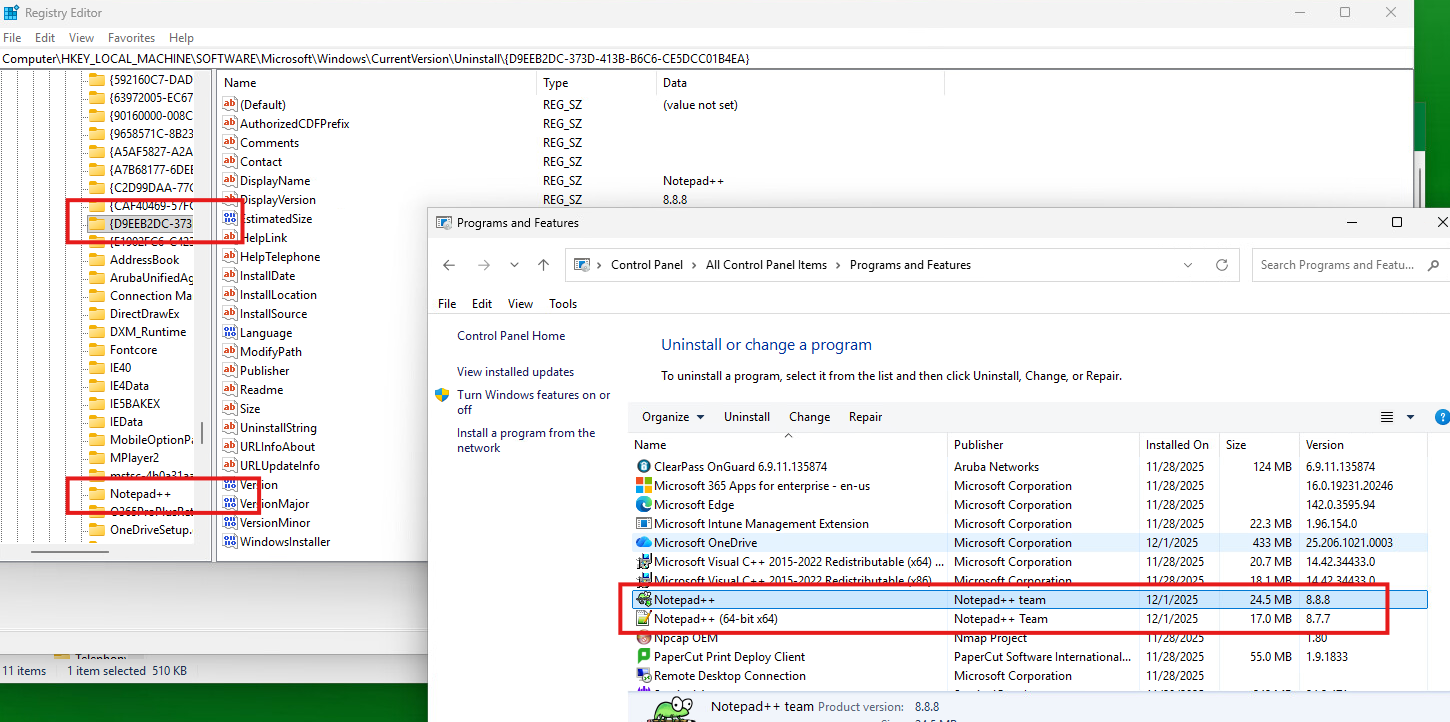
I have also noticed that there are two separate .msi installers for v8.8.8 with different Product Codes https://github.com/notepad-plus-plus/notepad-plus-plus/releases/download/v8.8.8/npp.8.8.8.Installer.x64.msi and https://download.notepad-plus-plus.org/MISC/npp.Installer.x64.msi
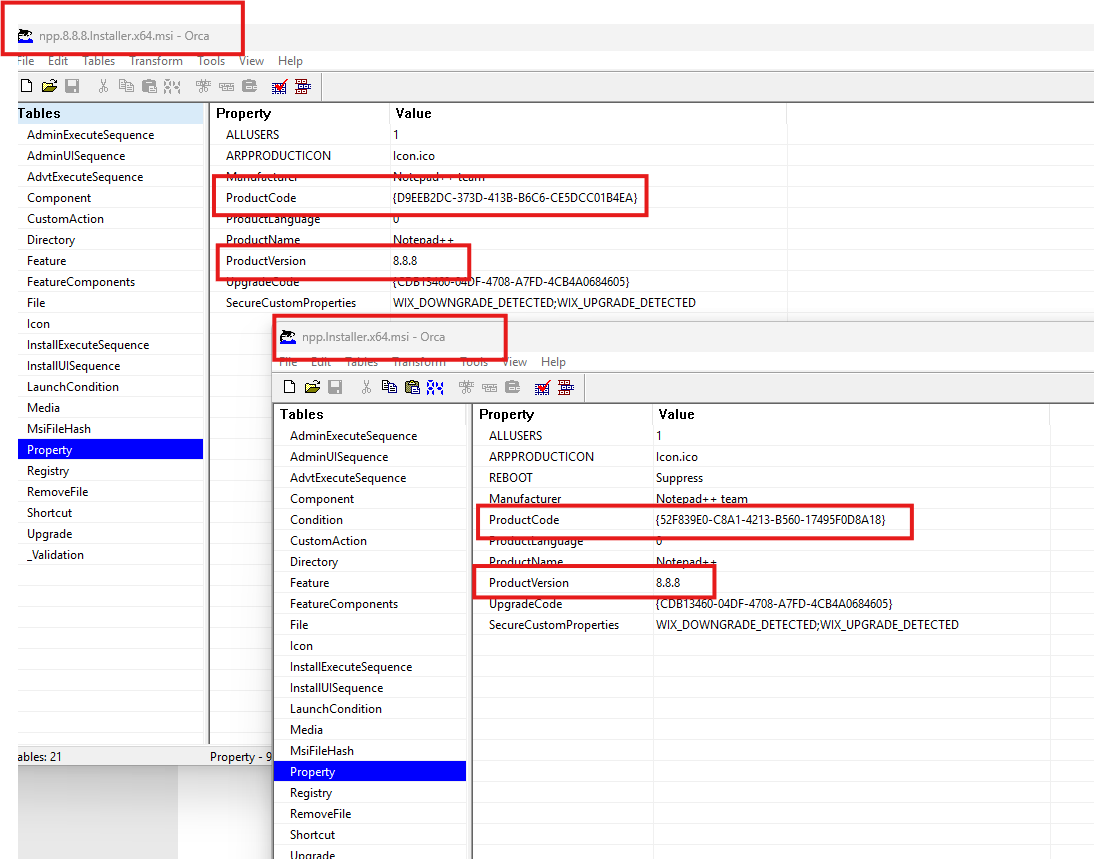
Do I need to add to my PSADT scripts to uninstall previous versions in my Pre-Install block, or should the .msi (as intended) remove earlier versions? In addition will the duplicate installers be consolidated to a new single Product Code in an updated installer?
Thank you for giving us the .msi for enterprise deployments, I’m looking forward to using them over the .exe installers.
-
@Garrett I have added the following in my Pre-Install block
<Perform Pre-Installation tasks here>
$uninstallPath = Join-Path $env:ProgramFiles “Notepad++\uninstall.exe”
if (Test-Path $uninstallPath) {
Write-Host “Uninstaller found. Running silent uninstall…”
Start-ADTProcess -FilePath $uninstallPath -ArgumentList ‘/S’
}
else {
Write-Host “Uninstaller not found. Skipping uninstall.”
} -
@Garrett
Which deployment software do you use? -
@Daniel-Richter I am using PSADT 4.1.7 for packaging and deploying with both Intune & MECM
-
D donho referenced this topic on
-
Greetings,
Just updated after quite a long while, and on Windows 10, TextFX (NppTextFX2) plugin will not work (appear at all), whether installed manually or through plugin admin, with this latest version, neither on 32 nor 64 bit versions. Both portable, not installed through setup.Yes I ran as admin.
Had to revert back to v8.1.5, works fine there.
-Laters
-
@Sinsearach said in Notepad++ 8.8.8 release:
Just updated after quite a long while, and on Windows 10, TextFX (NppTextFX2) plugin will not work …
It might be that it was caused specifically by Notepad++ v8.8.8… but more likely, it’s a setup issue on your side, or a bug in the plugin as it relates to your setup and v8.8.8.
But there needs to be some debug work, so I will duplicate your post to a separate Topic in Help Wanted (I will crosslink this post
to there in a few minutes: new post here), and the discussion can happen there, until we can prove whether it’s really a bug/regression in v8.8.8, or whether it’s just something that should be handled by fixing something on your side, or by fixing something in the plugin itself.
Update: Wait, you said “after quite a long while”, so that means it wasn’t just v8.8.8 that you had the problem with. Please only use the “Notepad++ x.y.z release” announcement topics for changes between immediately-previous version and this version. For example, this v8.8.8 topic should only mention regressions that changed behavior between v8.8.7 and v8.8.8. Any other problems you find when you jump from v8.1.5 (for example) to v8.8.8 should go in “help wanted”, and if can be confirmed as a bug in Notepad++, we will direct you on where to put in the official bug report. But it’s not an immediate regression with v8.8.8, so doesn’t belong in this discussion.
-
I auto-upgraded from 8.8.5 to 8.8.8 64bit about a week ago and today I experienced very high and persistent (ongoing) CPU load caused by NPP in a Windows 10 VM. NPP caused 18% load on a 6 core VM, i.e. full single-core load. The NPP user interface was very unresponsive, but I managed to close it normally (using the X in top right).
I had 40 files open, mostly JavaScipt files, but also some JSON, JSON-Lines, HTML and SVG files. Also a large yarn.lock file, maybe cause by this one.
I have a bunch of plugins installed, but didn’t try to turn them off:
Compare 2.02
HEX-Editor 0.9.12
JSTool 1.2502
Mime tools 3.1
Npp Converter 4.6
NppExport 0.4Downgrading to 8.8.5 solved the issue for me, but I wanted to let you know there is an issue somewhere.
-
Yes we are seeing this in our Enterprise install testing of the MSI. We had to build a script to uninstall the executable and then install the MSI. And package the scrip & MSI in an Intune package. Seems to have solved the problem.
-
-
I have noticed going from the executable to the MSI, when installing from Intune, that remnents of the old version get left behind.

Also, when we deployed 8.8.8 and the program updates to 8.8.9 that it doesn’t clean up and you see two versions.

These are registry entries which should have been cleaned up in both events. I probably should have stuck with the original executable. 😕
-
@Andrea-Gaviraghi More results from allowing updates on MSI package. The 8.8.8 MSI pulls the update from Notepad++ and it then installs the 8.8.9 executable. So again, the computer shows 2 installs, when only the newest is really installed. This process should be a lot cleaner…


Hello! It looks like you're interested in this conversation, but you don't have an account yet.
Getting fed up of having to scroll through the same posts each visit? When you register for an account, you'll always come back to exactly where you were before, and choose to be notified of new replies (either via email, or push notification). You'll also be able to save bookmarks and upvote posts to show your appreciation to other community members.
With your input, this post could be even better 💗
Register Login