Find / Replace All Behavior Change
-
The find / replace all behavior changed recently (currently have v. 8.8.7) where it does so directionally based on the caret position rather than replacing all instances of the found text in a file. This is not a good or intuitive behavior. “Replace All” means replace all, not replace everything that happens to be after the caret position.
I ask that you return the original “Replace All” functionality and add a “Replace Directionally” button if you want to retain that sort of behavior.
Thanks.
-
I don’t think any behavior has changed recently regarding this.
You just need to ensure “Wrap around” checkbox is enabled in the replace dialog to achieve your desired behavior and having all occurences in the file replaced.
Maybe some day you will have the need to replace many occurences of a search from a given point in your file and then you’ll understand the behavior you described can also be very useful.
-
@Neymar44 is correct, no bug is present regarding what is described.
@Matt-Brown , you should take some time experimenting, and perhaps read Notepad++'s fine user manual, in order to understand how the software works.
-
@Alan-Kilborn @Neymar44 I’ve used Notepad++ for over a decade, and this is new behavior.
-
Nope.
-
@Alan-Kilborn I literally just downloaded an older version (7.9.3), put the caret in the center of the document, and it replaced everything from beginning to end, as it used to do.
I use Notepad++ every day of my life.
-
@Matt-Brown said in Find / Replace All Behavior Change:
@Alan-Kilborn @Neymar44 I’ve used Notepad++ for over a decade, and this is new behavior.
I have used Notepad++ for nearly 2 decades, and this is exactly the behavior I would expect.
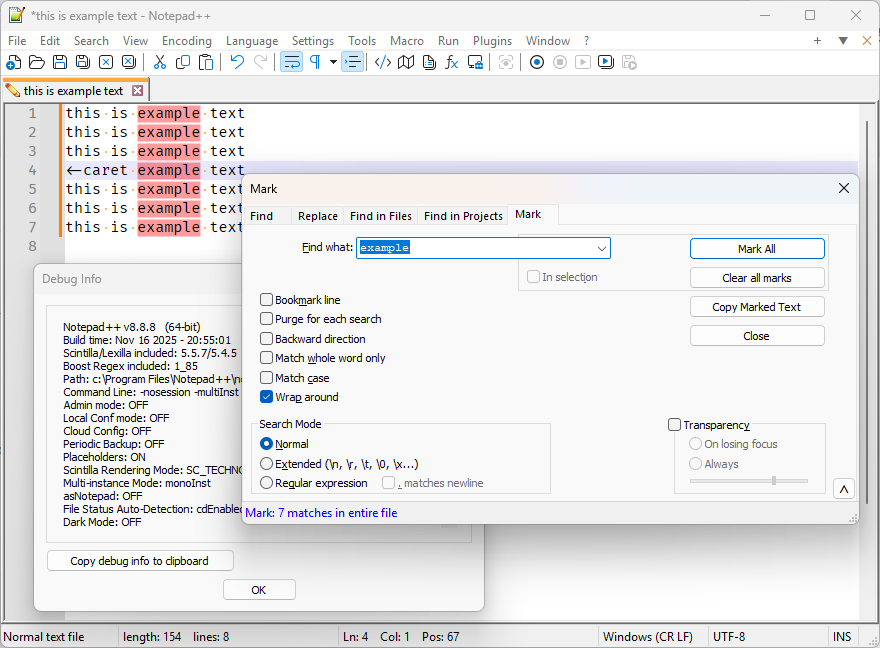
Are you sure you didn’t change the “wrap around” checkbox default? Because I am quite certain that if you downloaded a portable copy of Notepad++ from about a decade ago, say v7.0 (available here, from 2016), and set your FIND dialog settings to the same (or equivalent), they will work the same.
That is:
condition v7.0 v8.8.8 ☑ Wrap Around (on) 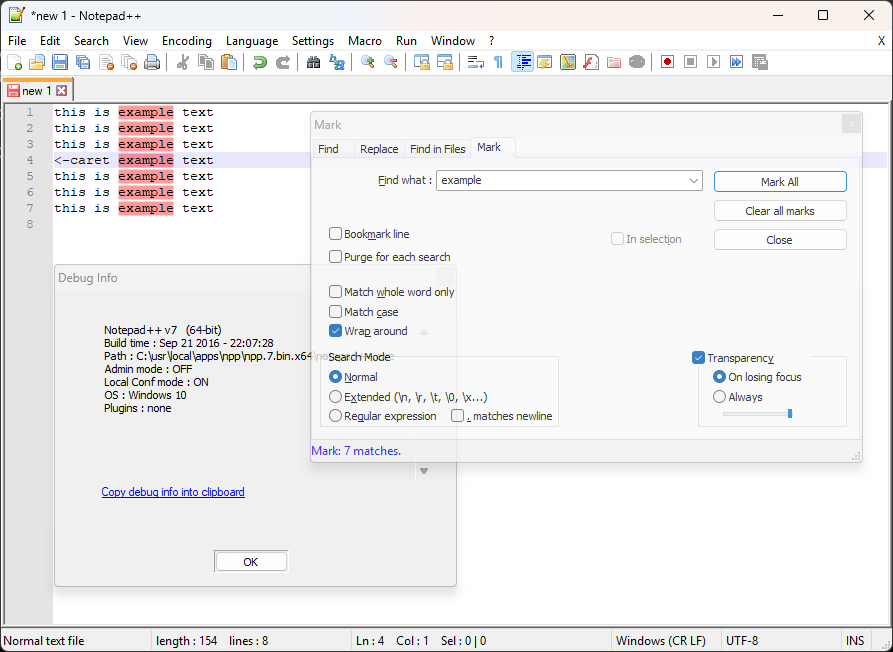
☐ Wrap Around (off) 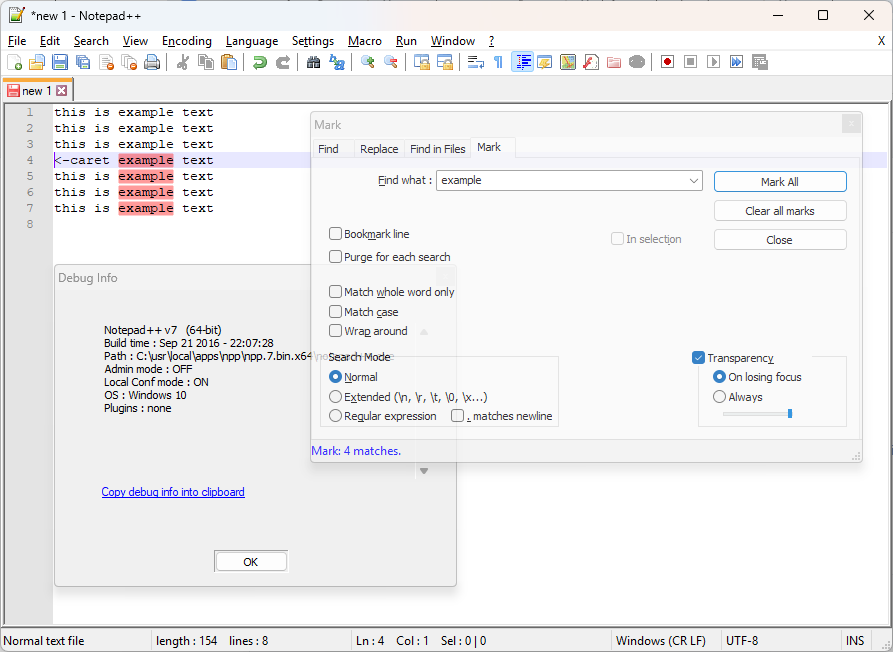
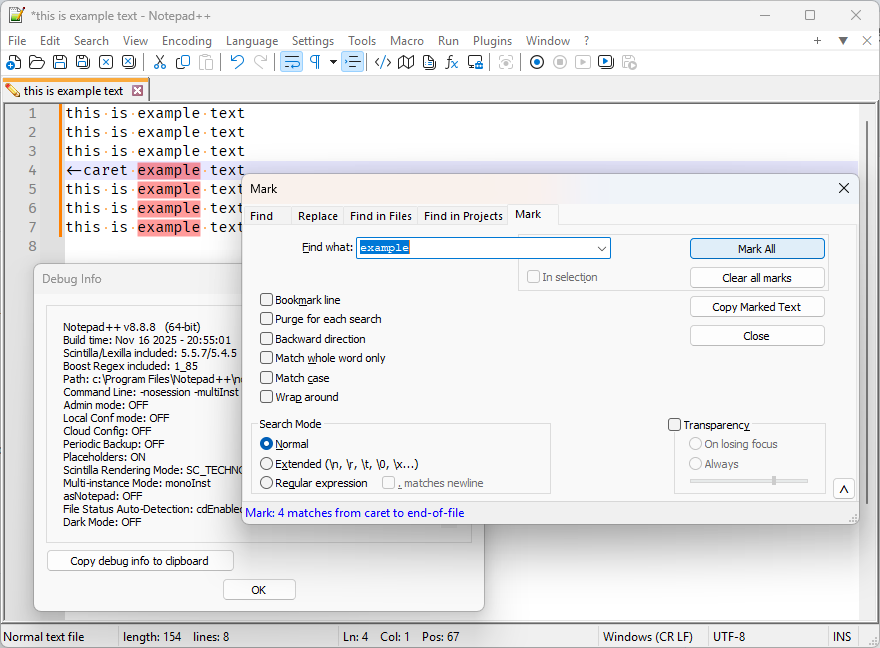
They behaved identically when given the same settings. If you don’t trust my experiment, you can download v7.0 yourself, and see it’s been the same behavior for years.
(I used Mark, because that’s easiest to show what the results were.
Data for copy paste:
this is example text
this is example text
this is example text
<-caret example text
this is example text
this is example text
this is example text
FIND WHAT =
example
SEARCH MODE =Normal
WRAP AROUND = checkbox or not, as shown in table above.
Action = MARK ALL -
@Matt-Brown said in Find / Replace All Behavior Change:
I literally just downloaded an older version (7.9.3), put the caret in the center of the document, and it replaced everything from beginning to end, as it used to do.
I use Notepad++ every day of my life.
and the default setting is to literally have WRAP AROUND checkmarked. Look at the dialog.
-
@PeterJones Thank you! Probably my own bone-headed oversight. I know it updated recently and afterwards I noticed the behavior…I’ve never intentionally touched the “wrap around” checkbox. It was unchecked. I appreciate the explanation.
-
@Matt-Brown said in Find / Replace All Behavior Change:
@PeterJones Thank you! Probably my own bone-headed oversight. I know it updated recently and afterwards I noticed the behavior…I’ve never intentionally touched the “wrap around” checkbox. It was unchecked. I appreciate the explanation.
That happens. Glad you figured it out.
(I deleted my intervening post, which was made before your post got approved in the post queue)



Hello! It looks like you're interested in this conversation, but you don't have an account yet.
Getting fed up of having to scroll through the same posts each visit? When you register for an account, you'll always come back to exactly where you were before, and choose to be notified of new replies (either via email, or push notification). You'll also be able to save bookmarks and upvote posts to show your appreciation to other community members.
With your input, this post could be even better 💗
Register Login