Notepad++ v8.8.9: Vulnerability-fix
-
@KleinerDickerTiger said in Notepad++ v8.8.9: Vulnerability-fix:
To be safe, I unpacked the portable version on a clean reference system, and the effect was immediately there. So it wasn’t an upgrade. The only style that works is ‘DarkModeDefault’
Replacing any files didn’t help. Even if I replace all files except for notepad.exe, nothing changes.
Only 12 of the 22 themes have Powershell defined: DansLeRuSH-Dark, DarkModeDefault, HotFudgeSundae, khaki, Monokai, MossyLawn, Navajo, Obsidian, Plastic Code Wrap, Solarized-light, Solarized, and Zenburn. So in the portable version 8.8.9, andy of those 12 should be colored reasonably.
Here are a few examples of powershell highlighting working in the portable:
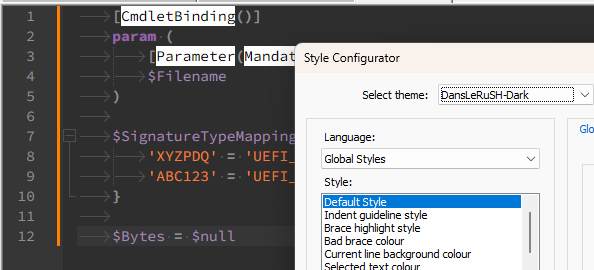
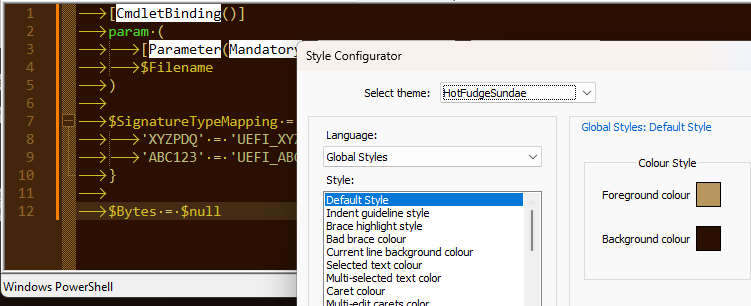
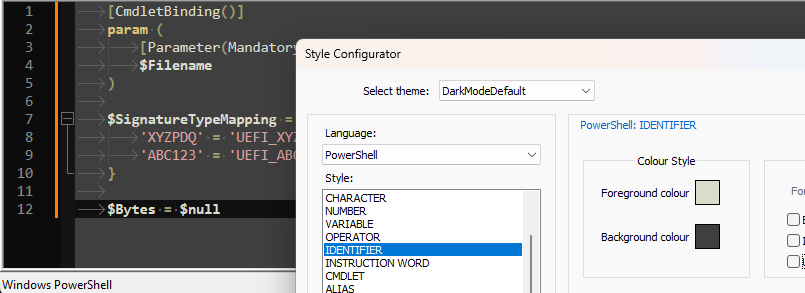
But as you can tell by the entries, even in those screenshots, even if the theme defines powershell, it doesn’t always have all its styles defined for that language, and the v8.8.9 theme updater grabbed the colors from the default stylers.xml for the missing colors, which makes it jarring for many of the themes. (As I said, it was a bad decision on my part, and the next release should use a better default color, so things at least blend in.)
But all the style entries are there for you now, so you should be able to choose the theme you want to use when editing Powershell files, then go through each of the Style entries for Language:
PowerShell: any that have a Background colour of White, you could either manually set to a color that fits with your theme, or you can right-click the Background colour box, and it will inherit the backgroud color from the theme’s Default background, which will be less jarring. -
@donho said in Notepad++ v8.8.9: Vulnerability-fix:
Add ability to update users’ langs.xml & stylers.xml from model XML files.
Sorry for the mess it has created. I highly recommend not triggering auto-update on this one.
I should have the a PR today or tomorrow which will fix #17289
-
Thank you for your reply. I understand what you wrote, but that still doesn’t explain the problem. PowerShell was just an example. This also applies to other languages, like Python. But anyway. Up to version 8.8.8, this problem didn’t exist. In this version, only ‘Black board’ causes problems, but all the other styles look good and don’t have the issues that were present in version 8.8.9.
-
@KleinerDickerTiger said in Notepad++ v8.8.9: Vulnerability-fix:
I understand what you wrote, but that still doesn’t explain the problem.
If it doesn’t explain the problem to you, then either you didn’t understand or I didn’t say enough.
PowerShell was just an example.
As it was for me.
Many of the themes are missing many of the languages, including Powershell. And even on the languages they do have, over time, new styles have been added to some of those languages. So your themes were missing many languages and many styles that Notepad++ supports. The reason that you didn’t notice in v8.8.8 and earlier is because the older versions of Notepad++ would just use the theme’s default FG/BG colors on any style or language that wasn’t defined… but it wouldn’t allow you to change them in the Style Configurator, because they would’t even be listed there. (For example, if you had originally installed v8.3.1 a couple years ago, and had upgraded through v8.8.8, you would not be able to use Style Configurator to set the IDENTIFIER or FUNCTION colors in Powershell, even though Notepad++ has supported those colors for a long time now.)
The new feature in v8.8.9 adds in those missing languages and missing styles, and that is working as designed. And with that, you can now set those colors to anything you want in the Style Configurator, as designed. The problem is that when it adds in the missing languages and styles, it had to pick a color of some sort… and I foolishly chose to set the colors to be the same colors that would be used in
stylers.xml(ie, it matches the default light theme of Notepad++): this makes the jarring black-text-on-white-background for any of the languages or styles that were added into the theme by the new v8.8.9 feature.Starting in the next version, if it finds a language or style entry that is missing from your theme, instead of using the light-theme’s equivalent color, it will populate any missing colors using your theme’s default FG/BG colors, so it will behave more like v8.8.8-and-earlier, but with the improvement that you will now be able to edit those previously-missing colors in the Style Configurator, and they will be saved in the theme file going forward (neither of which v8.8.8-and-earlier did for you).
-
@PeterJones said in Notepad++ v8.8.9: Vulnerability-fix:
Sorry for the mess it has created. I highly recommend not triggering auto-update on this one.
No problem - as the author of theme system, I didn’t think of it while I was reviewing the PR either.
I should have the a PR today or tomorrow which will fix #17289
Take your time. It’s an annoying bug for sure, but I prefer that we think of every aspect to not run after another corner case after next release.
-
@PeterJones said:
I foolishly chose to set the colors
I think you’re being too hard on yourself.
The overall idea of the change is a good one and moves the Notepad++ code forward.
Sometimes it just happens that development takes 3 steps forward and 1 step back, for a net gain of +2. Thus, still a win.
Thank you for your contribution. -
P PeterJones referenced this topic on
-
@PeterJones
In your FAQ you describe the way to manually update the style using an “old” version of the file. Do you think it would make sense that in your code you do a backup of the file before you do the update? Like this any unexpected change can be compared to the previous version of the style.
Another idea: Would it make sense to inform the user about the change of style (e.g. in a message box)? Perhaps the user could even be asked, if he agrees to update the files. A message something like “your file is outdated. Do you want to update to a current version. yes/no”
Just some thoughts for this great feature you implemented. -
@sevem47 ,
A backup wouldn’t be a bad idea. (And given the problems with the v8.8.9 version, I wish the backup had been there to begin with.) If @donho agrees, I can add the backup with just a couple lines of code.
As for a messagebox or other user prompt: I believe the majority of users would find it more annoying than helpful (given that there are users complaining about the 30-60ms that the current check adds, they would definitely complain about having to answer prompts for the langs and/or stylers/theme files). I am doubtful that @donho would want me to implement that – if he does, I could add it; but my guess is he’d say no to it.
-
@sevem47
No messagebox for sure, and no backup file for the moment.
The update xml files should be without issue, and we will do our best to make the update without issue. -
@PeterJones Hi after following those 2 Color RGB Values settings the white margin is now of same Khaki Style back again. But it looks like next any upgrade can override this config and need to do it manually again.
-
@Saquib-Akhtar said in Notepad++ v8.8.9: Vulnerability-fix:
But it looks like next any upgrade can override this config and need to do it manually again.
Nope. It does not overwrite any information in the style or theme file (except where it tracks the model-file’s date). The styles that got the light-mode colors were styles that your theme was missing. It only adds missing information, and will not overwrite any style that already exists in your theme.
-
@PeterJones said in Notepad++ v8.8.9: Vulnerability-fix:
@Saquib-Akhtar said in Notepad++ v8.8.9: Vulnerability-fix:
But it looks like next any upgrade can override this config and need to do it manually again.
Nope. It does not overwrite any information in the style or theme file (except where it tracks the model-file’s date). The styles that got the light-mode colors were styles that your theme was missing. It only adds missing information, and will not overwrite any style that already exists in your theme.
That’s why we don’t need to do the backup.
-
@donho
Sometimes there are users (like me) that do some silly thing, that are not expected.In version 8.6 a new style had been introduced: “Multi selected text colour”. The effect for me was, that in column-select mode the selection was shown only partially (last line only). It took me some time to find out what was my fault. I use a personalised style, where the default background colour happens to have the value “C0C0C0”, the same value as the background for this new style. Therefore I could not see the selection because it had the same bg-colour as the rest of my text. For “Selected text colour” I use the value “A0A0A0”; after applying this value to the new style, it worked again.
I know, it is really a very special case, but it may happen. A similar situation might arise with other changes in the future. For these cases it would help to have a backup for comparison.
-
D donho unpinned this topic on




Hello! It looks like you're interested in this conversation, but you don't have an account yet.
Getting fed up of having to scroll through the same posts each visit? When you register for an account, you'll always come back to exactly where you were before, and choose to be notified of new replies (either via email, or push notification). You'll also be able to save bookmarks and upvote posts to show your appreciation to other community members.
With your input, this post could be even better 💗
Register Login