Notepad++ Opens my file in a remote server and I'm able to work with the file, But then I receive a notification that the file doesn't exist
-
Notepad++ Opens my file in a remote server and I’m able to work with the file,
But then after a little while I receive a notification that the file doesn’t exist, and ask me
if I want to close it without saving or Keep it open
Then I click on save and the message is gone, but after a while it will display the message again
At first I didn’t think that this was probably introduced in a previous updates
I never Had seen this but it started showing up about 3 months ago.Regards.
-
The simplest workaround here is to disable the N++ file-status checking in the Preferences > MISC. > File Status Auto-Detection (select Disable there).
My guess is that either something has recently changed on your remote server (e.g. a networking/caching setting) or you’ve started to experience occasional network connection outages. If you have the File Status Auto-Detection set to its default (Enable for current file), whenever an opened tab in N++ gets activated (switched to), N++ v8.7.1+ issues a threaded (to prevent a possible frozen app state) I/O checking call. As of now, if your server isn’t able to respond in time (3 secs), the checking thread is then forcibly terminated and one can experience such behavior described in your report. I’d like to improve this in the future (e.g. with an adjustable timeout limit), but unfortunately haven’t had time to do it yet.
Could you follow these instructions and paste here the
nppLogNetworkDriveIssue.logobtained? -
@xomx Our users have been experiencing this problem in the past week too. They just reported it to me today, and I was able to reproduce the problem in Notepad++. Basically, our users are trying to edit small files (change a value) and then save, and they’re receiving this pop-up dialog:
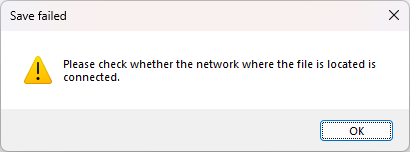
I’m able to edit and save this file just fine using other editing tools (UltraEdit, Notepad, VS Code), but our preferred tool is Notepad++.
I tried following your steps above (to look for nppLogNetworkDriveIssue.log), but that file isn’t present in there (and notepad++.exe is in that directory).
These files being edited exist on a Samba network drive, but the drive hasn’t changed at all in months. Many of us updated to Windows 11 24H2 (we are slow to update at my company), but that update happened almost 2 months ago, and things were working fine with Notepad++ after these Windows 11 updates.
We did have this Windows update on 11/21/25:
2025-11 Cumulative Update for Windows 11 Version 24H2 for x64-based Systems (KB5068861) (26100.7171)
Most of us are running this version of Notepad++:
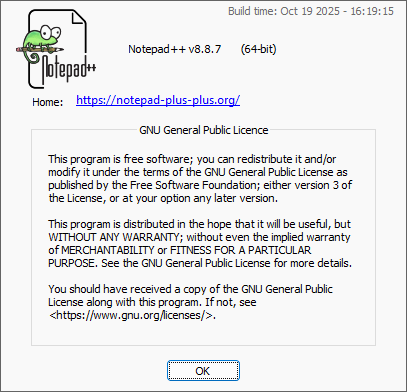
For the past few Notepad++ updates, we’ve had difficulty installing them (due to detected changes or something), so our IT department has had to release these as “Software Center” updates.
I see there’s an update (to version 8.8.9), so I’m going to try installing that version to see if it fixes anything.
-
@xomx I tried updated to version 8.8.9, and I’m still experiencing the same issue:
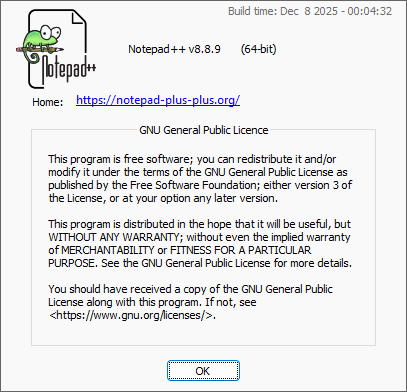
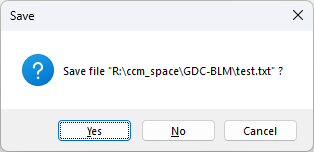
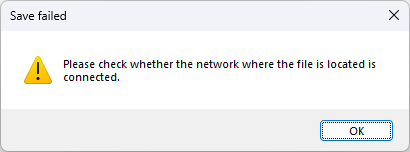
I also tried disabling file checking (via Settings->Preferences->MISC.->File Status Auto-Detection, set to Disable), and I’m still getting the same result: my file isn’t saved.
-
@Ryan-Cartmill said in Notepad++ Opens my file in a remote server and I'm able to work with the file, But then I receive a notification that the file doesn't exist:
I tried following your steps above (to look for nppLogNetworkDriveIssue.log), but that file isn’t present in there (and notepad++.exe is in that directory).
Please confirm you created the
nppLogNetworkDriveIssue.xmlfile in the same directory asnotepad++.exe(c:\Program Files\Notepad++\or equivalent). Please confirm that you are looking fornppLogNetworkDriveIssue.login the%AppData%\Notepad++directory, not the executable directory. Please confirm that after creating thenppLogNetworkDriveIssue.xml, you exited Notepad++ and re-ran before trying to replicate the error and see if the logfile is created (Notepad++ needs to see the XML file existing when it loads to know that it needs to create the logfile; if you create the XML while Notepad++ is running, it will not see the file, and will not create the logfile).(I am not an expert on this, and I will leave it to @xomx to actually interpret results; I just thought I’d chime in with the clarifications, because if it was set up correctly, that logfile really should be created when the error occurs. And I thought that by chiming in, you might be able to provide the additional information before @xomx is back, so that he can better spend his time interpreting, rather than for waiting for the next round.)
-
@Ryan-Cartmill said in Notepad++ Opens my file in a remote server and I'm able to work with the file, But then I receive a notification that the file doesn't exist:
and they’re receiving this pop-up dialog:
1e0e4e3e-eb6b-43d7-a446-2e437ea7317b-image.png
Ok, but what you’re reporting now doesn’t correspond to your 1st report (?):
I receive a notification that the file doesn’t exist, and ask me
if I want to close it without saving or Keep it openSo this
Save faileddlg with the msg “Please check whether the network where the file is located is connected.” changes my POV on this issue and thatnppLogNetworkDriveIssuelog stuff is no longer needed.Futher, from this I think now that it might be an AV-like problem:
For the past few Notepad++ updates, we’ve had difficulty installing them (due to detected changes or something)
If some security SW or Windows setting blocks the N++ app access to your network storage in question, the outcome can be exactly such N++ dlg.
Also I noticed few recent issues in this area, so maybe these are all connected somehow:
https://community.notepad-plus-plus.org/post/104131
https://community.notepad-plus-plus.org/post/104077 -
@PeterJones said in Notepad++ Opens my file in a remote server and I'm able to work with the file, But then I receive a notification that the file doesn't exist:
%AppData%\Notepad++
Aha, I had missed the step creating the empty XML file. Once I did that, I closed Notepad++, reopened, then tried to edit and save my file.
The nppLogNetworkDriveIssue.log was created, with this message printed over and over:
[2025-12-15 20:24:49 new 41 in Buffer::checkFileState(), getFileAttributesExWithTimeout returned FALSE, its worker thread finished successfully within the timeout given, dwFileAttributes == INVALID_FILE_ATTRIBUTES ! (WIN32API Error Code: 2)]and with this line at the end:
2025-12-15 20:25:15 R:\ccm_space\GDC-BLM\test.txt in Buffer::checkFileState(), getFileAttributesExWithTimeout returned FALSE, its worker thread had to be forcefully terminated due to timeout reached!I’m not sure how to actually attach that log file, but hopefully the information above is enough.
-
@xomx I reverted back to Notepad++ v 8.6.5, and the file takes a long time to save, but it does eventually work. But it’s way longer than 3 seconds.
I’m going to request a restart of our Samba server tomorrow to see if that fixes things. I’ll let you know the result either way.
-
Your 1st log entry above means that the N++ file checking I/O routine succeeded within the specified maximum time limit (3 secs), but that the OS (or network layer) response is that the file corresponding to the opened doc/tab in the N++ was not found. (WIN32API Error Code: 2 means ERROR_FILE_NOT_FOUND). I also see that the file is named
new 41and without any path, so it looks like it’s not a real (saved) file yet(!?) but the newXXX N++ tab filebuffer only. But in that case the N++ getFileAttributesExWithTimeout call should not be used at all, as the N++ knows that it’s not a real file yet! Weird.2nd one means that the OS (or network layer) doesn’t respond in the 3secs time limit at all.
-
@xomx After restarting our Samba instance, the issues appear to be resolved. Apologies for the false alarm, but thank you for the responses!




Hello! It looks like you're interested in this conversation, but you don't have an account yet.
Getting fed up of having to scroll through the same posts each visit? When you register for an account, you'll always come back to exactly where you were before, and choose to be notified of new replies (either via email, or push notification). You'll also be able to save bookmarks and upvote posts to show your appreciation to other community members.
With your input, this post could be even better 💗
Register Login