Notepad++ release 8.9
-
Hi,
I am using 8.9 and I just noticed when I go to edit JavaScript (.js) file, all of the lines are highlighted. I looked into preferences and styles and found nothing that was turned on or off to account for this. Can you please help? The highlighting makes it very hard to read the code unless I am on just one line.
I checked the other files, and it does not happen with the language I code. It seems this is only for JavaScript (.js) files.
Joe Ruffino
Web Programmer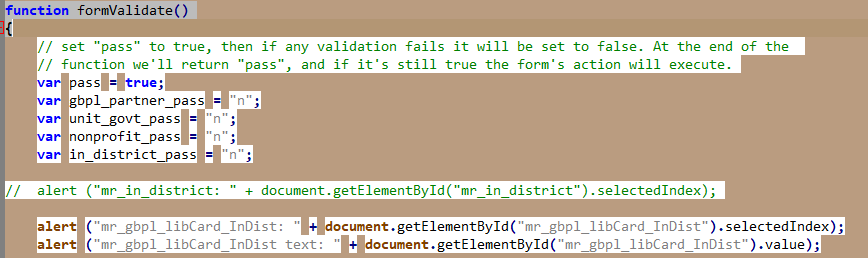
-
@joemidnite said in Notepad++ release 8.9:
am using 8.9 and I just noticed when I go to edit JavaScript (.js) file,
As I said a couple days ago, “The Themes FAQ has been updated to include instructions for explaining and fixing the JavaScript if you upgraded to v8.9 and it messed up your JavaScript syntax highlighting.” The instructions are there.
-
I see the instructions, but, it does not address the 2nd JavaScript theme. Would the new install delete the 2nd theme, or should I delete both before I do the update?
Joe Ruffino
-
@joemidnite said in Notepad++ release 8.9:
it does not address the 2nd JavaScript theme. Would the new install delete the 2nd theme, or should I delete both before I do the update?
I don’t know what you mean by that. The instructions tell you how to fix JavaScript in your active theme.
Specifically, it says, and I quote, “You can just copy the entire
<LexerType name="javascript.js" desc="JavaScript" ext="">...</LexerType>section from the downloaded theme(s) and paste it overtop that same section in your Config Directory and/or Installation Directory theme file(s), then save and restart to get it to take effect.”So you download the newer file to some temporary location and open it. Then you open your active theme (in either the install directory or AppData, depending on whether you’ve customeized your theme or not), and you paste the
javascript.jssection from the temporary file overtop thejavascript.jssection from your active file. Then you save, and restart Notepad++.if you haven’t customized your theme at all (no changes to font or color or user keywords or user extensions anywhere), then it’s even easier: just download the file, and save it in your install directory’s themes subdirectory, and restart.
-
D datatraveller1 referenced this topic on
-
@donho said in Notepad++ release 8.9:
Auto-update will be triggered for this release in 1 week, if no critical issues found.
Serious tinyxml-2 regression found:
https://community.notepad-plus-plus.org/topic/27339/enter-key-duplicated-in-macros -
@donho I updated from 8.8.8 and after the first launch of Notepad++ the error “Load lang.xml failed!” occured once (exe-installer on latest Windows 11).
-
 X xomx referenced this topic on
-
D donho unpinned this topic on
-
M MarkusBodensee referenced this topic on

Hello! It looks like you're interested in this conversation, but you don't have an account yet.
Getting fed up of having to scroll through the same posts each visit? When you register for an account, you'll always come back to exactly where you were before, and choose to be notified of new replies (either via email, or push notification). You'll also be able to save bookmarks and upvote posts to show your appreciation to other community members.
With your input, this post could be even better 💗
Register Login