Page with the license fixed in front of the text
-
Hello everyone!
I am using version 8.8.2. Suddenly, a screen with the license started appearing in front of my text and it doesn’t allow me to close it. I would need guidance to get rid of this. I am in the environment of a large Brazilian bank and reinstalling is not an option. Can someone help me with this? I have been using Notepad++ for many years and this has never happened to me.
Greetings to everyone from São Paulo-Brazil and a happy New Year.
Arí Ricardo Ody
-
v8.8.2, like every other version of Notepad++, shows the license when you use ?-menu’s About Notepad++ entry, or click the
F1key on your keyboard (default shortcut).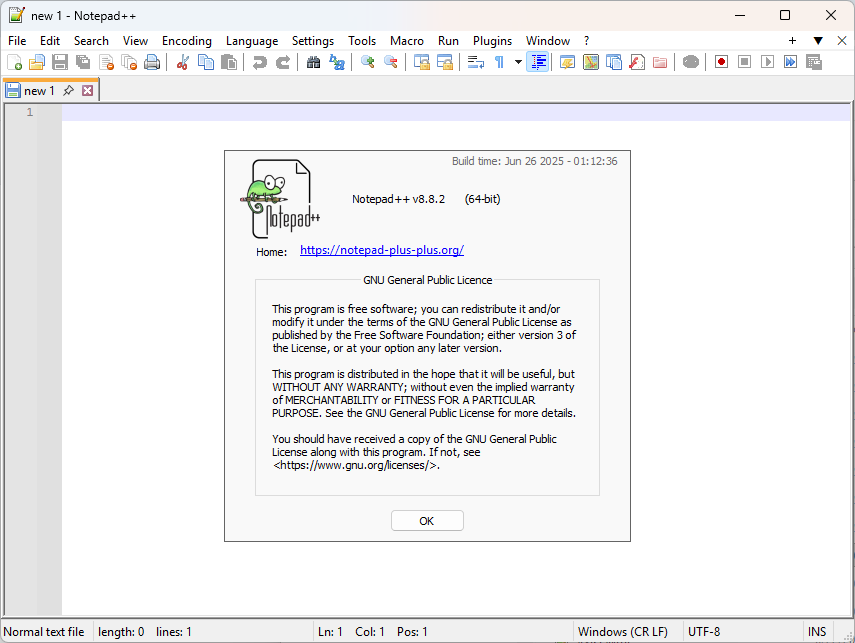
But it’s super-simple to get rid of. You can click OK or hit the
ESCkey on your keyboard, and it goes away. (TheESCkey won’t work if you’ve clicked in the main Notepad++ window after the About dialog appears, because theESCkey needs the dialog to have focus to work. You can give the dialog focus by clicking anywhere in that dialog.)The problems that I can only guess you might be having:
- You clicked somewhere else, so
ESCdoesn’t work for you. Possible fixes:- clicking the OK button
- clicking anywhere in the dialog’s window then typing
ESC
- The OK button isn’t visible. Possible fixes:
- clicking on the About window somewhere, then typing
ESC - clicking on the About window somewhere, then use
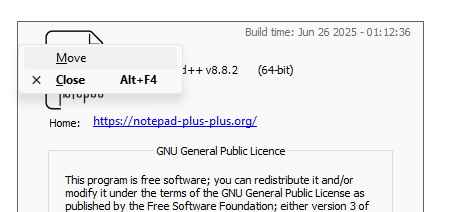
Alt+SPACEBARto bring up the System Menu for the dialog. From there, you can selectMove(or your language’s equivalent); if you cannot see the System Menu, it might be hidden somewhere, so you can typeM(or whatever your language’s normal letter is for the “move this window” action from any application’sAlt+SpacebarSystem Menu). Either way, once it’s in move mode, you should be able to move the window around until you can see the OK button
- clicking on the About window somewhere, then typing
- You see and click the OK button, but the window doesn’t go away, or comes back
- Not sure what could be causing this. My best guess would be that the
F1key on your keyboard is stuck (or some other application or malware is constantly sending theF1keystroke command), so it is repeatedly opening the About dialog, even after you close it. There’s nothing Notepad++ can do about this, but a reboot might help, or trying a different keyboard on that computer. - If
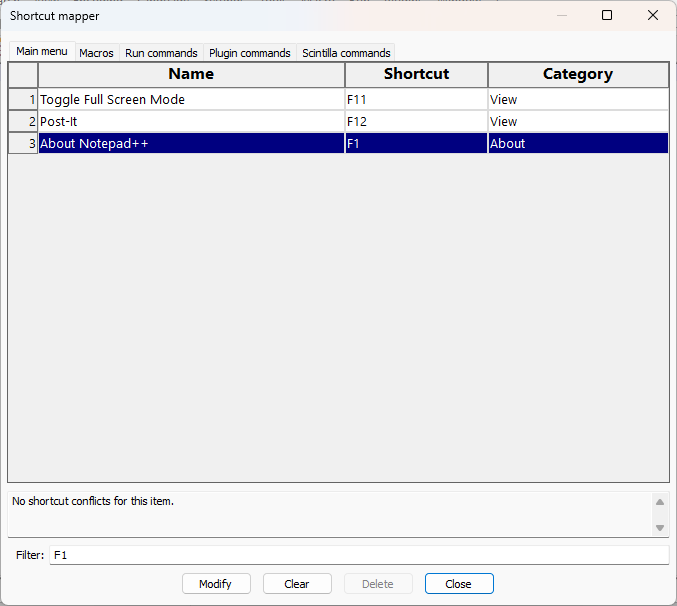
F1is really a problem that you cannot solve through keyboard or reboot, go to Settings > Shortcut Mapper (you can do that even when the About menu is showing), typeF1into the Filter, click onAbout Notepad++in the grid, click the Clear button – this will remove theF1shortcut fromAbout Notepad++, soF1will no longer launch that dialog. So then if you close it, even pressingF1shouldn’t launch the dialog anymore.
- Not sure what could be causing this. My best guess would be that the
But, in General, Notepad++ (v8.8.2 or any other version) only shows that dialog when you access it through the menu or through using
F1, and can easily be closed using the OK button or typing theESCkey while the dialog is in focus.If nothing in this works, you will have to give us more information (maybe a screenshot of the dialog, in case I’ve misinterpreted what you meant by the “page with the license”)
- You clicked somewhere else, so


Hello! It looks like you're interested in this conversation, but you don't have an account yet.
Getting fed up of having to scroll through the same posts each visit? When you register for an account, you'll always come back to exactly where you were before, and choose to be notified of new replies (either via email, or push notification). You'll also be able to save bookmarks and upvote posts to show your appreciation to other community members.
With your input, this post could be even better 💗
Register Login