Where is the Plugins Admin?
-
Hello. Running v8.8.8. Please forgive me, but where is the Plugins Admin found? I can’t locate it.
Thanks,
sd -
@Dean-Macinskas said in Where is the Plugins Admin?:
Hello. Running v8.8.8. Please forgive me, but where is the Plugins Admin found? I can’t locate it.
Same place it has been for years:
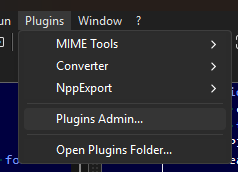
My guess is that when you unzipped/installed, you didn’t clear the Mark of the Web (MotW), so your PC isn’t letting N++ executable access the
plugins\config\nppPluginsList.dll: To fix the MotW, look atc:\program files\Notepad++\plugins\config\nppPluginList.dllin Windows Explorer, right click to Properties, and if there’s an “unblock” checkbox in the lower right, mark it and apply/ok. Similarly, checknotepad++.exeitself, and...\updater\GUP.exeand...\updater\libcurl.dllto make sure they don’t have the MotW, either.
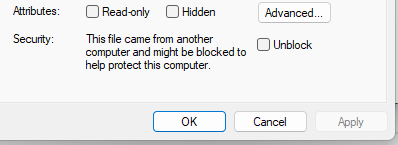
If none of those showed it needing to unblock, then it might be the
-noPlugincommand-line option, or something else. Please share the ?-menu’s Debug Info if clearing the MotW didn’t solve it. -
I checked all the files you suggested, and none of them have the ‘unblock’ checkbox. Here is the Debug info you requested:
Notepad++ v8.8.9 (64-bit)
Build time: Dec 8 2025 - 00:04:32
Scintilla/Lexilla included: 5.5.8/5.4.6
Boost Regex included: 1_85
Path: C:\Program Files\Notepad++\notepad++.exe
Command Line:
Admin mode: OFF
Local Conf mode: OFF
Cloud Config: OFF
Periodic Backup: ON
Placeholders: OFF
Scintilla Rendering Mode: SC_TECHNOLOGY_DIRECTWRITE (1)
Multi-instance Mode: monoInst
asNotepad: OFF
File Status Auto-Detection: cdEnabledNew (for current file/tab only)
Dark Mode: OFF
Display Info:
primary monitor: 1920x1200, scaling 125%
visible monitors count: 3
installed Display Class adapters:
0000: Description - Intel® Graphics
0000: DriverVersion - 32.0.101.6881
0001: Description - DisplayLink USB Device
0001: DriverVersion - 9.3.3324.0
0002: Description - DisplayLink USB Device
0002: DriverVersion - 9.3.3324.0
OS Name: Windows 11 Enterprise (64-bit)
OS Version: 25H2
OS Build: 26200.7171
Current ANSI codepage: 1252
Plugins:
mimeTools (3.1)
NppConverter (4.7)
NppExport (0.4)Thanks,
sd -
Is it possible that when you got to this step in the installer:
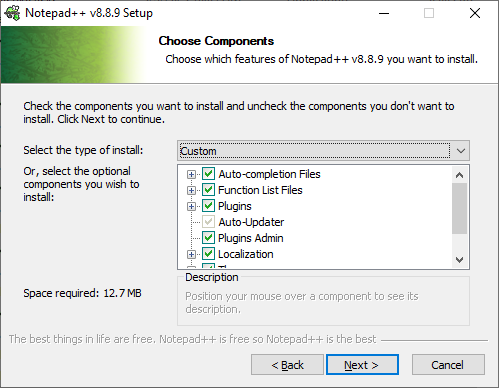
you didn’t have Plugins Admin checked (or you selected Minimalist in the drop down box)?
Try running the installer again. I believe it will retain your previous setting. If Plugins Admin isn’t checked, check it before clicking Next on that step.
-
I’m not immediately seeing why it wouldn’t be there.
Could you share a screenshot of your full Plugins menu, like the one I showed before:
Could you do Run > Run…,
cmd /k dir "c:\program files\notepad++\plugins\" "c:\program files\notepad++\plugins\config" "c:\program files\notepad++\updater"then copy everything from that cmd.exe window, click the
</>button when creating your reply, and paste between the ``` lines, like this:Volume in drive C is OS Volume Serial Number is BE09-3728 Directory of c:\program files\notepad++\plugins 11/18/2025 10:42 AM <DIR> . 12/24/2025 08:55 AM <DIR> .. 08/13/2025 06:46 AM <DIR> AutoSave 11/18/2025 10:42 AM <DIR> ComparePlus 10/25/2025 05:00 PM <DIR> Compose 01/31/2025 01:10 PM <DIR> Config 01/31/2025 01:10 PM <DIR> disabled 02/01/2025 01:50 PM <DIR> doc ... 0 File(s) 0 bytes Directory of c:\program files\notepad++\plugins\config 01/31/2025 01:10 PM <DIR> . 11/18/2025 10:42 AM <DIR> .. 12/27/2025 05:31 AM 218,752 nppPluginList.dll 1 File(s) 218,752 bytes Directory of c:\program files\notepad++\updater 01/31/2025 01:10 PM <DIR> . 12/24/2025 08:55 AM <DIR> .. 12/27/2025 05:31 AM 649,856 GUP.exe 12/20/2025 02:13 PM 4,608 gup.xml 12/27/2025 05:31 AM 841,344 libcurl.dll 12/20/2025 02:13 PM 7,804 LICENSE 12/20/2025 02:13 PM 4,114 README.md 12/20/2025 02:13 PM 133,872 updater.ico 6 File(s) 1,641,598 bytes 2 Dir(s) 495,203,532,800 bytes free(I deleted some from my copy/paste, because I have a lot of plugins; but your debug info shows you don’t have a lot, so you shouldn’t need to delete any)
Right now, my guess is that you don’t have the GUP updater, or you don’t have the nppPluginList, and this will show me if either is true…
-
I reinstalled v8.9, made sure that the Plugin Admin was checked, and it works!
Thanks for your help.
Regards,
sd -
I’m guessing that GUP.exe and/or nppPluginList.dll somehow wasn’t updated before.


Hello! It looks like you're interested in this conversation, but you don't have an account yet.
Getting fed up of having to scroll through the same posts each visit? When you register for an account, you'll always come back to exactly where you were before, and choose to be notified of new replies (either via email, or push notification). You'll also be able to save bookmarks and upvote posts to show your appreciation to other community members.
With your input, this post could be even better 💗
Register Login