Notepad++ v8.9.1 Release
-
FYI: Auto-update will be triggered for this release in one hours.
-
Auto-update is triggered for v8.9.1.
Note that auto-update doesn’t work when updating from v8.8.9 to v8.9.1 or later versions.
Version 8.8.9 will download the installer, but it will not launch the v8.9.1 or any newest installer, because v8.8.9 attempts to verify the old Notepad++ auto-signed certificate (which was removed since v8.9) instead of GlobalSign’s certificate. -
@donho
I went to the trouble to verify the signature before installing. I got this which includes a warning. Note, first time verifying sig using gpg, so maybe I got something wrong but I don’t think so.PS C:\Users\malaw\Downloads> gpg --import .\nppGpgPub.asc
gpg: key 6C429F1D8D84F46E: 56 signatures not checked due to missing keys
gpg: key 6C429F1D8D84F46E: “Notepad++ don.h@free.fr” not changed
gpg: Total number processed: 1
gpg: unchanged: 1
PS C:\Users\malaw\Downloads> gpg --verify .\npp.8.9.1.Installer.exe.sig
gpg: assuming signed data in ‘.\npp.8.9.1.Installer.exe’
gpg: Signature made 01/26/26 06:25:43 Pacific Standard Time
gpg: using RSA key 14BCE4362749B2B51F8C71226C429F1D8D84F46E
gpg: Good signature from “Notepad++ don.h@free.fr” [unknown]
gpg: WARNING: This key is not certified with a trusted signature!
gpg: There is no indication that the signature belongs to the owner.
14BCE4362749B2B51F8C71226C429F1D8D84F46E
PS C:\Users\malaw\Downloads>So, good that it said good sig. Bad that key is not certified with trusted sig.
-
@A-T said in Notepad++ v8.9.1 Release:
Bad that key is not certified with trusted sig.
That just means that you haven’t marked it as trusted. GPG relies upon you to decide whether you trust a public key or not. If you don’t certify it as trusted, it will always say that it’s not signed with a trusted key, even though it confirms that it was signed with the key that it said it did.
-
Hi, for some reason it seems that in the INI and Properties languages Notepad++ now displays text before a
:in italics. After downgrading Notepad++ it seems this started in v8.8.9. I should also mention that fixing it after downgrading requires any customized themes in%appdata%\Notepad++\themesto be deleted or presumably fixed by hand.Example:

-
-
@mpheath said in Notepad++ v8.9.1 Release:
I am unsure what you fixed.
@mpheath, the user had outdated themes, which didn’t have the KEY style for either Langage:INI or Language:Properties. When v8.9.1 brought in all those style entries for the INI and Properties lexers, it began properly formatting those styles rather than ignoring those styles that weren’t defined in the themes. This was the intention of the new style-updating feature: it is intended to bring all themes up-to-date, so that they can format all the styles that users have not been seeing for years (for some, it’s a decade or more of missing syntax highlighting).
@Drift91: As with all styles, if you don’t like the formatting that is chosen by default for a given style, you are free to change it for yourself. You go to Settings > Style Configurator > Language:
INIor Language:Properties, select Style:KEYand change the Italic checkbox, as shown here for INI: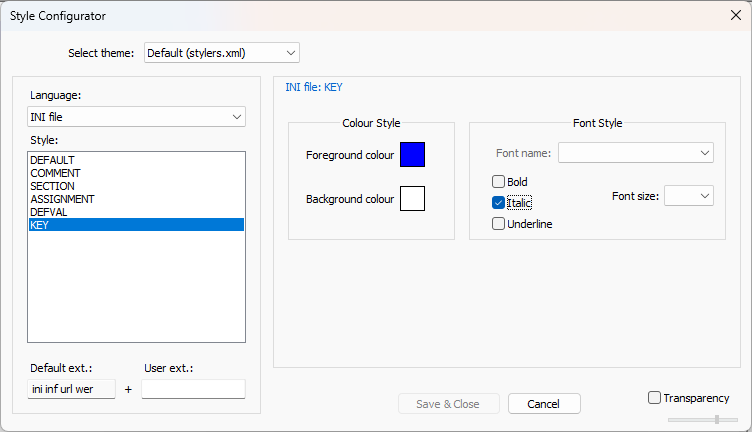
-
Bug report: Find in files causes Notepad++ to crash. Have upgraded to 8.9.1. No improvement. Windows version 11 Home 10.0.26200 Build 26200
-
@Pete-Davis said in Notepad++ v8.9.1 Release:
Bug report: Find in files causes Notepad++ to crash. Have upgraded to 8.9.1. No improvement. Windows version 11 Home 10.0.26200 Build 26200
Cannot reproduce. Find in Files works just fine with v8.9.1 for me. You will need to be more specific than that.
- ?-menu Debug Info
- Exact sequence of events that cause it to crash
- State of Find in Files dialog before the crash (what values, what options enabled, what buttons you pressed, etc)
-
@Pete-Davis, if you’re using WebEdit, a fixed version is already available.
-
Having some issues since the 8.9.1 update. Notepad++ was working great for me prior to that. (Wonderful program in general, by the way.)
-
I’m coding in Python, and the first thing I noticed was the syntax highlighting had multiple changes in color & style I didn’t enjoy. So, I figured out how to change those in Style Configurator. (Not a problem, just an annoyance.)
-
Noticed backspacing would no longer unindent (as previous), but simply go back by single spaces. Found the option to change that behavior under Settings>Preferences>Indentation. (Though it doesn’t seem to work consistently. I’m unsure why. And this may be connected to the issue I’m experiencing below.)
-
New code I’ve written today in Notepad++ (which is a mix of code written pre-update & code written post-update) is pulling either “IndentationError: unindent does not match any outer indentation level” or “TabError: inconsistent use of tabs and spaces in indentation”. (I’ve gone through line-by-line, removed any spacing / indents, and re-indented, but this doesn’t seem to resolve it.)
-
I’ve also noticed that folding of code (in my Python files) doesn’t work as it previously did, and sections of code are either not being folded, only partially being folded, or folding in sections beneath them that should not be folded.
I reverted back to the previous 8.9.0 & wait for fixes, but that doesn’t seem to address any of these issues, and I’m unsure of why.
Any help or advice would be much appreciated. As at present, my project won’t even launch. Thanks.
-
-
@NovusOperandi said in Notepad++ v8.9.1 Release:
Having some issues since the 8.9.1 update. Notepad++ was working great for me prior to that. (Wonderful program in general, by the way.)
- I’m coding in Python, and the first thing I noticed was the syntax highlighting had multiple changes in color & style I didn’t enjoy. So, I figured out how to change those in Style Configurator. (Not a problem, just an annoyance.)
What version did you upgrade from? Because Python styles didn’t change recently. OTOH, the last few versions of Notepad++ have automatically brought in the new styles that were missing from your theme, so if your theme (or stylers.xml) had been customized a long time ago, it had probably missed the addition of new styles a long time ago. Assuming you went from something older than v8.8.9 and skipped all the way to v8.9.1, then it would have added those new styles (but should not have overwritten any colors on existing styles).
- Noticed backspacing would no longer unindent (as previous), but simply go back by single spaces. Found the option to change that behavior under Settings>Preferences>Indentation. (Though it doesn’t seem to work consistently. I’m unsure why. And this may be connected to the issue I’m experiencing below.)
The option to control backspace-unindent has existed since v8.6.9 from July 2024. But it’s defaulted to not being enabled (so backspace doesn’t unindent) since the beginning of that option. So if backspace was previously unindenting for you, you must’ve turned on that option at some point in the past.
When you updated, did you just run the updater? Or did you uninstall the old version then run updater (and, if uninstall first, did you tell it to keep your settings or delete them)? Because that almost sounds like you lost your config.xml, because otherwise that setting should not have changed on you.
- New code I’ve written today in Notepad++ (which is a mix of code written pre-update & code written post-update) is pulling either “IndentationError: unindent does not match any outer indentation level” or “TabError: inconsistent use of tabs and spaces in indentation”. (I’ve gone through line-by-line, removed any spacing / indents, and re-indented, but this doesn’t seem to resolve it.)
Are you 100% certain of your line-by-line check? Have you tried View > Show Symbol > Show Space and Tab to help with that process?
- I’ve also noticed that folding of code (in my Python files) doesn’t work as it previously did, and sections of code are either not being folded, only partially being folded, or folding in sections beneath them that should not be folded.
Someonehas reported a bug with folding in v8.9.1. Per the list of changes in the Announcement above, I don’t think anything was expected to change folding behavior in Python or any other language. So it surprises me that a regression would be caused here. Again, knowing what version you were using before your upgrade would be helpful. Also, do you have a small piece of Python code that you could paste here, which shows the folding bug? (Use the</>button, and paste your python code between the ``` lines that the button creates in your reply.)(edit: I see that you were that “Someone”… Sorry I didn’t notice that at first. Still, giving code that someone can copy/paste would help, because your screenshot over there is not sufficient to replicate your bug.)
I reverted back to the previous 8.9.0 & wait for fixes, but that doesn’t seem to address any of these issues, and I’m unsure of why.
none of the issues? That surprises me. If the folding were a v8.9.1 regression, at least that should have been fixed; if not, the regression was caused earlier – and you will need to share what version you were using before the upgrade in order to help figure out where that bug was introduced. The backspace-unindents doesn’t surprise me, because once config.xml got saved, when you installed the older version, it was installed with that option in the same state. (And if you deleted your config.xml when downgrading to v8.9.0, it would have started in the default condition, which is backspace-does-not-unindent.)
Any help or advice would be much appreciated. As at present, my project won’t even launch.
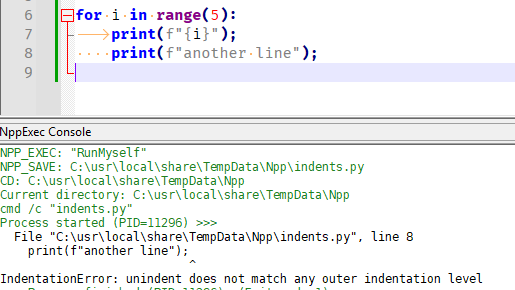
I would have thought python would give you a line number of where the inconsistency in indentation occurs, so you should easily be able to compare indentation characters before and after the first line mentioned. Quick experiments:
- if I have tab on the first indent followed by spaces on the second, it gives the IndentationError:
- if I have spaces on the first indent and tab on the second, it gives the TabError:
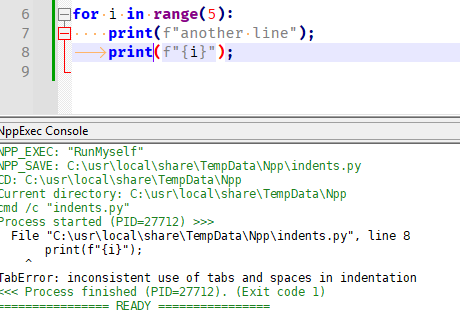
And both show me exactly which line the problem is in. You should be able to use that information to fix your code. (Also, Edit > Blank Operations is your friend for making indentation consistent.)
-
I normally install updates for Notepad++ as soon as they pop up as available, so I think I was updating directly from 8.9.0 to 8.9.1, but I’m not 100% sure. And no uninstall or deletion of settings was performed beforehand; I just did a direct in-program update.
Good news: my project is up and running again. So, crisis averted. And in the process of making that happen, I think I figured out what went wrong. Some of this was definitely user error on my part, as you’ll see below.
- It’s my theory, that when the program updated, for some reason, it deleted some of my custom settings (which I perhaps didn’t realize were custom, as they’d been in place so long). This might include the Python syntax settings for colors & style, as well as unindent behavior of the backspace button (perhaps indentation settings in general).
- When I tried to re-enable the unindent behavior, I only enabled it under Default, but not under Python, so that may be the source of some of the inconsistent results I was seeing. (Results seem to be consistent now with it enabled under Python.)
- As I was trying to figure things out, and get my settings back to where they were, I was also writing code in between these attempts, so I think that resulted in some of my code having mismatched indentation styles applied: I think this caused the IndentationErrors & TabErrors I was experiencing. (Which, thankfully, are now resolved.) And I think this was also causing havoc with the folding behavior of my code, as now that also seems to be cleared up. (Cross fingers.)
- Thank you for the tip on the View > Show Symbol > Show Space and Tab option. I wasn’t aware that was available. It’s very helpful.
-
@NovusOperandi said in Notepad++ v8.9.1 Release:
And I think this was also causing havoc with the folding behavior of my code, as now that also seems to be cleared up.
If you believe it’s working, don’t forget to close the Issue at GitHub. If you later have evidence that the folding still isn’t working, you can re-open it.
-
the user had outdated themes, which didn’t have the KEY style for either Langage:INI or Language:Properties.
Were the preinstalled themes out-of-date, or is that in reference to my custom theme? Because I’ve deleted my custom theme files several times within the past year or two and re-customized them from stock, so I would have expected them to be roughly equal to the ones that come with the application. Either way, as much as the italics were bothering me, I’m glad to see the themes are being updated dynamically now. I’m honestly not sure why I assumed it was a regression, I guess it just seemed visually jarring and I didn’t see a changelog entry about it.
-
@Drift91 said in Notepad++ v8.9.1 Release:
the user had outdated themes, which didn’t have the KEY style for either Langage:INI or Language:Properties.
Were the preinstalled themes out-of-date,
Yes. Only
stylers.model.xmlandthemes\DarkModeDefault.xmlwere guaranteed to have all updates; all other themes were up to the original theme author and/or other volunteers to keep up to date, and volunteer ever took real ownership of them. That’s why I implemented the new feature, to make sure that themes would never get hopelessly out of date again.I didn’t see a changelog entry about it.
The changes involved in this new feature were announced as:
-
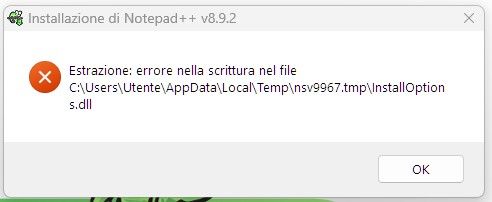
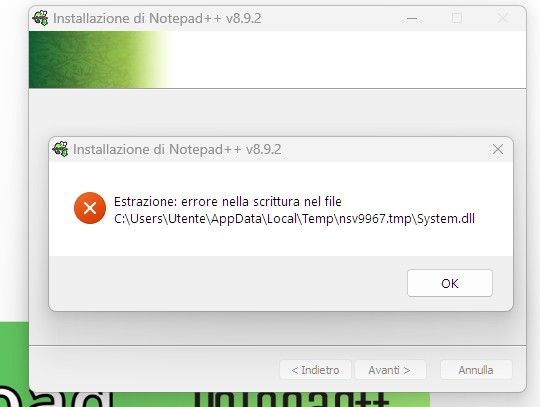
Why do I get these errors when I install Notepd++ with both v8.9.2 and v8.9.1?
-
@leleganja said in Notepad++ v8.9.1 Release:
Why do I get these errors when I install Notepd++ with both v8.9.2 and v8.9.1?
At first glance: it appears that whatever account that is being used to install Notepad++ doesn’t have write-permission to the temp directory that the installer created. That is odd, given that the installer usually asks for Admin privileges to install. But maybe your computer is set up so the Admin account(s) don’t have write permission to the indiviudal user file-areas.
Try creating a directory someplace where both your normal user and your admin user have write access, and then temporarily set
%TMP%to point to that directory. When you run the installer, it should use that new directory instead, and should (I would think) have write-permission there. (My experiments showed it used the alternate location if I set the%TMP%user variable, but not if I set the%TEMP%variable, so you only need to change%TMP%. If you don’t know how to change that variable: click the START menu, typesystem environtmentwhich will find the Edit the system environment variables option, which you use; click Environment variables button, then in the User variables section, editTMPto point to the new directory you created; after doing OK a few times, then you can run the installer, and it should use that directory. When done installing, don’t forget to setTMPback to%USERPROFILE%\AppData\Local\Tempin the same manner.)




Hello! It looks like you're interested in this conversation, but you don't have an account yet.
Getting fed up of having to scroll through the same posts each visit? When you register for an account, you'll always come back to exactly where you were before, and choose to be notified of new replies (either via email, or push notification). You'll also be able to save bookmarks and upvote posts to show your appreciation to other community members.
With your input, this post could be even better 💗
Register Login