styler.xml/WordsStyle/keywordClass association with langs.xml/Language/Keyword/Name
-
I was looking to add a WordsStyle with a keyword list to an existing language.
My question concerns the styler.xml/WordsStyle/keywordClass that appears to match langs.xml/Language/Keyword/Name. There are some seemingly standard keywordClass values instre1, instre2 and type1 to type7 and maybe type8. Do these seemingly standard values have any additional meaning besides providing a link from the keywordClass in styler.xml to the Language/Keyword/Name in langs.xml? Such as whether or not they need to be delimited by whitespace, etc? If they have additional meanings is there a complete list of keywordClass values and their associated meanings? If they do not have any additional logic associated with them are they only used to link the Styler.xml entry to the associated langs.xml keyword entries meaning any keywordClass/Name that matches could be used?
-
@pasha-19 said in styler.xml/WordsStyle/keywordClass association with langs.xml/Language/Keyword/Name:
I was looking to add a WordsStyle with a keyword list to an existing language.
That’s not the way it works. Existing languages are hardcoded (compiled) internally with a list of available styleIDs, and only particular styleIDs have keyword lists associated with them. You cannot just add a WordsStyle with its own styleID and a list of keywords, and hope that the lexer will magically see them. It will not.
My question concerns the styler.xml/WordsStyle/keywordClass that appears to match langs.xml/Language/Keyword/Name. There are some seemingly standard keywordClass values instre1, instre2 and type1 to type7 and maybe type8. Do these seemingly standard values have any additional meaning besides providing a link from the keywordClass in styler.xml to the Language/Keyword/Name in langs.xml?
They have an integer value (0-8). Those correspond to the 9 available keyword lists inside the lexer, which any given lexer may reference zero or more of.
If you use the wrong keywordClass, Notepad++ will not be able to pass the list of words to the lexer. And if you make up a keywordClass or use one that’s not already defined for a given language, the lexer won’t see it, and those keywords won’t get highlighted.
[can] any keywordClass/Name that matches could be used?
Nope, sorry. Each lexer has a predefined list that Notepad++ will pass on to the lexer and that the lexer will recognize.
To sum up: the official list of available keywordClass/name values for any given lexer are listed in the copy of langs.model.xml that ships with a given version of Notepad++: that will always list all the ones that Notepad++ knows about, and if you try to define others than those for any given language, Notepad++ cannot pass it on to the lexer.
However, it may be that your langs.xml or stylers.xml are out of date. If you haven’t updated to v8.9.1 yet, run that update, and the first time you run, Notepad++ will update langs.xml and stylers.xml (or any other active theme) to include any missing styles. You might find that the language you want to customize has more keyword lists available in the Style Configurator now.
If a given language doesn’t have enough different styles to give you differently-colored sets of keywords, you cannot just trick Notepad++ into creating more for you. However, using the EnhanceAnyLexer plugin (you can install it using Plugins Admin from the Plugins menu), you could define a regular expression to match the keywords you wanted. For example, for a given lexer language, if you wanted to add three keywords with red foreground and four with a blue foreground, you could use the following in the EnhanceAnyLexer configuration file (whcih you can easily access using Plugins > EnhanceAnyLexer > Enhance current language.
[LexerName]
0x0000FF = \b(red1|red2|red3)\b
0xFF0000 = \b(blueA|blueB|blueC|BlueD)\b
This will give:
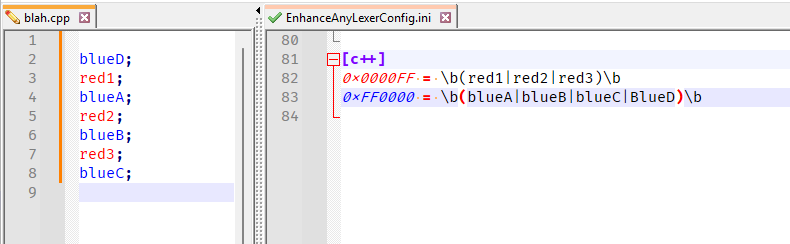
The EnhanceAnyLexerConfig.ini has documentation in its comments, explaining that it’s 0xBBGGRR for the hex colors, and how to get those colors to only apply within certain parent styles, etc. And https://github.com/Ekopalypse/EnhanceAnyLexer/ is the homepage for the plugin.


Hello! It looks like you're interested in this conversation, but you don't have an account yet.
Getting fed up of having to scroll through the same posts each visit? When you register for an account, you'll always come back to exactly where you were before, and choose to be notified of new replies (either via email, or push notification). You'll also be able to save bookmarks and upvote posts to show your appreciation to other community members.
With your input, this post could be even better 💗
Register Login