Modleine Parser No Longer Works
-
I’ve been using “ModelineParser_0.2” for several years to automatically select the language. This parser is still available here.
Recently my NP++ version got auto updated (by IT) to version Notepad++ v8.7.4. Now I’m getting these two messages in regards to the modeline parser:
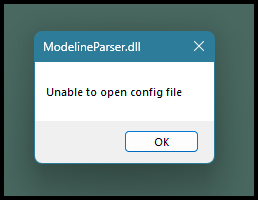
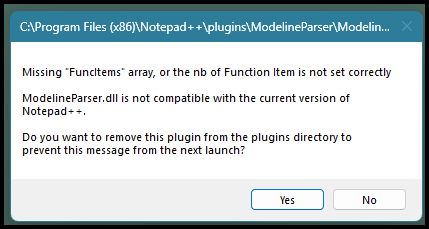
When I open a program that used to default to a specific language, no language is set. I have to manually set it.
Notepad++ v8.7.4 (32-bit)
Build time : Dec 4 2024 - 23:47:50
Path : C:\Program Files (x86)\Notepad++\notepad++.exe
Command Line :
Admin mode : OFF
Local Conf mode : OFF
Cloud Config : OFF
Periodic Backup : ON
Placeholders : OFF
DirectWrite : OFF
Multi-instance Mode : monoInst
File Status Auto-Detection : cdEnabledNew (for current file/tab only)
Dark Mode : OFF
OS Name : Windows 11 Enterprise (64-bit)
OS Version : 24H2
OS Build : 26100.7623
Current ANSI codepage : 1252
Plugins :
CSVLint (0.4.6.7)
mimeTools (3.1)
NppConverter (4.6)
NppExport (0.4)
PythonScript (0.9.2) -
@LaMar-M said in Modleine Parser No Longer Works:
I’ve been using “ModelineParser_0.2” for several years to automatically select the language. This parser is still available here.
Yes. But it hasn’t been updated in 13 years. Notepad++, on the other hand, releases a new version about once a month.
Recently my NP++ version got auto updated (by IT) to version Notepad++ v8.7.4.
Your IT department chose a version from 14 months ago? It will still be missing security updates found in more recent Notepad++ versions.
But yes, in the intervening 13 years, Notepad++ has made multiple changes to the documented interface for communication between a plugin and Notepad++. There have been some changes that were known to break older/unsupported plugins. But Notepad++ cannot stop all progress just because there are legacy plugins still published out there.
When I open a program that used to default to a specific language, no language is set. I have to manually set it.
Fortunately, the NppFileSettings plugin has modeline support, including recognizing
filetype,ft,syntax, andsynfor setting which syntax highlighting lexer to use. And its Releases page has 32bit and 64bit downloads, so it will work in your 32-bit edition of Notepad++.(And also, if you have a consistent filenaming convention with extensions that match the filetype, you can just set the User ext: box in the appropriate language(s) in the Style Configurator to make Notepad++ recognize the file type by extension, rather than by modeline. But if you need modeline support, hopefully NppFileSettings will work for you.)
Notepad++ v8.7.4 (32-bit)
In the modern world, where Windows OS is only maintained in 64-bit, there is virtually no reason to use 32-bit applications. For Notepad++, the only good reason for 32-bit instead of 64-bit is because you have a legacy plugin that only comes in 32-bit, that has no 64-bit version or alternative plugin with the same features.
Looking at your other non-default plugins:
CSVLint (0.4.6.7)
PythonScript (0.9.2)
Both of those come in 64-bit versions now.
And PythonScript’s latest official release is up to v2.1.0, which uses Python 2.7.18, with significant bugfixes and feature improvements in both the plugin itself, and in the underlying Python interpreter (interpreter 2.7.1 from plugin 0.9.2, vs interpreter 2.7.18 from plugin 2.1.0). (Given your IT department’s apparent reticence to upgrade, I am not going to suggest moving to the “alpha” version of PythonScript 3.0.24, which uses Python interpreter 3.12.10, even though unless you use a lot of non-unicode files, I personally recommend using the version of the plugin that uses a modern Python interpreter rather than an interpreter that’s past its end of life.)
And assuming that NppFileSettings plugin works as a replacement for the unsupported and incompatible modelineparser plugin for you, then all three of the non-preinstalled plugins that you have shown an interest in will work with 64-bit Notepad++ as well.
As such, if you can confirm that PythonScript v2.1.0 and NppFileSettings will work for you, then I highly recommend that you talk with your IT:
- Ask if they can switch to 64-bit Notepad++.
- Ask if they will support a newer Notepad++.
- I desparately want to recommend the newest version, because of all the recent security fixes, but if you use UDL, then v8.9.2 probably won’t work for you, so you might have to stick with v8.9.1 until the regression fix for UDL is released in v8.9.3 (hopefully soon)


Hello! It looks like you're interested in this conversation, but you don't have an account yet.
Getting fed up of having to scroll through the same posts each visit? When you register for an account, you'll always come back to exactly where you were before, and choose to be notified of new replies (either via email, or push notification). You'll also be able to save bookmarks and upvote posts to show your appreciation to other community members.
With your input, this post could be even better 💗
Register Login