How to adjust the rate of horizontal scrolling ?
-
Hi,
I like to use horizontal scroll as I often deal with lines of text over 8000 characters longs and I cannot use word wrap.
Here is what I mean by slow scroll, each of these movement is a full thumb swipe on the horizontal scroll, I find that far two slow, I would like at least +200% to +400% more scroll per swipe.
This post suggest to use shift+scroll, however, this has no effect on the horizontal scroll wheel. And if there is a modifier key for scroll, I would prefer it slow down the rate, while keeping the unmodified scroll as the “fast scroll”. But there is currently no speed modifier key for horizontal scrolling.
Also, as it the case through windows, the scroll direction is inverted as that of the vertical scroll.
That is scroll down, moves the scrollbar down. while scrolling to the right move the scrollbar to the left.
This discussion is about the same thing, however I could not comment there as it is locked
Here is another discussion regarding horizontal scroll
https://community.notepad-plus-plus.org/topic/24688/scroll-horizontallyAnd here is a list of all forum posts which mention horizontal scrolling
-
@shodanx2 said in How to adjust the rate of horizontal scrolling ?:
I like to use horizontal scroll as I often deal with lines of text over 8000 characters longs and I cannot use word wrap.
You mention using a horizontal scroll wheel, that suggests you might have a mouse with expanded capabilities. Normally that would come with it’s own special driver and application to enhance it’s usability. Does that application have ability to alter the horizontal scroll speed?
I’m thinking that what you would like would have very few supporters. Generally the first thing the developer would want to know is how much benefit is derived from considering including such a feature. If you were to read the FAQ section, look for the “Feature Request or Bug Report”. That will tell you where a feature request needs to be posted to get visibility, posting here will just get you some feedback on the usability of the idea. However you need to verify if it has been asked before, all the details are in that post.
I am going to say though, that I would think this request would be denied. As I stated above, the specialised mice have their own applications to support these types of features, and I think that’s where you should be looking.
Actually a quick Google search turned up XMBC (X-Mouse Button Control), which is a free Windows app to enhance any mouse by customising the buttons. No doubt there are others as well.
Terry
-
@shodanx2 said in How to adjust the rate of horizontal scrolling ?:
shift+scroll, however, this has no effect on the horizontal scroll wheel
shift+scroll is just a helper substitute for achieving a basic horizontal scrolling for those who don’t have a true 4-way scrolling wheel mouse HW.
Currently (N++ v8.8.9+) I’ve fixed a long standing N++ issue Can’t adjust horizontal scroll speed , so now (for mouse with real 4-way/tilt scroll wheel) this can be achieved via the standard Windows mouse control panel, see it in action:
https://github.com/notepad-plus-plus/notepad-plus-plus/pull/17193#issuecomment-3572082186
Panel is in Windows Settings > BT & devices > Mouse > Additional mouse settings > Mouse Properties dlg > Wheel tab > Horizontal Scrolling
-
@Terry-R
Hello,
Horizontal scroll is part of the basic windows mouse driver, I do not have any special software installed, this applies to all mice with horizontal scroll capability.But I remember a long time ago a similar thing was said when vertical scroll was added, I mean, so few people had those things it was not really worth anyone’s time to support these “scroll wheels”.
Thanks that resolves the issue for me.
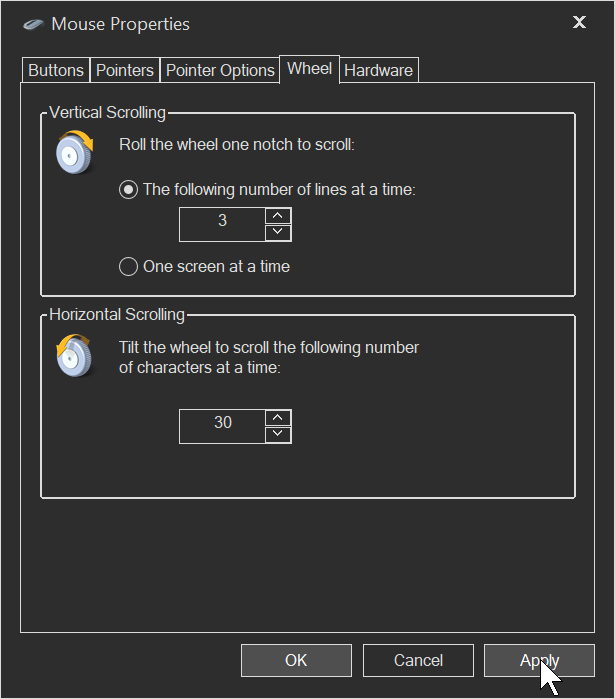
Although it makes horizontal scroll coarse system-wide, notepad++ is the only application where I make extensive use of horizontal scrolling.
Also the scroll direction is still inverted but I see that this is a good as its going to get for now !
-
Actually, that feels MUCH better system wide, now the horizontal scroll is WAY more responsive !!
As for de-inverting the horizontal scroll wheel direction
I found this
https://www.reddit.com/r/windows/comments/1cl7ama/its_2024_and_why_is_there_not_a_way_to_invert_my/
HKEY_LOCAL_MACHINE\SYSTEM\CurrentControlSet\Enum\HID
HID\VID_046D&PID_C548&MI_01&COL01\B&EF06FE6&0&0000
FlipFlopWheel DWORD set to 1
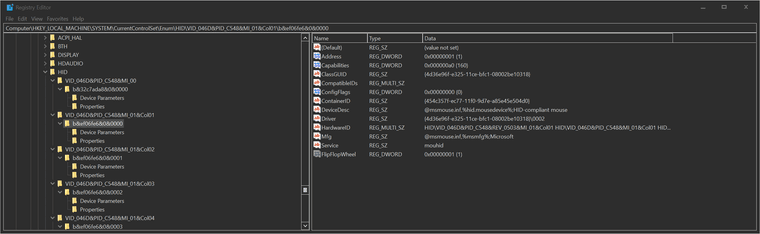
However I haven’t rebooted
I highly suspect this will invert both scroll wheels, or maybe just the vertical scroll so … probably not the right thing.The problem with software like XBMC, is that they intercept all messages in all windows, and they tend to cause issues, especially during moments of stutter, AltSnap also is like this. Hopefully there is a “native” solution.
-
Hello,
I have automated the process of inverting the horizontal scroll axis, this should work with any mouse.
I have better documented this process here.
Here is how this works
This command will invert the horizontal scroll for all mice
powershell -Command "$envVID=$env:USBVID; $envPID=$env:USBPID; $envFlip=$env:FlipHS; $desiredValue=1; if($envFlip){ if($envFlip.ToLower() -eq 'false'){ $desiredValue=0 } }; Write-Output ''; Write-Output \"Desired FlipFlopHScroll value: $desiredValue\"; Write-Output ''; $mouseDevices=Get-PnpDevice -Class Mouse; $changesMade=0; foreach($mouse in $mouseDevices){ $instanceId=$mouse.InstanceId; $vendorId=$null; $productId=$null; if($instanceId -match 'VID_([0-9A-Fa-f]{4})'){ $vendorId=$matches[1].ToUpper() }; if($instanceId -match 'PID_([0-9A-Fa-f]{4})'){ $productId=$matches[1].ToUpper() }; if($envVID){ if($vendorId -ne $envVID.ToUpper()){ continue } }; if($envPID){ if($productId -ne $envPID.ToUpper()){ continue } }; $regPath=\"HKLM:\\SYSTEM\\CurrentControlSet\\Enum\\$instanceId\\Device Parameters\"; if(Test-Path $regPath){ $currentValue=0; $existing=Get-ItemProperty -Path $regPath -Name 'FlipFlopHScroll' -ErrorAction SilentlyContinue; if($existing){ $currentValue=$existing.FlipFlopHScroll }; if($currentValue -ne $desiredValue){ New-ItemProperty -Path $regPath -Name 'FlipFlopHScroll' -PropertyType DWord -Value $desiredValue -Force | Out-Null; Write-Output \"Device found : $instanceId\"; Write-Output \"Current FlipFlopHScroll value:$currentValue changed to: $desiredValue\"; Write-Output ''; $changesMade++ } } }; if($changesMade -eq 0){ Write-Output 'No changes were necessary.' } else { Write-Output \"$changesMade device(s) updated.\" }; Write-Output ''; Write-Output 'Done.'"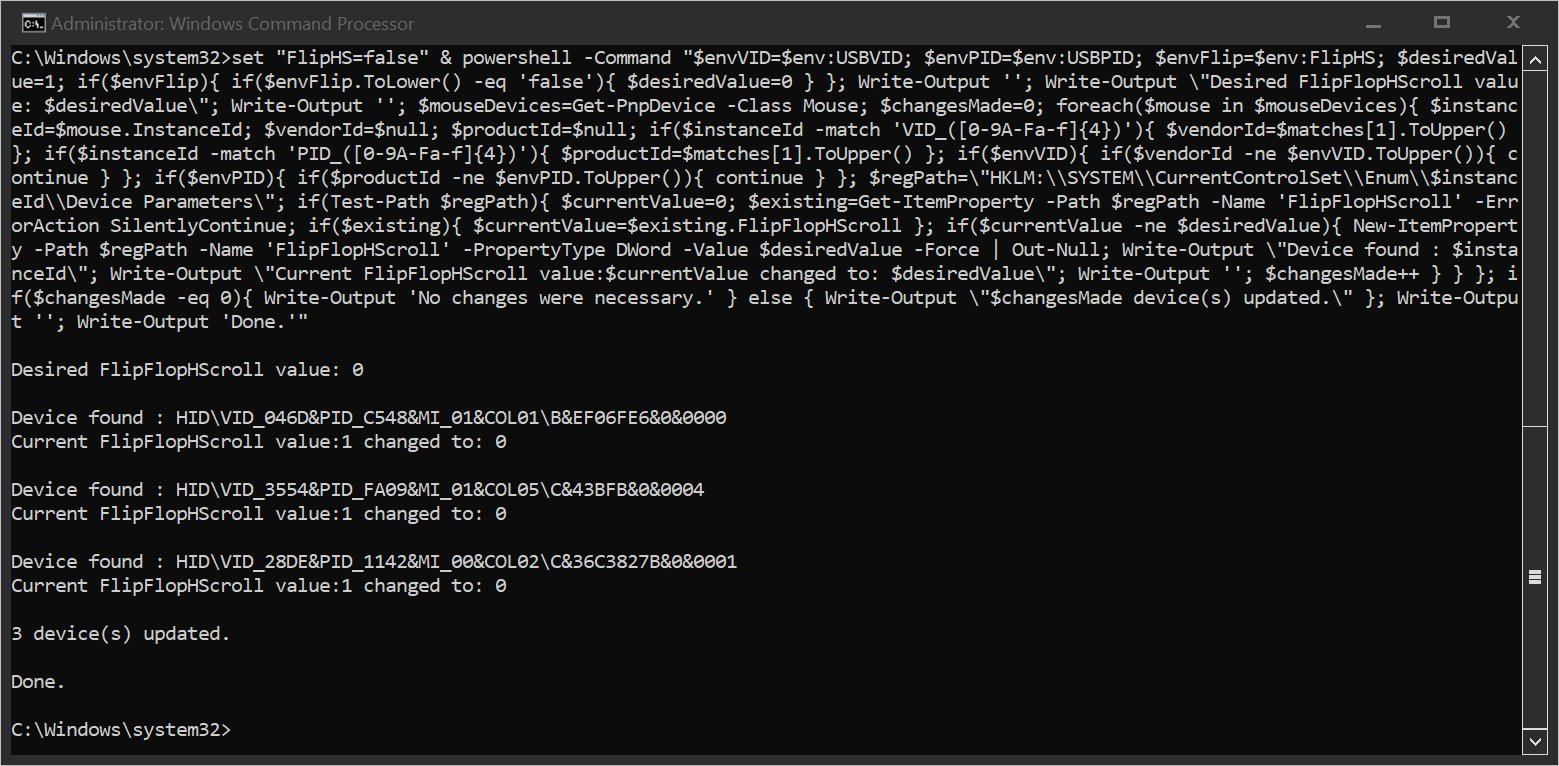
To DISABLE inversion of the horizontal axis, simply set the variable FlipHS to false
set "FlipHS=false"If you want only ONE mouse device, or one mouse manufacturer to be inverted in the horizontal axis, then first you must discover your USBVID (vendor ID) and USBPID (product ID)
I have also made a command for this purpose
powershell -Command "$mouseDevices=Get-PnpDevice -Class Mouse; foreach($mouse in $mouseDevices){ $instanceId=$mouse.InstanceId; $friendly=$mouse.FriendlyName; $status=$mouse.Status; $vendorId=$null; $productId=$null; if($instanceId -match 'VID_([0-9A-Fa-f]{4})'){ $vendorId=$matches[1].ToUpper() }; if($instanceId -match 'PID_([0-9A-Fa-f]{4})'){ $productId=$matches[1].ToUpper() }; $regPath=\"HKLM:\\SYSTEM\\CurrentControlSet\\Enum\\$instanceId\\Device Parameters\"; $currentValue=0; $stateText='Disabled'; if(Test-Path $regPath){ $existing=Get-ItemProperty -Path $regPath -Name 'FlipFlopHScroll' -ErrorAction SilentlyContinue; if($existing){ $currentValue=$existing.FlipFlopHScroll }; if($currentValue -eq 1){ $stateText='Enabled' } }; Write-Output '---------------------------------------------'; Write-Output \"FriendlyName : $friendly\"; Write-Output \"Status : $status\"; Write-Output \"InstanceId : $instanceId\"; Write-Output \"FlipFlopHScroll : $stateText\"; Write-Output ''; if($vendorId -and $productId){ if($currentValue -eq 0){ Write-Output 'To ENABLE:'; Write-Output \"set \"\"USBVID=$vendorId\"\" ^& set \"\"USBPID=$productId\"\" ^& set \"\"FlipHS=true\"\" ^&\" } else { Write-Output 'To DISABLE:'; Write-Output \"set \"\"USBVID=$vendorId\"\" ^& set \"\"USBPID=$productId\"\" ^& set \"\"FlipHS=false\"\" ^&\" }; Write-Output '' } }; Write-Output 'Done.'"This will tell you your USBVID and USBPID for all devices, and will also give you a command to copy-paste into the console to set them
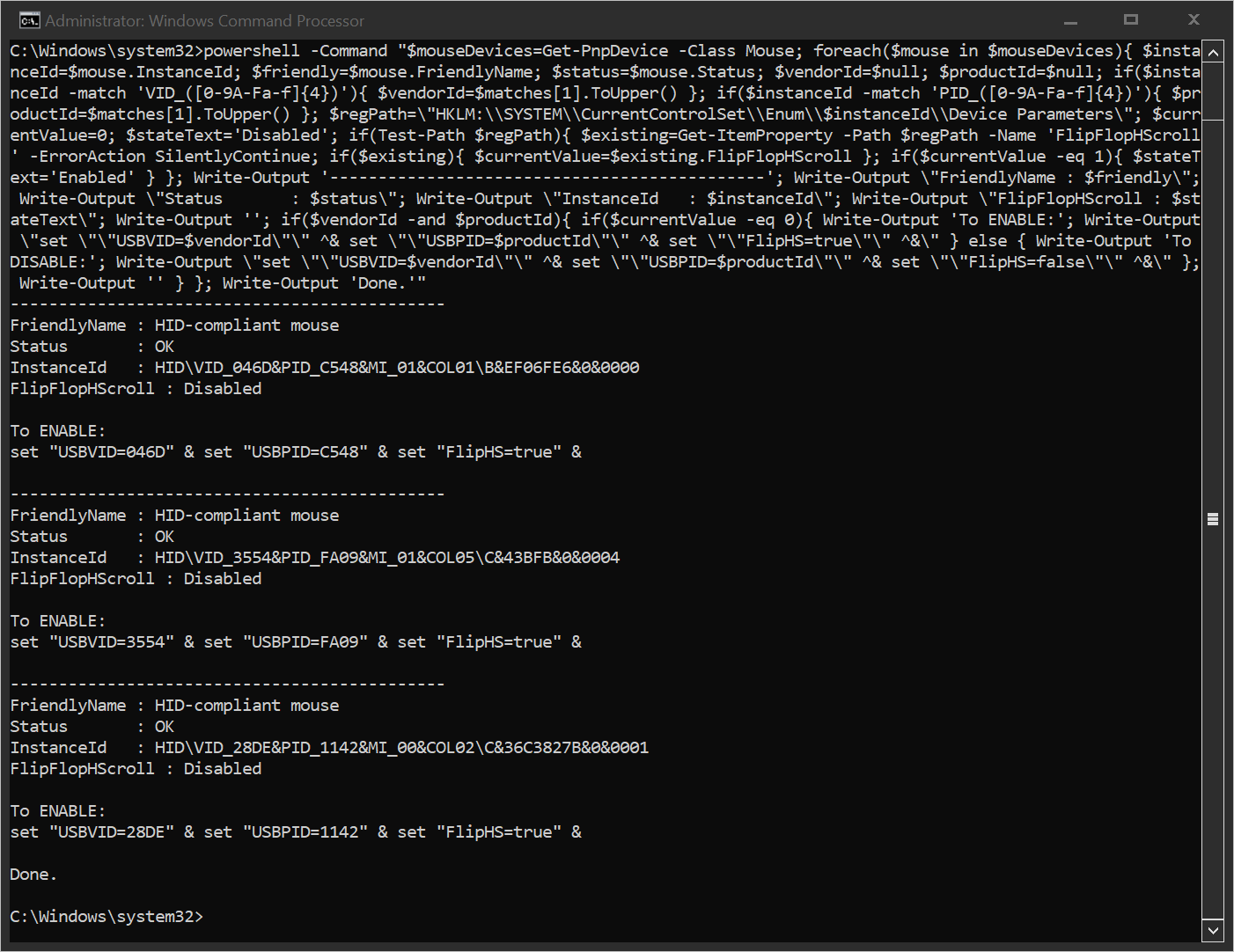
So final example for my mouse is the following
set "USBVID=046D" & set "USBPID=C548" & set "FlipHS=true" & powershell -Command "$envVID=$env:USBVID; $envPID=$env:USBPID; $envFlip=$env:FlipHS; $desiredValue=1; if($envFlip){ if($envFlip.ToLower() -eq 'false'){ $desiredValue=0 } }; Write-Output ''; Write-Output \"Desired FlipFlopHScroll value: $desiredValue\"; Write-Output ''; $mouseDevices=Get-PnpDevice -Class Mouse; $changesMade=0; foreach($mouse in $mouseDevices){ $instanceId=$mouse.InstanceId; $vendorId=$null; $productId=$null; if($instanceId -match 'VID_([0-9A-Fa-f]{4})'){ $vendorId=$matches[1].ToUpper() }; if($instanceId -match 'PID_([0-9A-Fa-f]{4})'){ $productId=$matches[1].ToUpper() }; if($envVID){ if($vendorId -ne $envVID.ToUpper()){ continue } }; if($envPID){ if($productId -ne $envPID.ToUpper()){ continue } }; $regPath=\"HKLM:\\SYSTEM\\CurrentControlSet\\Enum\\$instanceId\\Device Parameters\"; if(Test-Path $regPath){ $currentValue=0; $existing=Get-ItemProperty -Path $regPath -Name 'FlipFlopHScroll' -ErrorAction SilentlyContinue; if($existing){ $currentValue=$existing.FlipFlopHScroll }; if($currentValue -ne $desiredValue){ New-ItemProperty -Path $regPath -Name 'FlipFlopHScroll' -PropertyType DWord -Value $desiredValue -Force | Out-Null; Write-Output \"Device found : $instanceId\"; Write-Output \"Current FlipFlopHScroll value:$currentValue changed to: $desiredValue\"; Write-Output ''; $changesMade++ } } }; if($changesMade -eq 0){ Write-Output 'No changes were necessary.' } else { Write-Output \"$changesMade device(s) updated.\" }; Write-Output ''; Write-Output 'Done.'"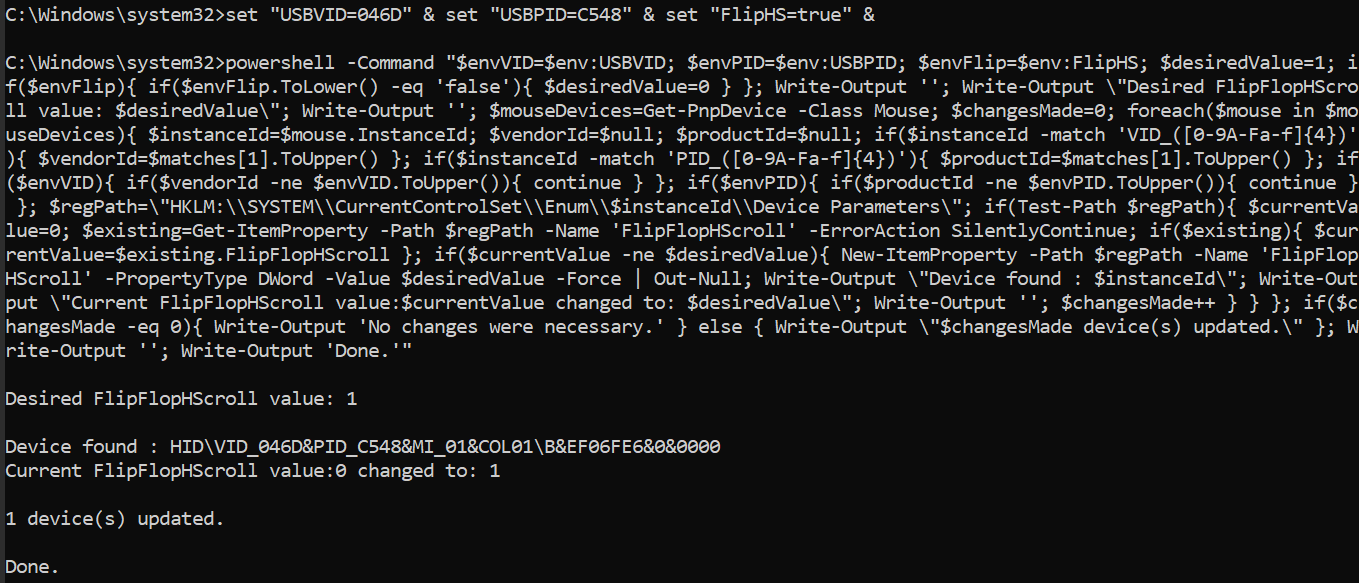
-
Ah, and you can adjust the horizontal scroll rate like this
I find for the Logitech MX Master 3S the value of 30 is very pleasant for long, 8000 character lines.
call set "NEW_WheelScrollChars=30" & ( call reg add "HKCU\Control Panel\Desktop" /v WheelScrollChars /t REG_SZ /d %NEW_WheelScrollChars% /f & call RUNDLL32.EXE user32.dll,UpdatePerUserSystemParameters & ( reg query "HKCU\Control Panel\Desktop" | findstr /i scroll ) )
This will take effect only for application launched after this is changed.

Hello! It looks like you're interested in this conversation, but you don't have an account yet.
Getting fed up of having to scroll through the same posts each visit? When you register for an account, you'll always come back to exactly where you were before, and choose to be notified of new replies (either via email, or push notification). You'll also be able to save bookmarks and upvote posts to show your appreciation to other community members.
With your input, this post could be even better 💗
Register Login