Notepad++ v8.9.3 Release Candidate
-
Notepad++ 8.9.3 Release Candidate is available here:
~~https://github.com/donho/notepad-plus-plus/releases/tag/RC~~Notepad++ 8.9.3 RC2 is updated here:
~~https://github.com/donho/notepad-plus-plus/releases/tag/RC2~~Notepad++ 8.9.3 RC3 is updated here:
~~https://github.com/donho/notepad-plus-plus/releases/tag/RC3~~Notepad++ 8.9.3 RC4 is updated here:
https://github.com/donho/notepad-plus-plus/releases/tag/RC4The added fix & enhancement is in change log #8 & #16.
Notepad++ v8.9.3 regression fixes, bug-fixes & new improvements:
- Regression fix: a crash in User Defined Language. (Fix #17520)
- Regression fix: installing (or removing) plugin re-opens Notepad++ with permanent admin privilege (Fix #17540)
- Regression-fix: wrongly added parenthesis for some multi-bytes characters. (Fix #17521, #17802)
- Regression-fix: incorrect function list text display for non-UTF8 documents. (Fix #17847)
- Regression-fix: ProjectPanel Workspace text localization issue. (Fix community report)
- Regression-fix: Change History margin not enabled by default. (Fix comment repport)
- Regression-fix: Notepad++ update & plugin download fail behind corporate MITM proxies. (Fix community report)
- Security enhancement: Update cURL to v8.19.0 in auto-updater (WinGUp) to fix cURL security issue (CVE-2025-14819). (Fix #17869)
- Improve performance by migrating the XML parser from TinyXML to pugixml. (Fix #16175)
- Update Scintilla to 5.6.0 & Lexilla to 5.4.7. (Implement #17562)
- Fix the issue where printing caused Notepad++ to crash. (Fix #6126, #12645, community report #1, community report #2, community report #3)
- Fix Find in Files failing to search file content on disk. (Fix #16177, #17070)
- Add disableNppAutoUpdate.xml to disable auto-update when WinGUp (GUP.exe) is present. (Implement #17836)
- Fix a memory leak on exit. (Fix #17817)
- Fix installed auto-completion files not overwritten after update. (Fix #14749)
- Add model capacity of shortcuts.xml & contexMenu.xml for administration. (Fix #17872)
- Add an option to disable selected text drag-and-drop. (Fix #2571, #11335)
- Fix wrong theme-writing path for non-ProgramFiles installations. (Fix comment repport)
- Enhancement: prevent XML config files from being overwritten when updating portable package (copy/paste). (Fix #9755, #14279, #15120)
- Fix incomplete Find dialg tab translation when 1st opêned from Project Panels. (Fix community report)
- Fix Notepad++ spawning a new Windows Explorer process in Task Manager. (Fix comment repport)
- Add Function List & Autocompletion for D language. (Fix #17349)
The release is planned for 23-24 March next week provided no regressions or critical issues are identified.
-
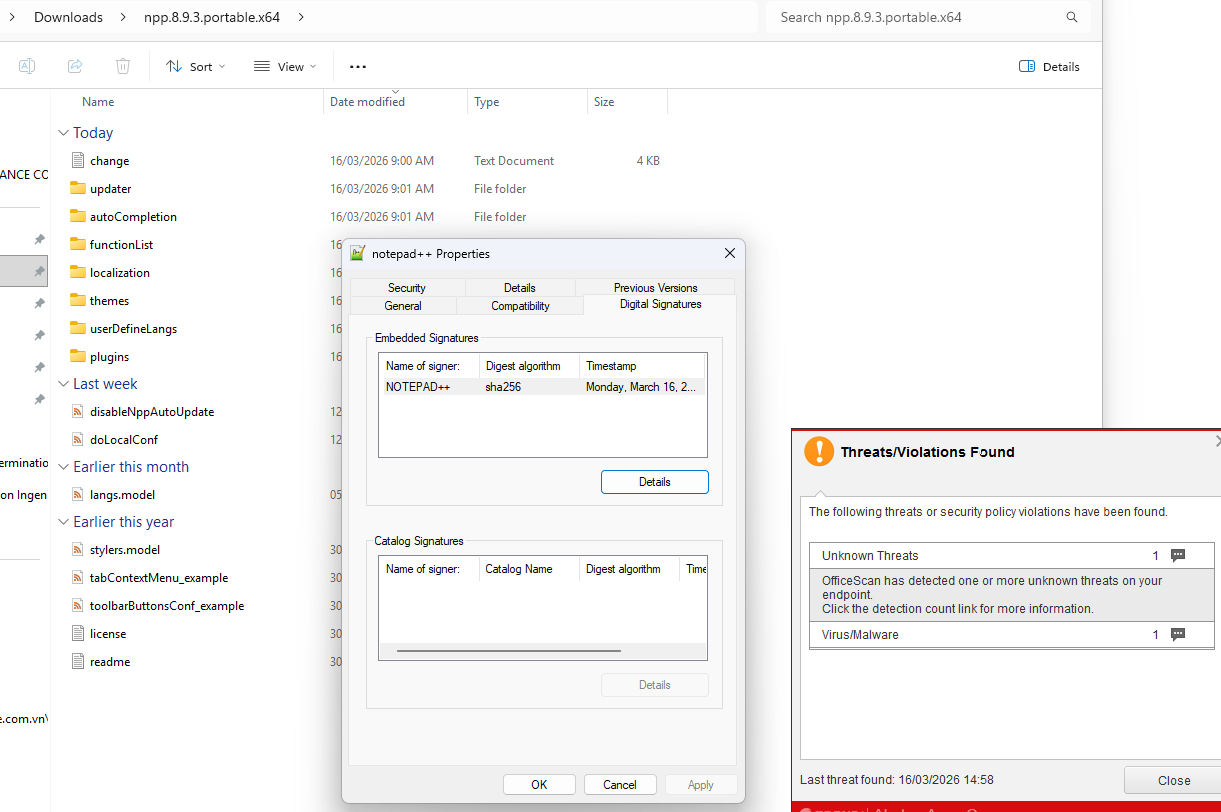
@donho i have just extract & run portable version x64 in my work-laptop. Virus/malware detected with log as-below (i didn’t have this issue with 8.9.1 & 8.9.2):
Damage Cleanup Engine (DCE) 7.5(Build 1209) (RCM: 8.20.0-1210)
Windows 10 Insider Preview(Build 26100)Start time : Mon Mar 16 2026 13:43:54
Load Damage Cleanup Template (DCT) “C:\Program Files (x86)\Trend Micro\Security Agent\TMRDCT.ptn” (version ) [fail]
Load Damage Cleanup Template (DCT) “C:\Program Files (x86)\Trend Micro\Security Agent\tsc.ptn” (version 1634) [success]
Normal File Check for Detected File “C:\Users\xx.xxx\Softwares\Notepad++\notepad++.exe” (Virus Name TROJ.Win32.TRX.XXPE50FFF103E0002): Normal file check result 0x00000002, from “NOTEPAD++ [D]”.
GenericClean::Pattern:WORM_DOWNAD,Virus Name:TROJ.Win32.TRX.XXPE50FFF103E0002,Virus File Path:C:\Users\xx.xxx\Softwares\Notepad++\notepad++.exe
GenericClean::Pattern:PE_PATCHEP.A,Virus Name:TROJ.Win32.TRX.XXPE50FFF103E0002,Virus File Path:C:\Users\xx.xxx\Softwares\Notepad++\notepad++.exe
GenericClean::Pattern:BKDR_TIDIES,Virus Name:TROJ.Win32.TRX.XXPE50FFF103E0002,Virus File Path:C:\Users\xx.xxx\Softwares\Notepad++\notepad++.exe
GenericClean::Pattern:TROJ_REVETON,Virus Name:TROJ.Win32.TRX.XXPE50FFF103E0002,Virus File Path:C:\Users\xx.xxx\Softwares\Notepad++\notepad++.exe
GenericClean::Pattern:WORM_GAMARUE,Virus Name:TROJ.Win32.TRX.XXPE50FFF103E0002,Virus File Path:C:\Users\xx.xxx\Softwares\Notepad++\notepad++.exe
GenericClean::Pattern:BKDR_POISON,Virus Name:TROJ.Win32.TRX.XXPE50FFF103E0002,Virus File Path:C:\Users\xx.xxx\Softwares\Notepad++\notepad++.exe
GenericClean::Pattern:PE_QUERVAR,Virus Name:TROJ.Win32.TRX.XXPE50FFF103E0002,Virus File Path:C:\Users\xx.xxx\Softwares\Notepad++\notepad++.exe
GenericClean::Pattern:BKDR_PLUGX,Virus Name:TROJ.Win32.TRX.XXPE50FFF103E0002,Virus File Path:C:\Users\xx.xxx\Softwares\Notepad++\notepad++.exe
GenericClean::Pattern:LNK_DORKBOT,Virus Name:TROJ.Win32.TRX.XXPE50FFF103E0002,Virus File Path:C:\Users\xx.xxx\Softwares\Notepad++\notepad++.exe
GenericClean::Pattern:BREX_GENCLEAN,Virus Name:TROJ.Win32.TRX.XXPE50FFF103E0002,Virus File Path:C:\Users\xx.xxx\Softwares\Notepad++\notepad++.exe
GenericClean::Pattern:VBS_CRIGENT,Virus Name:TROJ.Win32.TRX.XXPE50FFF103E0002,Virus File Path:C:\Users\xx.xxx\Softwares\Notepad++\notepad++.exe
GenericClean::Pattern:TROJ_LNKCLEAN,Virus Name:TROJ.Win32.TRX.XXPE50FFF103E0002,Virus File Path:C:\Users\xx.xxx\Softwares\Notepad++\notepad++.exe
GenericClean::Pattern:PE_URSNIF-INF,Virus Name:TROJ.Win32.TRX.XXPE50FFF103E0002,Virus File Path:C:\Users\xx.xxx\Softwares\Notepad++\notepad++.exe
GenericClean::Pattern:COINMINER_MALXMR,Virus Name:TROJ.Win32.TRX.XXPE50FFF103E0002,Virus File Path:C:\Users\xx.xxx\Softwares\Notepad++\notepad++.exe
GenericClean::Pattern:TSPY_EMOTETSVC,Virus Name:TROJ.Win32.TRX.XXPE50FFF103E0002,Virus File Path:C:\Users\xx.xxx\Softwares\Notepad++\notepad++.exe
GenericClean::Pattern:PE_AMBER,Virus Name:TROJ.Win32.TRX.XXPE50FFF103E0002,Virus File Path:C:\Users\xx.xxx\Softwares\Notepad++\notepad++.exe
GenericClean::Pattern:File_SCAN,Virus Name:TROJ.Win32.TRX.XXPE50FFF103E0002,Virus File Path:C:\Users\xx.xxx\Softwares\Notepad++\notepad++.exe
GenericClean::Pattern:TSC_GENSCAN,Virus Name:TROJ.Win32.TRX.XXPE50FFF103E0002,Virus File Path:C:\Users\xx.xxx\Softwares\Notepad++\notepad++.exe
TSC_GENCLEAN[virus found]
–>delete process(“C:\Users\xx.xxx\Softwares\Notepad++\notepad++.exe”,“”,“”) success
–>delete file(“C:\Users\xx.xxx\Softwares\Notepad++\notepad++.exe”,“”,“”) success
–>delete file(“C:\Users\xx.xxx\Desktop\Notepad++.lnk”,“”,“”) success
GenericClean::Pattern:TSC_GENCLEAN,Virus Name:TROJ.Win32.TRX.XXPE50FFF103E0002,Virus File Path:C:\Users\xx.xxx\Softwares\Notepad++\notepad++.exe
GenericClean::Pattern:TRENDX_GENCLEAN,Virus Name:TROJ.Win32.TRX.XXPE50FFF103E0002,Virus File Path:C:\Users\xx.xxx\Softwares\Notepad++\notepad++.exeComplete time : Mon Mar 16 2026 13:43:58
Execute pattern count(20), Virus found count(1), Virus clean count(1), Clean failed count(0) -
Neither Windows Defender nor the scan on virustotal, which uses a Trend Micro engine, detected anything.
Did you download the ZIP file using the link provided?
-
@Ekopalypse Yes, this link as above. (7z). I often visit this forum to check new version of Notepad++.
-
- Fix v8.9.2 wingup regression when installing (or removing) plugin re-opens Notepad++ with permanent admin rights ( #17540 )
And I’d also like to especially highlight (in the release notes or news) that this version finally completed the difficult tinyxml1 -> pugixml transition.
-
I’m not familiar with the inner workings of the Trend Micro engine and its OfficeScan feature, but could there be some kind of “blocked” version feature?
Something where an administrator can specify which versions are allowed or blocked?
Do you get more information when you click the links in the “Threat Violations” window?
Or does the antivirus agent perhaps need to receive a definition update—or whatever Trend Micro calls it—to be up to date? -
@Xuân-Thơ-HOÀNG said in Notepad++ v8.9.3 Release Candidate:
Windows 10 Insider Preview(Build 26100)
Should be Win11, right? If so, it’s a very old RTM (Release to Manufacturing) Canary/Dev-channel candidate for the 24H2. Such Win builds are often source of problems.
(Virus Name TROJ.Win32.TRX.XXPE50FFF103E0002)
That TRX means it’s from their predictive Machine Learning (i.e. most likely a complete junk - it’s AI-driven analysis to detect emerging or up-to-date unknown 0-day threats based only on file behavior and characteristics rather than verified malware signatures…).
-
@xomx i return Ok with 8.9.1 with debug info. I don’t have admin’s right.
Maybe, it just be specical case of Trend Micro of my company. I will recheck later in next week :) if there is any issue.Notepad++ v8.9.1 (64-bit)
Build time: Jan 18 2026 - 22:45:31
Scintilla/Lexilla included: 5.5.8/5.4.6
Boost Regex included: 1_90
pugixml included: 1.15
nlohmann JSON included: 3.12.0
Path: C:\Users\hx.tho\Softwares\Notepad++\notepad++.exe
Command Line:
Admin mode: OFF
Local Conf mode: ON
Cloud Config: OFF
Periodic Backup: ON
Placeholders: OFF
Scintilla Rendering Mode: SC_TECHNOLOGY_DIRECTWRITE (1)
Multi-instance Mode: monoInst
asNotepad: OFF
File Status Auto-Detection: cdEnabledNew (for current file/tab only)
Dark Mode: OFF
Display Info:
primary monitor: 1920x1080, scaling 100%
visible monitors count: 2
installed Display Class adapters:
0001: Description - Intel® UHD Graphics
0001: DriverVersion - 31.0.101.2115
OS Name: Windows 11 Pro (64-bit)
OS Version: 24H2
OS Build: 26100.7623
Current ANSI codepage: 1252 -
- Fix v8.9.2 wingup regression when installing (or removing) plugin re-opens Notepad++ with permanent admin rights ( #17540 )
And I’d also like to especially highlight (in the release notes or news) that this version finally completed the difficult tinyxml1 -> pugixml transition.
Well spotted!
Added your suggestions in #2 & #8. I will also update change log in the release.@Xuân-Thơ-HOÀNG
I believe this is another false positive. Unfortunately aside from users reporting the issue to the antivirus company, there’s nothing more I can do. -
New RC2, which fixes the issue where printing caused Notepad++ to crash, is available:
https://github.com/donho/notepad-plus-plus/releases/tag/RC2 -
New RC3, which fixes the issue of installed auto-completion files not overwritten after update, is available:
https://github.com/donho/notepad-plus-plus/releases/tag/RC3 -
New RC4, in which the cURL security issue in WinGUp is fixed & model capacity of shortcuts.xml & contexMenu.xml for administration. is added, is available:
https://github.com/donho/notepad-plus-plus/releases/tag/RC4 -
FYI:
I just updated RC4 binaries with the fix:
https://github.com/notepad-plus-plus/notepad-plus-plus/commit/9b558895e744601842ffdaff4679467863b9722dSorry for the inconvenience.
-
D donho unpinned this topic on



Hello! It looks like you're interested in this conversation, but you don't have an account yet.
Getting fed up of having to scroll through the same posts each visit? When you register for an account, you'll always come back to exactly where you were before, and choose to be notified of new replies (either via email, or push notification). You'll also be able to save bookmarks and upvote posts to show your appreciation to other community members.
With your input, this post could be even better 💗
Register Login