Notepad++ release 8.9.3
-
Notepad++ release 8.9.3 is available:
https://notepad-plus-plus.org/news/v893-released/Notepad++ v8.9.3 regression fixes, bug-fixes & new improvements:
- Regression fix: a crash in User Defined Language. (Fix #17520)
- Regression fix: installing (or removing) plugin re-opens Notepad++ with permanent admin privilege (Fix #17540)
- Regression-fix: wrongly added parenthesis for some multi-bytes characters. (Fix #17521, #17802)
- Regression-fix: incorrect function list text display for non-UTF8 documents. (Fix #17847)
- Regression-fix: ProjectPanel Workspace text localization issue. (Fix community report)
- Regression-fix: Change History margin not enabled by default. (Fix comment repport)
- Regression-fix: Notepad++ update & plugin download fail behind corporate MITM proxies. (Fix community report)
- Security enhancement: Update cURL to v8.19.0 in auto-updater (WinGUp) to fix cURL security issue (CVE-2025-14819). (Fix #17869)
- Improve performance by migrating the XML parser from TinyXML to pugixml. (Fix #16175)
- Update Scintilla to 5.6.0 & Lexilla to 5.4.7. (Implement #17562)
- Fix the issue where printing caused Notepad++ to crash. (Fix #6126, #12645, community report #1, community report #2, community report #3)
- Fix Find in Files failing to search file content on disk. (Fix #16177, #17070)
- Add disableNppAutoUpdate.xml to disable auto-update when WinGUp (GUP.exe) is present. (Implement #17836)
- Fix a memory leak on exit. (Fix #17817)
- Fix installed auto-completion files not overwritten after update. (Fix #14749)
- Add model capacity of shortcuts.xml & contexMenu.xml for administration. (Fix #17872)
- Add an option to disable selected text drag-and-drop. (Fix #2571, #11335)
- Fix wrong theme-writing path for non-ProgramFiles installations. (Fix comment repport)
- Enhancement: prevent XML config files from being overwritten when updating portable package (copy/paste). (Fix #9755, #14279, #15120)
- Fix incomplete Find dialg tab translation when 1st opêned from Project Panels. (Fix community report)
- Fix Notepad++ spawning a new Windows Explorer process in Task Manager. (Fix comment repport)
- Add Function List & Autocompletion for D language. (Fix #17349)
Note that I’m away from home and I’ll be able to provide GPG signatures in two days. Sorry for the inconvenience.
Auto-updater will be triggered in 2 weeks, if no critical issue found.
-
Possible bug/shortcoming, or maybe just incorrect online manual info:
I occasionally use the Column Editor Dialog, but looks like a few things have changed since I last used it. First of all, not sure if this is new or not, but the dialog’s title bar says “Column / Multi-Selection Editor”, while the online manual appears (at a glance, anyway) to only address its use for columnar editing.
In the dialog, there is a field for “Repeat”. The manual states, “Repeat will repeat the same number n times. Defaults to 1 if left blank.” I do not recall ever having to deal with that field at all before, but when using it in v8.9.3, it won’t allow me to leave it blank.
Notepad++ v8.9.3 (32-bit)
Build time: Mar 20 2026 - 00:43:07
Scintilla/Lexilla included: 5.6.0/5.4.7
Boost Regex included: 1_90
pugixml included: 1.15
nlohmann JSON included: 3.12.0
Path: C:\Program Files (x86)\Notepad++\notepad++.exe
Admin mode: OFF
Local Conf mode: OFF
Cloud Config: OFF
WinGUp: present
disableNppAutoUpdate.xml: absent
Periodic Backup: ON
Placeholders: OFF
Scintilla Rendering Mode: SC_TECHNOLOGY_DIRECTWRITE (1)
Multi-instance Mode: monoInst
asNotepad: OFF
File Status Auto-Detection: cdEnabledNew (for current file/tab only)
Dark Mode: OFF
Display Info:
primary monitor: 1920x1080, scaling 100%
visible monitors count: 1
installed Display Class adapters:
0000: Description - Intel® HD Graphics 620
0000: DriverVersion - 31.0.101.2111
0001: Description - NVIDIA GeForce 940MX
0001: DriverVersion - 30.0.15.1169
OS Name: Windows 10 Enterprise (64-bit)
OS Version: 22H2
OS Build: 19045.6466
Current ANSI codepage: 1252
Plugins:
BetterMultiSelection (1.5)
ColumnsPlusPlus (1.3.1)
ColumnTools (1.4.5.1)
ComparePlus (2.2)
DSpellCheck (1.5)
ExtSettings (1.3.1)
HTMLTag_unicode (1.5.6)
mimeTools (3.1)
MultiClipboard (2.1)
MultiReplace (5.0.0.35)
NppCalc (1.5)
NppConverter (4.7)
NppExport (0.4)
NPPJSONViewer (2.1.1)
NppTextFX (1.4.1)
NppXmlTreeviewPlugin (2)
PreviewHTML (1.4.3)
PythonScript (2.1)
RegexTrainer (1.2)
SessionMgr (1.4.4) -
@M-Andre-Z-Eckenrode said in Notepad++ release 8.9.3:
Possible bug/shortcoming, or maybe just incorrect online manual info:
One of each. But neither are unique to v8.9.3.
In general, when replying to the Announcement posts, make sure that the issue you are brining up really started in the version you comment on: if it started earlier, it really belongs in a separate discussion, and if it’s confirmed, as a normal bug report.
Quick responses to each:
The “Column Editor” dialog has actually been renamed to “Column/Multi-Selection Editor” since v8.5.4 in 2023 (in the Changes, it was lumped as part of the “GUI Enhancements”). It’s true that the manual doesn’t use the text of the “/ Multi-Selection” for the dialog title, but the screenshot in the UM has included the more recent dialog for some time. But yes, the manual does need to mention that all those dialog features work in multi-selection mode, too. (You can actually create issues in the user manual repo directly (https://github.com/notepad-plus-plus/npp-usermanual/issues) to point out things like that. {edit: fixed in PR#863}
For not being able to leave Column Editor entries blank: there was a change to
ColumnEditorDlg::getNumericFieldValueFromText()in v8.9.2 where it no longer handles the empty field the same as it used to, creating a regression in v8.9.2 (which carried into v8.9.3). (I will create an issue for this one momentarily. {edit: issue #17912}) -
-
@xomx said in Notepad++ release 8.9.3:
v8.9.3 (Scintilla) EOL regression: #17920
Thank you for the heads up.
It’s indeed a regression, but not a critical one.
Let’s wait one more week, if no critical regression or issue is reported, the auto-updater will be triggered for the release v8.9.3. -
FYI, auto-update is triggered for v8.9.3.
-
With EOL regression, I better stay on 8.9.2.
The EOL mismatch often happens when copying and pasting between different apps and web pages. In this situation, the text editor must be a reliable tool of fixing all these mismatches. -
@Vitalii-Dovgan said in Notepad++ release 8.9.3:
With EOL regression, I better stay on 8.9.2.
The EOL mismatch often happens when copying and pasting between different apps and web pages. In this situation, the text editor must be a reliable tool of fixing all these mismatches.For you, and anyone else, who needs to fix EOLs in the meantime, even with v8.9.3: regular expression FIND =
\r\n|\r|\nREPLACE =\r\nReplace All will do what you want (and can be easily recorded as a macro) -
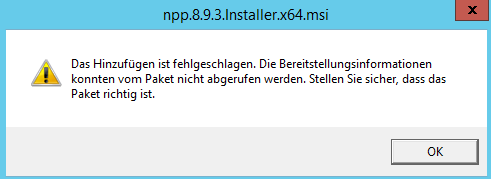
Hello, we got an issue with the MSI file - trying to go for the gpo installation path - adding the MSI to the softwaredeployment complains that the deployment information can not be read from the package.
(we got 8.9.2, 8.9.1 already deployed sing GPOs)
any advice is appreciated (or if someone could give the MSI the required information)
-
adding the MSI to the softwaredeployment complains that the deployment information can not be read from the package.
Could you provide more detailled info?
-
@donho tryin’ - as usual with a lots of other MSIs we take to the softwareinstallation in the GPO editor, then select “new - package”, select the current npp.8.9.3.Installer.x64.msi file from our GPO deployment path, open it, then select to deploy the package in a customized version (German: Erweitert), but tried all three options in the meantime, all end with the GPO editor reporting that adding the package to the GPO went wrong because the deploymentinformation can not be read (from the package) and we should check if we got the correct softwarepackage…
(german screenshot)
-
@hknet said in Notepad++ release 8.9.3:
as usual with a lots of other MSIs we take to the softwareinstallation in the GPO editor, then select “new - package”, select the current npp.8.9.3.Installer.x64.msi file from our GPO deployment path, open it, then select to deploy the package in a customized version (German: Erweitert), but tried all three options in the meantime, all end with the GPO editor reporting that adding the package to the GPO went wrong because the deploymentinformation can not be read (from the package) and we should check if we got the correct softwarepackage…
It’s likely that Windows has placed a “Zone.Identifier” alternate data stream on it, marking it as untrusted.
If not, please check the network share where npp.8.9.3.Installer.x64.msi is stored has Read permissions for both “Domain Computers” and “Authenticated Users” (or at least your specific admin account). -
D donho unpinned this topic on




Hello! It looks like you're interested in this conversation, but you don't have an account yet.
Getting fed up of having to scroll through the same posts each visit? When you register for an account, you'll always come back to exactly where you were before, and choose to be notified of new replies (either via email, or push notification). You'll also be able to save bookmarks and upvote posts to show your appreciation to other community members.
With your input, this post could be even better 💗
Register Login