Search++: A work in progress
-
Regarding the Search++ Results dialog :
Would it be possible to add a Purge option, like in the context menu of the N++ Search results dialog ? You could use the same label Purge for every search or some equivalent ( I do like Purge before each search )
A question about this. Since it is in a sense a “destructive” option, do you think it should be remembered across Notepad++ sessions, or should it have to be invoked afresh in each session where you want it enabled?
-
Hi, @coises,
In my opinion, this option seems more like a way of working than a delete option. So, I think this option should remain active between Notepad++ sessions. Note that it’s presently the case within the N++
Search resultspanel.But, of course, on re-opening N++, the N++
Search resultsand theSearch++ Resultspanels are both cleared silently, before any search !After opening Notepad+ and a first search, involving the N++
Search resultsor theSearch Resultspanels, you can easily un-check thatPurgeoption if you plan to compare multiple searches !BR
guy038
-
Search++ version 0.6.1 is available.
This update enhances the Search++ Results list, including adding more detail to the search headers, implementing an “automatically purge” toggle and recognizing single-click in the margin.
All comments, critiques and thoughts are welcome!
- Would it be possible to add a Purge option, like in the context menu of the N++
Search resultsdialog ?
- Although written in your files list, I also noted that the number of scanned files is not reported in the
Search++ Results** dialog, unlike with the N++ **Search results` dialog
[…]
And, if possible, it would be best to include the chosen options of the current regex too, like
Regex, Case,...?!To end with, I noticed that, within the N++
Search results, it is possible to easily see all files which has matches, without seeing the matched linesThis update addresses all those points. See the help for details about the commands in the results list.
I’m not handling folding quite the same way as Notepad++ does. (It could be that in time I will decide to try to emulate Notepad++’s appearance and behavior more closely.) What I did was add a context menu option (also available as Shift+Enter or Shift+double-click) for search header lines that toggles the fold state of all documents in that search without folding the search itself. So if you select Expand/Collapse Search, or double-click, the search folds or unfolds with the folding of documents within it unchanged. If you select Expand/Collapse Documents, or Shift+double-click, when the search is expanded, all documents within that search either expand or collapse (the opposite of whatever is the state of the first document).
I added a few other things, like clicking in a margin being equivalent to double-clicking in a header line or on the first position in a detail line. There is a purge toggle now, and search header lines include information about how many files were searched and the type of search (including modifiers).
- Would it be possible to add a Purge option, like in the context menu of the N++
-
Hello, @coises and All,
Thanks for this quick new version. And many thanks for implementing all propositions that I suggested ;-)) So far, everything seems to work nicely !
Now, one request :
- Would it be possible, in the
Search++ Resultsto prevent the displaying of the last character ( an?sign inside a rectangle ) in all lines ( Search line, Document lines and Matched lines ) ? Personally, I think it globally makes the display harder to read ! Just a personnal appreciation
And one question :
Natively, you can swap the keyboard focus between the N++
Search resultsand theCurrent documentwindow by hitting theF7key. I do not see an equivalent with your Search++ pluginI mean :
When, both, the
Search++and theSearch++ Resultspanels are opened, you can swap the keyboard focus between them with theCtrl + Hshortcut. How to toogle between theSearch++ Resultsand theCurrent documentwindow ?Best Regards,
guy038
- Would it be possible, in the
-
Hi, @coises and All,
Sorry, but I came across a serious bug regarding the
ICUsearch, sinceSearch++versionv0.6-
The Find in Selection, Find in Marked Text and Find in Whole Document options
-
The Find All in Selection, Find All in Marked Text and Find All in Whole Document options
Triggers the closure of Notepad++, without saving any configuration file and unsaved tabs
After some quick tests :
-
The Select, Mark and Show options,
-
The Count in Selection, Count in Marked Text and Count in Whole Document
Seems to work correctly in
ICUmodeBR
guy038
-
-
@guy038 said:
I came across a serious bug regarding theICUsearch, sinceSearch++versionv0.6Thank you for the detailed report. I can reproduce it… in the release version. It doesn’t happen in a debug version (which uses exactly the same code); so it’s a subtle error somewhere. I will find it.
I changed some existing code when I added Find in Files. You observation that this fault began in 0.6 will help me know where to look.
-
- Would it be possible, in the
Search++ Resultsto prevent the displaying of the last character ( an?sign inside a rectangle ) in all lines ( Search line, Document lines and Matched lines ) ?
Huh. I know what must be causing that, but I don’t know why it is causing it (on your system, but not on mine). (I set line ending characters to be displayed, but then to display with zero opacity. I do this so the marks I place to indicate a zero-length match will still show when the match occurs at the end of a line. The mark must be placed on the following character, and if the character isn’t shown, neither is the mark.)
Would you tell me what font you use for Notepad++ documents (the Search++ Results window copies that from the document window) and what you have at Settings | Preferences… | MISC. for rendering mode (GDI or DirectWrite)?
If I can figure out why you see the characters, hopefully I can figure out what to change so that you (and others with the same configuration) won’t see them.
Natively, you can swap the keyboard focus between the N++
Search resultsand theCurrent documentwindow by hitting theF7key. I do not see an equivalent with your Search++ pluginThe problem is that Search++ can’t (or shouldn’t… see below) control what shortcut keys do when focus is in Notepad++.
From the Search++ Results window, Ctrl+N will take you to the document. To switch from the document to the Results, though, I’d have to add a Search++ Results entry on the Plugins | Search++ menu, and then you’d have to set a shortcut for that in the Notepad++ shortcut mapper. You probably wouldn’t want to give up Ctrl+N, though.
The only way to get from Notepad++ to Search++ (or any plugin) is through a shortcut that’s either manually added in Shortcut Mapper or added by default in the plugin’s setup. (I’m still not sure how conflicts are resolved when a plugin defines a shortcut key that is already defined by default, by the user or by another plugin. I did define a few shortcut keys in Columns++ for manipulating rectangular selections, but it still bothers me that it feels a little… arrogant… to do that. My plugin might not be as important to the user as something else that also wants those keys.)
I am open to suggestions on how to manage this. I agree that consistency between navigation keys used when focus is in the plugin and when focus is in Notepad++ would be desirable, I just don’t have a plausible design for it.
- Would it be possible, in the
-
Hi, @coises,
Practically, I installed your plugin
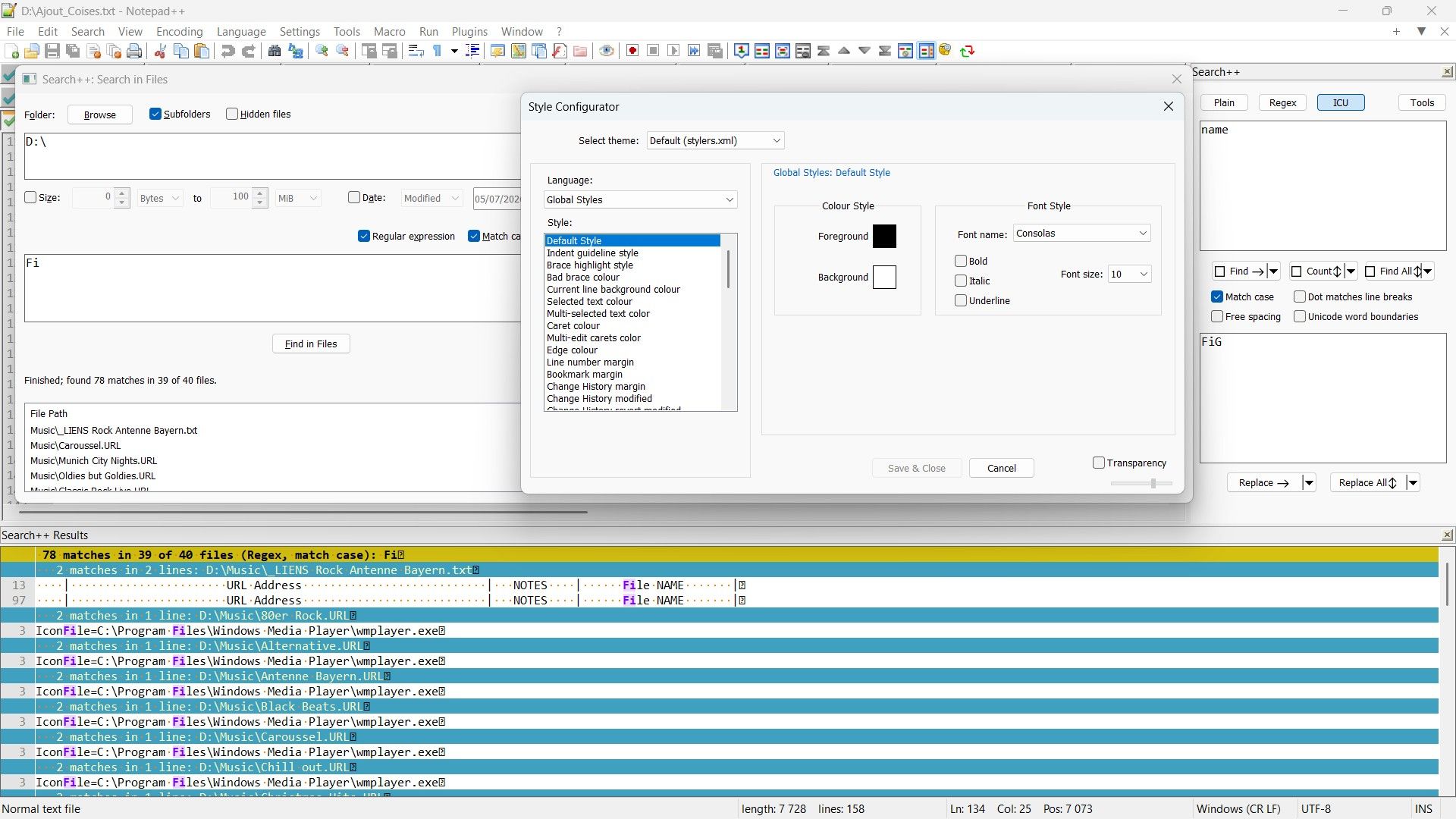
Search++on a8.9_x64version of N++As you can see, in the screenshot below :
-
I did not hit the Show All characters option (
¶) -
I did a search on a specific folder (
^Music) -
Most of the time, I use the Consolas font (
Consolas / Version 7.00 / Disposition **Open Type** signé numériquement **True Type Contours)
But you found out the culprit : it’s just because the
GDI ( most compatible)option was selected !. Luckily, for any other option of the rendering mode, after closing an re-starting N++, this special character does not display, anymore !
Regarding the problem about swapping between the
Search++ Resultsand theCurrent Documentwindow, do not bother about it :-))May be, you remenber that I personally used the
Ctrl + Shift+ Nshortcut to open theSearch...option. Thus, each use of theCtrl + Shift + N, alternatively, opens or closes mySearch...docked panelSo, I was able to deduce a way ( rather long, of course ) to do that :
-
Firstly, use
Ctrl + Nshortcut to switch to theCurrent Documentwindow -
Secondly, use the
Ctrl + Shift + Nshortcut to put the focus on theSearch..panel -
Thirdly, use the
Ctrl + Hshortcut to get the focus on theSearch++ Resultspanel, again !
Even, on my French keyboard, the
Hkey is quite close to theNkey !BR
guy038
-
-
But you found out the culprit : it’s just because the GDI ( most compatible) option was selected !. Luckily, for any other option of the rendering mode, after closing an re-starting N++, this special character does not display, anymore !
Thanks for documenting that!
It should appear correctly in GDI mode too, of course. I suspect the problem will turn out to be that GDI mode doesn’t support alpha transparency, so my setting the opacity to zero is doing nothing. I’ll have to find another way.
-
Search++ version 0.6.2 is available:
- Fix a critical error that caused ICU searches to crash Notepad++.
- Fix unwanted characters appearing at the ends of lines in the Results list with Notepad++ rendering mode GDI.
- Fix regression of line ending symbols being in text color instead of white space color, and switch the CRLF symbol in GDI mode to one that hopefully renders more consistently.
Thanks to @guy038 for catching the ICU error and the unwanted characters in the results list in GDI mode.
(The ICU error appears to have been due to an uninitialized variable. The faulty code has been there from the beginning. As chance would have it, up until now it just happened to land on memory that contained an innocuous value. Hopefully I didn’t miss anything else similar…)
-
Hello, @coises and All,
Again, thanks for quickly fixing the different issues ( and some others, at the same time ! ). So far, everything looks OK ;-))
Now, I did a test, searching in all files of my
D:USB key, with :-
The native N++
Find in Filesdialog -
The Search++
Search in Filesdialog -
The MultiReplace
Find All in Filescommand
To be sure to process fair tests, I unplung my USB key, re-start my laptop completely, replug my USB key and starts a new N++ session, before running these three
Find in Filesoperations, in turn !I searched for the
Fistring, with theMatch caseand theRegular expressionoptions checked. I got :-
27,112 matches in 833 files of 1,761 searchedfor theN++Search Results panel, in1m 37s -
27,112 matches in 833 files of 1,761 filesfor theSearch++Search++ Results, in2m 21s -
27,087 hits in 835 file(s)for theMultiReplaceSearch results panel, in1m 36s
However, when you re-run this same search, without exiting N++, right after the first search, we get the job done in about :
-
6sfor theN++search -
5.2sfor theMultiReplacesearch -
1,1sfor theSearch++search
So, apparently, the results of the first search seem to speed up all the next same searches, whatever the search engine used ( native one or plugins ones ) !
Best Regards,
guy038
P.S. :
I understood the small differences which occur in the
MultiReplacesearch( 27,112 - 25 )matches in( 833 + 2 )files. But, I prefer, first, to study more closely theMultiReplaceplugin, which is very powerful too and reply later to @thomas-knoefel. It concerns the encoding of4files which is not recognized properly and which occurs only when theFind in Filescommand is used. TheFind AllandFind in Docscommands, themselves, give correct results for these4files !? -
-
So, apparently, the results of the first search seem to speed up all the next same searches, whatever the search engine used ( native one or plugins ones ) !
My guess is that the total size of all the files on your USB key was well less than the amount of memory available to Windows. If so, then (I think) that when you repeated a test, almost nothing was read from the USB key: Windows already had the whole drive cached in memory.
It makes sense that in that circumstance, Search++ would be several times faster, because it uses multiple threads for search in files; I’m pretty sure both native Notepad++ search and MultiReplace are strictly single-threaded. So when the actual searching, rather than reading the files, is what takes most of the time, Search++ is using all cores of your CPU and the others are using just one.
I do wonder, though, why Search++ is so much slower on the first execution. I suspect that something in the way I’m reading files (trying to get several at once, since multiple threads are running) is reducing throughput from the USB key. There is probably a way to make that better. Whether I can figure out what it is remains to be seen.
Thanks for your testing!
-
I understood the small differences which occur in the MultiReplace search ( 27,112 - 25 ) matches in ( 833 + 2 ) files. But, I prefer, first, to study more closely the MultiReplace plugin, which is very powerful too and reply later to @thomas-knoefel. It concerns the encoding of 4 files which is not recognized properly and which occurs only when the Find in Files command is used. The Find All and Find in Docs commands, themselves, give correct results for these 4 files !?
As best I can make out, like Search++, MultiReplace processes searches against documents open in Notepad++ using the copy of the document that Notepad++ has loaded into Scintilla. (I can’t really think of another way it could be done.) That means that for existing files, Notepad++ has already determined the encoding and either loaded it as ANSI or UTF-8, or translated it to UTF-8. (Notepad++ never sets Scintilla to use any encoding other than UTF-8 or the system default code page; anything else is translated to UTF-8 and translated back on writing.)
So it’s no surprise that we’re both using the same encoding as Notepad++ for Find All and Find in Open Documents, because we’re just using the work Notepad++ has already done.
I think MultiReplace uses an invisible Scintilla to process searches in files. It could be that it hasn’t entirely replicated the labyrinthine logic Notepad++ uses to determine the encoding of a file (including the effect of Preferences | MISC. | Autodetect character encoding).
Search++ does not duplicate that logic either, but it approaches the problem in a different way. Rather than using an invisible Scintilla control, Search++ uses its customized version of Boost::regex directly on the data in the file buffer. So I never translate the file encoding to anything else. I do have to determine the encoding, though, as the choice of iterator for Boost::regex depends on that.
There are limitations, not yet formally documented, to the way Search++ handles encodings for Search in Files:
- UTF-16 files without a byte order mark are not recognized as such. (They’ll be misread as something else.)
- UTF-8 files without a byte order mark that contain any invalid UTF-8 sequences will be processed using the system default (ANSI) code page.
- Pure ASCII files are processed as UTF-8. (This doesn’t matter for Find, but I will have to review it when I implement Replace, since someone might include non-ASCII characters in the replacement text. I think there will have to be a user control to determine whether to promote ASCII to ANSI or to UTF-8.)
- Files without a byte order mark that are not pure ASCII and contain any invalid UTF-8 characters are processed using the system default code page. No attempt is made to detect whether a different legacy code page is more likely to be correct, or is explicitly declared within the file.
The sad fact about file encoding is that in most cases there is no algorithmic way to be absolutely certain about what it is. (The exceptions are pure ASCII — but then, if any non-ASCII characters are introduced, there is no way to know how those should be encoded — and some file types, like HTML and XML, that can include a declaration of their own encoding, the declaration itself being in plain ASCII. Byte order marks are, in practice, another exception: they could occur in a legacy encoding, but they would be so uncommon at the start of a file that it’s safe to assume they are definitive, or the file has been purposely engineered to cause mis-detection.)
I will probably improve handling of file encodings as Search++ evolves. I doubt that I will attempt to duplicate exactly what Notepad++ does.
-
C Coises referenced this topic on
-
Hello, @coises and All,
You said :
There are limitations, not yet formally documented, to the way Search++ handles encodings for Search in Files:

1. UTF-16 files without a byte order mark are not recognized as such. (They’ll be misread as something else.)

2. UTF-8 files without a byte order mark that contain any invalid UTF-8 sequences will be processed using the system default (ANSI) code page.

3. Pure ASCII files are processed as UTF-8. (This doesn’t matter for Find, but I will have to review it when I implement Replace, since someone might include non-ASCII characters in the replacement text. I think there will have to be a user control to determine whether to promote ASCII to ANSI or to UTF-8.)

4. Files without a byte order mark that are not pure ASCII and contain any invalid UTF-8 characters are processed using the system default code page. No attempt is made to detect whether a different legacy code page is more likely to be correct, or is explicitly declared within the file.
Thanks for this extra information !
FYI, during all my tests, the
Autodetect character encodingoption, in Settings > Preferences… > MISC, was checked and all the files, described in the P.S. section of my previous post, contain a Byte Order Mark (BOM). Here is the list of allUTF-16files of myD:USB key•------------•--------------------------------------------------------------•-----------------•---------------------•--------------------• | | | | Multi-Replace | Search++ / N++ | | BOM | File | Encoding | Matches 'Fi' | Matches 'Fi' | •------------•--------------------------------------------------------------•-----------------•---------------------•--------------------• | FE FF | D:\Plane_0_UCS-2_BE.txt | UTF-16 BE BOM | 2 | 0 | | FE FF | D:\Planes_0+1_UTF-16.txt | UTF-16 BE BOM | 2 | 0 | •------------•--------------------------------------------------------------•-----------------•---------------------•--------------------• | FF FE | D:\862_x64\plugins\NppExec\doc\NppExec\NppExec_HelpAll.txt | UTF-16 LE BOM | 0 | 31 | | FF FE | D:\Plane_0_UCS-2_LE.txt | UTF-16 LE BOM | 2 | 0 | | FF FE | D:\862_x64\plugins\Config\npec_cmdhistory.txt | UTF-16 LE BOM | 0 | 0 | | FF FE | D:\862_x64\plugins\Config\npes_last.txt | UTF-16 LE BOM | 0 | 0 | •------------•--------------------------------------------------------------•-----------------•---------------------•--------------------• | | Total | | 3 Files / 6 hits | 1 File / 31 hits | •------------•--------------------------------------------------------------•-----------------•---------------------•--------------------•Notes :
-
The correct results are reported in the last column
-
My USB key also contains
49UTF-8-BOM files (EF BB BF) correctly detected by all the search engines !
Now, based on my test, have you conducted any similar tests of your own, and have you found that searching with
Search++also takes longer compared to the native search in N++ ?Of course, I can run more tests myself, but I imagine your tests would be more valuable and might, perhaps, give you some ideas on how to increase the overall search speed with Search++
I’m really curious to hear your own observations !
Best Regards,
guy038
-
-
FYI, during all my tests, the
Autodetect character encodingoption, in Settings > Preferences… > MISC, was checked and all the files, described in the P.S. section of my previous post, contain a Byte Order Mark (BOM).Autodetect is irrelevant when a byte order mark is present: Notepad++ always honors byte order marks. The only time autodetect matters is for a file with no byte order mark that doesn’t appear to be UTF-8 and doesn’t have an internal indication (like an HTML file with a <meta charset> declaration) of its encoding. With autodetect off, such files will always be read using the system default code page. With autodetect on, Notepad++ runs some heuristic tests to try to guess whether the file uses a different legacy encoding.
When plugins access documents open in Notepad++ they necessarily use the copies Notepad++ has already loaded, so they “inherit” Notepad++’s encoding detection. The loaded copy will always be either in the system default code page (“ANSI”) or UTF-8. Notepad++ converts any document that isn’t one of those. (Any indication in the status bar other than ANSI or UTF-8 means Notepad++ has converted the document to UTF-8, and will convert it back to the indicated encoding when saving it.)
If a plugin accesses files on disk without opening them in Notepad++ — as Search++ does for Search in Files, and as it appears MultiReplace does when searching in files — it’s up to the plugin to sort out the encoding.
I’m not familiar with the code for @thomas-knoefel’s MultiReplace, but based on your tests, I suspect it doesn’t process UTF-16 correctly when searching in files. You could probably construct a minimized example and submit an issue if you were so inclined.
Now, based on my test, have you conducted any similar tests of your own, and have you found that searching with
Search++also takes longer compared to the native search in N++ ?Comparisons looked fine at first. I was running regular expressions with a lot of backtracking against thousands of files on an SSD. Then things fell apart when I tried a network share.
Most of my testing has been “stress testing” rather than comparisons, but they point to the same problem. I understand the problem. Engineering a solution is taking some time.
Your tests, with the inclusion of re-running the searches, demonstrate what is happening quite well.
In the rerun tests, the files from your thumb drive were already cached by Windows. Those second tests show (roughly) how much time the actual searching took. (Notice that Search++ was faster there, because it uses multiple cores of your computer to search several files simultaneously instead of processing them one at a time.)
The difference between the first and second runs is (roughly) the time it took to read the files from the thumb drive. That is where the current version of Search++ is just plain doing it wrong. I naïvely supposed that Windows was smart enough to “serialize” access to a device, like a USB drive, from different threads in a manner sensible for the device. Alas, it doesn’t work that way. However many threads your computer can run simultaneously, they’re all hitting the USB drive with requests for different files at the same time. Not only is that not any faster than single-threading them, it’s actually slower, because the controller in the drive is dealing with “too many” requests coming in all at once.
The multi-threading I have works pretty well for an internal SSD. It also works if Windows has already cached the entire folder in memory. For everything else… it sucks.
I’m working on solving that problem now. It’s slow going. There are a lot things you can “get by with” when single-threading that just blow up under one condition or another when multi-threading.
-
Search++ version 0.6.3.1 is available:
-
Fix a pair of errors that caused incorrect results when characters outside the basic multilingual plane were used in a regex replacement string and when a capture group included invalid UTF-8.
-
Fix problematic behavior for Show file in explorer on the context menu for the file list in the Search in Files dialog when the file list is large. The action could become sluggish or fail to complete and interfere with other activity.
-
Handle absolute file paths larger than MAX_PATH in Search in Files. (They still won’t open in Notepad++, but there was no reason Search in Files shouldn’t be able to parse them.)
-
Avoid “configuration file for this plugin was edited” when running multiple instances of Notepad++: only save when the last instance is closing.
Nothing exciting here, and hopefully no new bugs… just some particular fixes.
Apologies to anyone who downloaded 0.6.3 in the short time it was available. I chose a dumb way to detect the last running instance of Notepad++ that was bound to cause a problem sooner or later. In 0.6.3.1 it is replaced with a less dumb way.
-
-
Now, based on my test, have you conducted any similar tests of your own, and have you found that searching with Search++ also takes longer compared to the native search in N++ ?
I ran some tests this morning because I wanted to get a reference before I start testing changes to the multithread scheduling in Search++ — so I can verify that what is supposed to be better actually is better.
- This is Windows 10 Pro, 64 bit, running on a 2019 desktop with a Core i9-9900K and 32 GB RAM.
- D is an internal SSD. S is an internal HDD. U is a USB thumb drive. \\PEACOCK is another machine on the same local area network.
- The content of the folder Testing2 on each drive is the same. It’s a mix of 3,762 files in 228 folders, 591 MB total. Somewhere around 5% are binary files (dll, exe, png, etc.).
- For U, following your lead, I did a “repeat” running the same search immediately after the first; after that, I unplugged and reconnected the drive before proceeding to another test.
- I couldn’t conveniently unplug the internal drives, but testing showed no significant variation in successive trials on D, S or PEACOCK.
Some of these results are surprising. (I thought the hard disk would be noticeably slower than the SSD, and I expected to see a repeat of your experience with the USB drive.) I suspect that some specialized knowledge I do not have, and perhaps a more controlled environment, is required to measure performance meaningfully, so all this should be taken as anecdotal.
Search++ 0.6.3.1:
D:\Quick\Testing2     a([^\r\n])[^\r\n]*b\1  0:08.71  149,919 matches in 2,505 of 3,762 files (Regex): a([^\r\n])[^\r\n]*b\1
D:\Quick\Testing2     the                    0:01.44  445,907 matches in 3,342 of 3,762 files (Regex): the
S:\Testing2           a([^\r\n])[^\r\n]*b\1  0:08.91  149,919 matches in 2,505 of 3,762 files (Regex): a([^\r\n])[^\r\n]*b\1
S:\Testing2           the                    0:01.10  445,907 matches in 3,342 of 3,762 files (Regex): the
U:\Testing2           a([^\r\n])[^\r\n]*b\1  0:16.36  149,919 matches in 2,505 of 3,762 files (Regex): a([^\r\n])[^\r\n]*b\1
U:\Testing2 (repeat)  a([^\r\n])[^\r\n]*b\1  0:08.87  149,919 matches in 2,505 of 3,762 files (Regex): a([^\r\n])[^\r\n]*b\1
U:\Testing2           the                    0:24.84  445,907 matches in 3,342 of 3,762 files (Regex): the
U:\Testing2 (repeat)  the                    0:01.03  445,907 matches in 3,342 of 3,762 files (Regex): the
\\PEACOCK\Testing2    a([^\r\n])[^\r\n]*b\1  0:12.32  149,919 matches in 2,505 of 3,762 files (Regex): a([^\r\n])[^\r\n]*b\1
\\PEACOCK\Testing2    the                    0:07.07  445,907 matches in 3,342 of 3,762 files (Regex): the
Notepad++ 8.9.7:
D:\Quick\Testing2     a([^\r\n])[^\r\n]*b\1  1:53:64  Search "a([^\r\n])[^\r\n]*b\1" (149919 hits in 2505 files of 3762 searched) [RegEx]
D:\Quick\Testing2     the                    0:14.14  Search "the" (445907 hits in 3342 files of 3762 searched) [RegEx]
S:\Testing2           a([^\r\n])[^\r\n]*b\1  1:53.99  Search "a([^\r\n])[^\r\n]*b\1" (149919 hits in 2505 files of 3762 searched) [RegEx]
S:\Testing2           the                    0:12.42  Search "the" (445907 hits in 3342 files of 3762 searched) [RegEx]
U:\Testing2           a([^\r\n])[^\r\n]*b\1  2:08.20  Search "a([^\r\n])[^\r\n]*b\1" (149919 hits in 2505 files of 3762 searched) [RegEx]
U:\Testing2 (repeat)  a([^\r\n])[^\r\n]*b\1  1:54.96  Search "a([^\r\n])[^\r\n]*b\1" (149919 hits in 2505 files of 3762 searched) [RegEx]
U:\Testing2           the                    0:31.62  Search "the" (445907 hits in 3342 files of 3762 searched) [RegEx]
U:\Testing2 (repeat)  the                    0:14.16  Search "the" (445907 hits in 3342 files of 3762 searched) [RegEx]
\\PEACOCK\Testing2    a([^\r\n])[^\r\n]*b\1  2:11.36  Search "a([^\r\n])[^\r\n]*b\1" (149919 hits in 2505 files of 3762 searched) [RegEx]
\\PEACOCK\Testing2    the                    0:29.46  Search "the" (445907 hits in 3342 files of 3762 searched) [RegEx]
(The reason for using
[^\r\n]instead of.is that Notepad++ and Search++ have slightly different definitions of.when “matches newline” is not in effect: like Columns++, Search++ excludes only the characters that cause a line break in Scintilla, new line and return; while Notepad++ also excludes four other control characters, FF, NEL, LS and PS. The.is noticeably faster, but it returns different results for Search++ and Notepad++, almost certainly due to the binary files in Testing2.)Edit: Added local area network tests.
-
Hello, @coises and All,
Your tests are much more comprehensive than my simple test and yield some interesting results !
In particular, the comparison between
Notepad++andSearch++for searches on a USB drive shows that Search++ outperforms Notepad++, whether the search is complex or simple !Indeed, we have :
Search++ 0.6.3.1 :
U:\Testing2           a([^\r\n])[^\r\n]*b\1  0:16.36  149,919 matches in 2,505 of 3,762 files (Regex): a([^\r\n])[^\r\n]*b\1
U:\Testing2 (repeat)  a([^\r\n])[^\r\n]*b\1  0:08.87  149,919 matches in 2,505 of 3,762 files (Regex): a([^\r\n])[^\r\n]*b\1

U:\Testing2           the                    0:24.84  445,907 matches in 3,342 of 3,762 files (Regex): the
U:\Testing2 (repeat)  the                    0:01.03  445,907 matches in 3,342 of 3,762 files (Regex): the
And :
Notepad++ 8.9.7 :
U:\Testing2           a([^\r\n])[^\r\n]*b\1  2:08.20  Search "a([^\r\n])[^\r\n]*b\1" (149919 hits in 2505 files of 3762 searched) [RegEx]
U:\Testing2 (repeat)  a([^\r\n])[^\r\n]*b\1  1:54.96  Search "a([^\r\n])[^\r\n]*b\1" (149919 hits in 2505 files of 3762 searched) [RegEx]

U:\Testing2           the                    0:31.62  Search "the" (445907 hits in 3342 files of 3762 searched) [RegEx]
U:\Testing2 (repeat)  the                    0:14.16  Search "the" (445907 hits in 3342 files of 3762 searched) [RegEx]
I’m actually really surprised by
Search++'s performance compared toNotepad++, especially when the search involves a complex regular expression. (0:16.36vs2:08.20! )Please, note that the USB flash drive I used for my test is a fairly old one with a capacity of only
512 Mb, which may not be well-suited for multithreading and would explain the poor results withSearch++In any case, I assume you’re now confident in
Search++'s overall performance !Best Regards,
guy038
-
I’m actually really surprised by Search++'s performance compared to Notepad++, especially when the search involves a complex regular expression. ( 0:16.36 vs 2:08.20 ! )
Please, note that the USB flash drive I used for my test is a fairly old one with a capacity of only 512 Mb, which may not be well-suited for multithreading and would explain the poor results with Search++
In any case, I assume you’re now confident in Search++'s overall performance !
I don’t entirely trust my own results. Why did my USB search in Search++ for
thetake longer than the search fora([^\r\n])[^\r\n]*b\1? Either the test data is erroneous or spurious, or Search++ is screwing up access to the USB in some way that’s causing it to “choke” and lose performance (what I suspect happened in your test). I’m still trying to work out how to avoid that happening without hurting the performance when reads are fast.To the best of my knowledge, Notepad++ is entirely single-threaded. It’s only ever doing one thing at a time. An i9-9900K can run sixteen threads simultaneously. So for CPU-heavy workloads (complicated regex searches) with lots of files, it’s not at all surprising that a multithreaded approach could be almost eight times faster. Thirteen times faster running
a([^\r\n])[^\r\n]*b\1against an SSD is pretty satisfying, though. :-) I’m probably getting additional gains from using memory-mapped I/O and running Boost::regex directly against the data the operating system maps into memory, while Notepad++ loads every file into a buffer, and from there into an off-screen Scintilla, before running the search through Scintilla’s API instead of directly with Boost::regex.It’s useful to have tests like yours. I won’t be able to test anywhere near all the situations that can occur. What happens when someone searches a OneDrive folder and not all the files are up-to-date? What happens when someone searches a drive that’s mounted over a VPN? What happens when the cat knocks the USB connector loose in the middle of a search? The worst case for all these is that the whole thing either crashes and takes Notepad++ down with it, or locks up and makes the user terminate Notepad++ with task manager — losing any unsaved work in progress. I don’t want to let that happen. I still have a lot to do to “harden” this against things that can go wrong.
And that’s not even starting with Replace yet.
-
First of all thanks to your great work with this plugin. Going through the help file to learn about all features of the plugin the following ideas came to my mind.
They are about graphical topics that probably are just cosmetical questions.
- Using a docking dialog for different plugins they may share the same space in NPP. If Search++ ist not active, there is just an empty space that is visible for me. Other plugins have a graphical representation that, in addition to the balloon tip, show which plugin is active. Two images to show my point:
 /
/ 
- Using Search++ I learned about the possibility to show only certain lines in the edit window. Would it make sense to have a marker that identifies that only some lines of a document are displayed after applying Search++ commands. Something like the following filter symbol to mark that not all lines are visible:
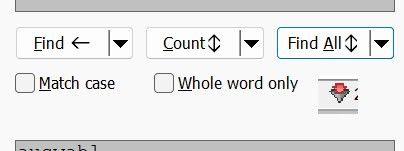
(the image is copied from Total Commander’s function ‘Synchronize directories’)
Just some ideas that would help me in using Search++.
- Using a docking dialog for different plugins they may share the same space in NPP. If Search++ ist not active, there is just an empty space that is visible for me. Other plugins have a graphical representation that, in addition to the balloon tip, show which plugin is active. Two images to show my point:


Hello! It looks like you're interested in this conversation, but you don't have an account yet.
Getting fed up of having to scroll through the same posts each visit? When you register for an account, you'll always come back to exactly where you were before, and choose to be notified of new replies (either via email, or push notification). You'll also be able to save bookmarks and upvote posts to show your appreciation to other community members.
With your input, this post could be even better 💗
Register Login